web
You’re offline. This is a read only version of the page.
close
Skip to main content

Announcements

No record found.

News and Announcements icon
Community site session details

Community site session details

Session Id :
Microsoft Dynamics 365 | Integration, Dataverse...
Suggested Answer

Dual-write failing with “Unable to lookup values for entity teams” after new legal entity

(3) ShareShare
ReportReport
Posted on by 11

Dual-write fails with “Unable to lookup values for entity teams” and then cascades into reference data lookup errors (currency, groups).

All data exists in Dataverse. Issue started after adding a new legal entity. Followed Microsoft learn article to add a legal entity and sync data. Since the new legal entity set up - unable to use dual write from F&O > CE. From CE > F&O - there is no issues. 

This issue is happening in all forms with dual write running - when trying to change something in F&O - different versions of the same error message.  I believe this is stemming from the fact that my company (legal entity) team in powerplatform may have different owners?  But I am not sure how to go about fixing this.  Any assistance would be great!

  • Suggested answer
    Navneeth Nagrajan Profile Picture
    2,699 Super User 2026 Season 2 on at
     
    A few questions:
    1. Have you mapped integration keys or field lookups for entities like teams, currency or groups 
    2. Are you doing any transformation on the lookup fields? 
    3. Do you have a matching Company record that exists in Dataverse. 
     
    The error "Unable to lookup for entity teams" and subsequent data lookup fails often when,
    1. The Legal entity in F&O needs to be mapped with the cdm_company in Dataverse. 
    2. The new LE in D365 F&O needs to be mapped with the cdm_Company in dataverse. The cdm_company needs to be mapped with the business unit in D365 CE.
    3. The dual write connection set includes new legal entity and its associated business unit.


  • JG-30051243-0 Profile Picture
    11 on at
    @Navneeth Nagrajan - thank you for responding.
     
     Have you mapped integration keys or field lookups for entities like teams, currency or groups - There are intergration keys for company - but does there need to be others? -
    2. Are you doing any transformation on the lookup fields?  - No - we are not
    3. Do you have a matching Company record that exists in Dataverse. - Yes - the company exists in Dataverse.
     
    All was working well until we make two changes:
     
    1 - installed project opertions
    2 - created new legal entity to integrate with project operations
     
    Your continued support is appreaciated.
     
    Thank you!
  • Suggested answer
    André Arnaud de Calavon Profile Picture
    307,037 Super User 2026 Season 2 on at
    HI,
     
    The error is stating that the integration user needs to have read access to the table msdyn_globalproducts in Dataverse. 

    You will need to assign the default owning team to security roles having read access to this table. See also: Set up dual-write security roles and permissions - Finance & Operations | Dynamics 365 | Microsoft Learn
  • cookyrag Profile Picture
    2 on at


    Hi , did you get an answer to this?

    I am having the same issue , so I'm an old fashioned CE developer so not very confident in FO, but have created a new Unified Development Environment and configured Dual Write , been working through lots of articles , but I have my environment up and running and CE to FO is working fine.

    I create a new contact in CE and it synced to FO fine

    I am having an issue now when updating the contact in FO i am also getting this error
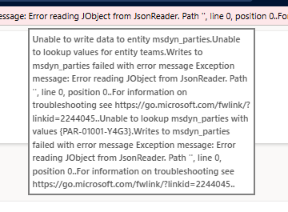
     

    I'm also getting similar error when trying to release products
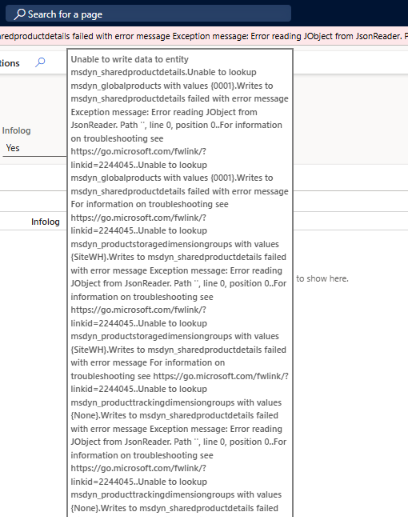


    So both these errors do suggest a permission issue in CE somewhere

    I have configured DAT and GLCO as dual write legal entities and checked

    1. All four teams are configured as Sys Admin , DAT , DAT Dual Write , GLCO and GLCO Dual Write
    2. F&O App Id 0000015……….. is configured as Sys Admin
    3. Data Integration Service Account App Id is configued as Sys Admin
    4. I even added sys admin to my parent BU default team

    Any advice?


  • Suggested answer
    CU27081119-2 Profile Picture
    2 on at

    We also faced this in Unifed Environment. Solution to this issue is to make sure “Finance and Operations Virtual Entity” app is installed on that instance. 

    Screenshot 2026-08-27 152354.png

Under review

Thank you for your reply! To ensure a great experience for everyone, your content is awaiting approval by our Community Managers. Please check back later.

Helpful resources

Quick Links

Season of Sharing Community Challenge Winners!

Congratulations to our community stars!

Women in Power Builds Momentum

Expanding mentorship, skilling, and AI innovation

Congratulations to the July Top 10 Community Leaders

These are the community rock stars!

Leaderboard > Microsoft Dynamics 365 | Integration, Dataverse, and general topics

#1
11manish Profile Picture

11manish 90 Super User 2026 Season 2

#2
ParthPatel249 Profile Picture

ParthPatel249 56

#3
André Arnaud de Calavon Profile Picture

André Arnaud de Cal... 52 Super User 2026 Season 2

Last 30 days Overall leaderboard

Product updates

Dynamics 365 release plans
