web
You’re offline. This is a read only version of the page.
close
Skip to main content

Notifications

Announcements

No record found.

Community site session details

Community site session details

Session Id :
Small and medium business | Business Central, N...
Answered

Add Custom field on Customer Table to Dataverse connector

(6) ShareShare
ReportReport
Posted on by 629
Hi, 
I added a new Custom field "Region Code" on the Customer Table in BC. 
I can see it on the Customer Card and the Customer list. 
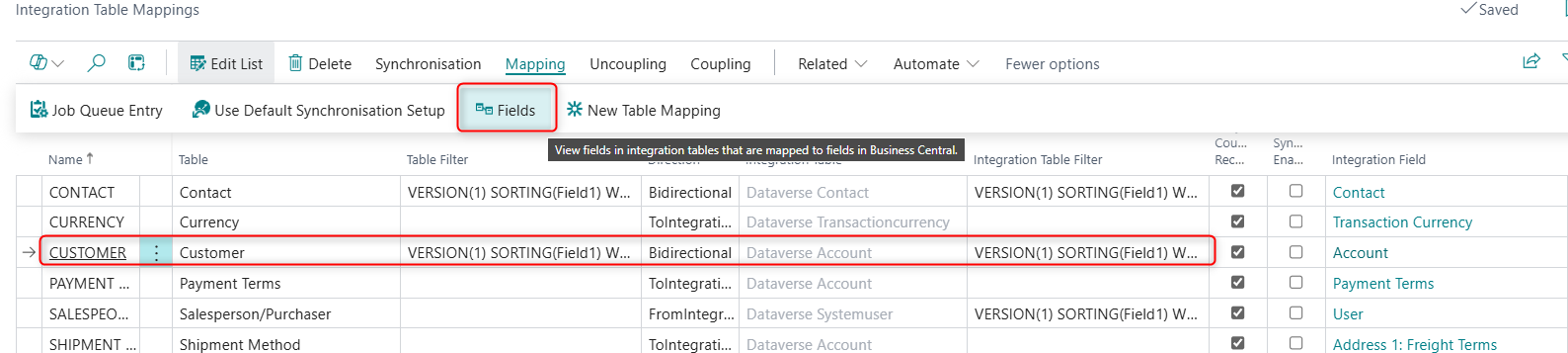
I'm trying to add "Region Code" to the Integration Table Mapping, however I can only see the Previous fields I added awhile ago. 
How can I force the Integration Table Mapping to "Capture" the new field. 
My extension is installed as a PTE. 


Thank you in Advance
 
I have the same question (0)
  • Suggested answer
    YUN ZHU Profile Picture
    95,331 Super User 2025 Season 2 on at
    Hi, hope the following helps.
    Business Central 2024 wave 1 (BC24): Add table and field mappings to existing integration tables (Dataverse)
    Dynamics 365 Business Central: Customizing an Integration with Microsoft Dataverse (Integrate custom tables)
     
    PS:
    Dynamics 365 Business Central Blog Series: Integrate with Microsoft Dataverse
     
    Thanks.
    ZHU
  • Suggested answer
    Andrés Arias Profile Picture
    4,188 Super User 2025 Season 2 on at
  • Gerardo Rentería García Profile Picture
    25,157 Most Valuable Professional on at

    Hi, good day
    I hope this can help you, and give you some hints.

    BC24: Manual integration mapping with Dataverse and Business Central - Discover Microsoft Business Central

    Best Regards
    Gerardo

  • Verified answer
    Hein Kruger Profile Picture
    629 on at
    Solved it by using the following link:
    https://community.dynamics.com/forums/thread/details/?threadid=b65deede-08f9-ef11-be20-6045bda94eab

    Also, 
    You need to add the CRM field on the CRM Accounts Table. 
    I used the "AL Table Proxy Generator tool (altpgen)". 
    https://yzhums.com/17065/
    When the field has a table relation you need to add the relation Table as one of the entities as well.

    .\altpgen -project:"*****" -packagecachepath:"********" -serviceuri:"********" -entities:account,region -baseid:18 -tabletype:CRM -clientid:********* -redirecturi:"*******"

    The Output was a table Extension on CRM Accounts with region as a new field of type GUID. 


Under review

Thank you for your reply! To ensure a great experience for everyone, your content is awaiting approval by our Community Managers. Please check back later.

Helpful resources

Quick Links

Responsible AI policies

As AI tools become more common, we’re introducing a Responsible AI Use…

Neeraj Kumar – Community Spotlight

We are honored to recognize Neeraj Kumar as our Community Spotlight honoree for…

Leaderboard > Small and medium business | Business Central, NAV, RMS

#1
OussamaSabbouh Profile Picture

OussamaSabbouh 3,143

#2
Jainam M. Kothari Profile Picture

Jainam M. Kothari 1,694 Super User 2025 Season 2

#3
YUN ZHU Profile Picture

YUN ZHU 1,067 Super User 2025 Season 2

Last 30 days Overall leaderboard

Featured topics

Product updates

Dynamics 365 release plans