web
You’re offline. This is a read only version of the page.
close
Skip to main content

Announcements

No record found.

News and Announcements icon
Community site session details

Community site session details

Session Id :
Customer experience | Sales, Customer Insights,...
Answered

Auto-generate numbers for new Opportunity records?

(0) ShareShare
ReportReport
Posted on by 150

Hi All

I hope you're all staying safe and isolated at this pandemic time. 

My client has indicated that they need new Opportunity records to auto-generate unique numbers (like project numbers). They would like it done this way so as to be consistent, avoid duplicity, and have a streamlined way of the system coming up with this field instead of manual input.

Can this be done in D365 Sales?

Many thanks. Tale care 

I have the same question (0)
  • Pratik Jog Profile Picture
    95 on at

    Hi ETconsultant,

    Please refer the below link on how to configure Auto-Numbering in D365.

    arunpotti.wordpress.com/.../

  • Verified answer
    LuHao Profile Picture
    40,892 on at

    Hi partner,

    As Pratik said, we can create an OOTB auto-number field for Opportunity entity.

    Whenever a new record is created, its auto-number field automatically generates value. It is locked and we cannot modify it on the form.

    In addition to the link above, let me add some points.

    In the make.powerapps.com, when go to Entities, you need to switch form Default to Managed to find the Opportunity.
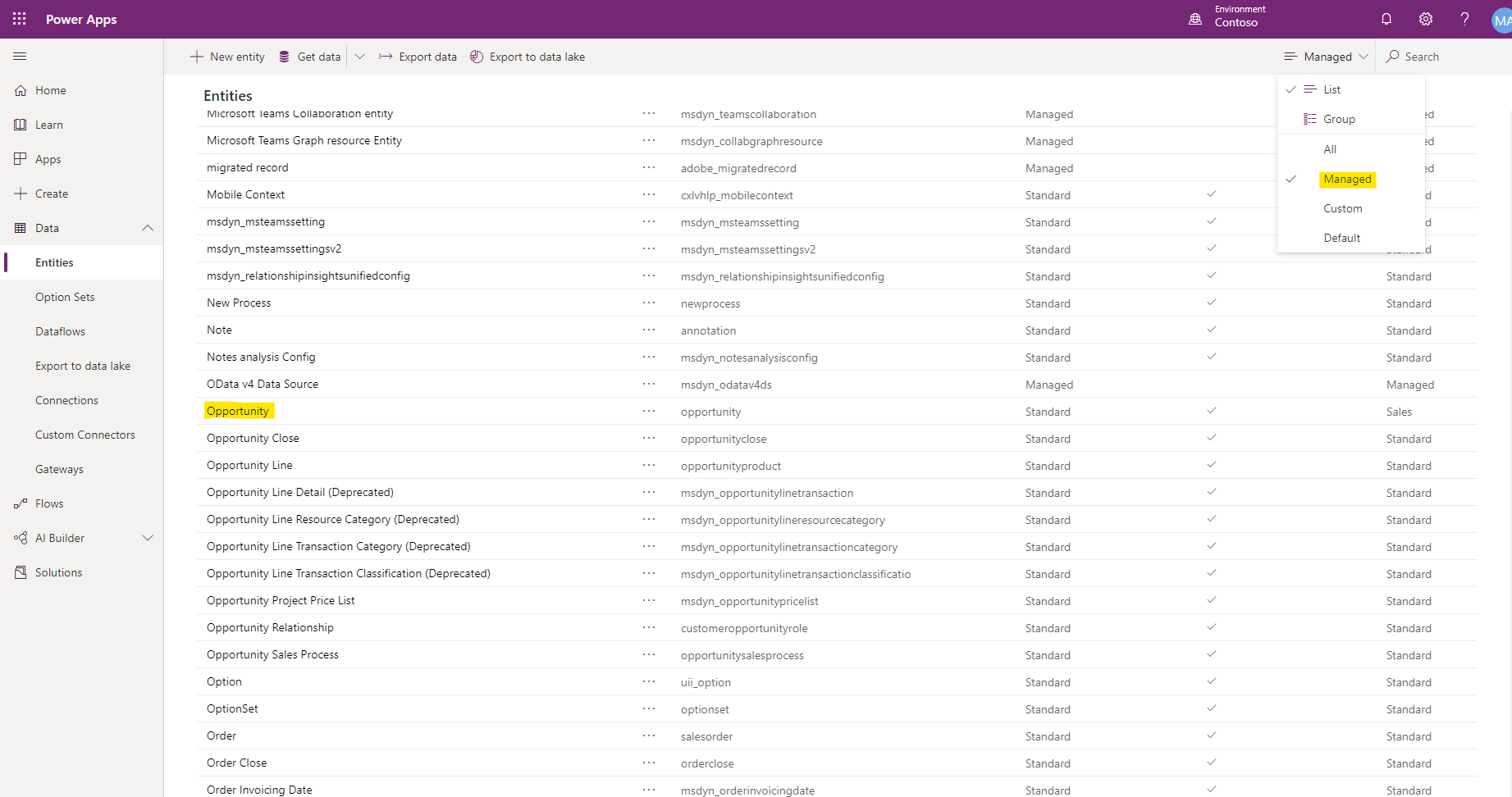
    pastedimage1585117541858v1.png

    I would recommend you set the auto-number field to be numbers plus random srtings rather than pure numbers, like {SEQNUM:5}-{RANDSTRING:4}.
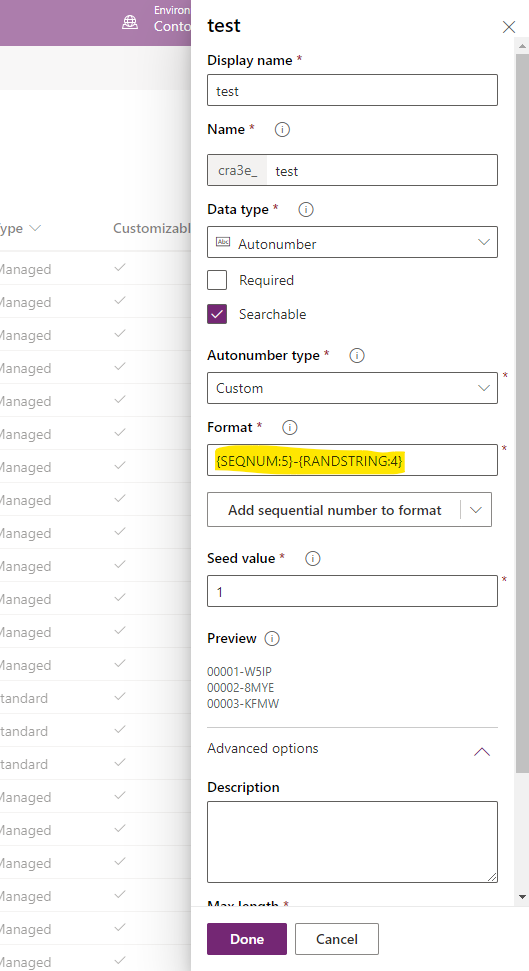
    pastedimage1585118241883v2.png

    The advantage is that when the user is using the offline D365, the auto-number field of the newly created record will not duplicate with others. If the auto-number field is numeric, it may be duplicated. If it is numbers plus random strings, it will not be repeated.

    For example, the auto-number field for the latest opportunity is 0100. If a user creates an opportunity record using offline D365, it is 0101.At the same time, another user using online D365 creates an opportunity record, which is also 0101.

    If the auto-number field is numbers plus random strings, these two values will be 0101-qwer and 0101-tyui, they will not be repeated.

  • ETconsultant Profile Picture
    150 on at

    Thank you very much for this expanded info.

    Do you know, if I make an existing field autonumber, what that will do to existing entries in that field (are they overwritten to blank)?

  • Suggested answer
    LuHao Profile Picture
    40,892 on at

    Hi partner,

    For existing values, they do not change at all.

    The field of the newly created records will automatically use the auto number attribute you set.

  • ETconsultant Profile Picture
    150 on at

    Hi again Lu Hao

    I have seen that the autonumber format I have created for the field works in the web view (where a lock symbol shows up next to the field on the left).

    But in the app view, there is no lock symbol and the field does not auto-generate.

    Any ideas?

    Thanks for your time.

  • LuHao Profile Picture
    40,892 on at

    Hi partner,

    I tested in the UCI, and the autonumber field is not locked, but it auto-generates its value.

    pastedimage1585562656237v1.png

    To lock it, just select read-only field in the field properties in the form editor.

    pastedimage1585562749093v2.png

  • ETconsultant Profile Picture
    150 on at

    Thanks for checking. Interesting.

    Regardless of lock or not, in the app view the auto field is not auto-generated, just left blank. In the web/customize area view on the same form, it does auto-generate.

    I'm trying to see what I've missed but cannot. Might there be a lag in the system that needs some time for the App view to update itself with the auto format of that field?

  • ETconsultant Profile Picture
    150 on at

    ...Or, what also might be likely is I need to 'publish' this updated field format somehow. But I can't work out how to publish from 'powerapps'.

  • ETconsultant Profile Picture
    150 on at

    UPDATE: Managed to find the 'Publish' button in powerapps. I had to go to 'Forms' and then the Publish option was there. Now new opportunity records have the auto field working properly.

    Remaining issue: Existing Opportunity records do not update this auto field even upon re-saving. Is there a solution for this?

  • Verified answer
    LuHao Profile Picture
    40,892 on at

    Hi ETconsultant,

    Yes, it is by design. The autonumber field does not work on the existing records.

    To Auto Numbering existing records, please refer to

    community.dynamics.com/.../auto-numbering-existing-records-in-microsoft-dynamics-365-crm

    If the number of existing records is not large, you can also export the records as Excel and manually modify and import.

Under review

Thank you for your reply! To ensure a great experience for everyone, your content is awaiting approval by our Community Managers. Please check back later.

Helpful resources

Quick Links

Introducing the 2026 Season 1 community Super Users

Congratulations to our 2026 Super Stars!

Meet the Microsoft Dynamics 365 Contact Center Champions

We are thrilled to have these Champions in our Community!

Congratulations to the March Top 10 Community Leaders

These are the community rock stars!

Leaderboard > Customer experience | Sales, Customer Insights, CRM

#1
ManoVerse Profile Picture

ManoVerse 196 Super User 2026 Season 1

#2
11manish Profile Picture

11manish 129

#3
CU11031447-0 Profile Picture

CU11031447-0 100

Last 30 days Overall leaderboard

Product updates

Dynamics 365 release plans
