web
You’re offline. This is a read only version of the page.
close
Skip to main content

Announcements

No record found.

News and Announcements icon
Community site session details

Community site session details

Session Id :
Customer experience | Sales, Customer Insights,...
Answered

Can't Create Note with jpg image attached from microsoft flow

(0) ShareShare
ReportReport
Posted on by 35

Hi, 

I've created a flow in PowerApps that gets from Onedrive directory a list of images in jpg format.

Then searches for a product code, and then creates a note with the image from onedrive attached.

But when is creating the note it gives this error: The 'inputs.parameters' of workflow operation 'Create_a_new_record_2' of type 'OpenApiConnection' is not valid. Error details: Input parameter 'item/documentbody' is required to be of type 'String/bytes'. The source type/format 'String/binary' of the value

I'm getting the image with a Get file content using path
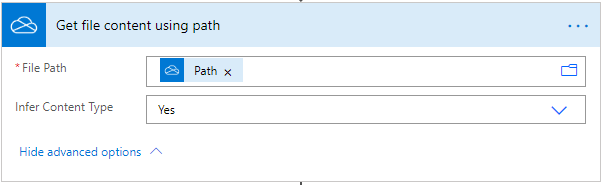
pastedimage1591730896777v1.png

And a set variable to set the image in the create new record this way
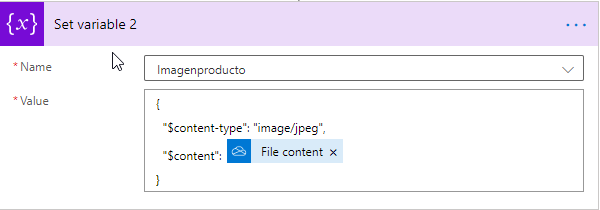
pastedimage1591730935845v2.png

Does anyone know how to do or solve this?

Best regards!

I have the same question (0)
  • Suggested answer
    Bipin D365 Profile Picture
    28,985 Moderator on at

    Hi,

    Instead of directly passing content to document body, you will have to convert to base64 string.

    Please find below function in microsoft which will help you do the same.

    docs.microsoft.com/.../workflow-definition-language-functions-reference

    Also look at flow community thread below.

    powerusers.microsoft.com/.../280333

    Please mark my answer verified if I were helpful!

  • fernando.campos@softtek.com Profile Picture
    35 on at

    Hi,

    Thanks for your answer!

    I've changed the variable to be a string, and pass the file content with base64

    base64(outputs('Get_file_content_using_path')?['body'])
    pastedimage1591796768137v1.png
    pastedimage1591796806122v2.png

    but when is creating the Note record I'm getting this error:

    "Invalid character in field 'documentbody': '.', hexadecimal value 0x00, is an invalid character.",
    IF instead of passing base64ToString I pass just the variable I've setted before I'm getting this error:
    pastedimage1591796941060v3.png
    The 'inputs.parameters' of workflow operation 'Create_a_new_record_2' of type 'OpenApiConnection' is not valid. Error details: Input parameter 'item/documentbody' is required to be of type 'String/bytes'. The source type/format 'String/base64-function-result' of the value

    Thanks for your help!

  • Verified answer
    H V Profile Picture
    351 on at

    Hi,

    Please follow below steps to create notes into Dynamics 365 from OneDrive:

    Step 1: Get File Content(One Drive)

    7041.png

    Step 2: Select Parse JSON

    - Content: add "[ File Content "

    - Schema: Click on 'Generate from Sample' and add below code.

    [{
      "$content-type": "image/jpeg",
      "$content": "Test Content"
    }]

    6758.png

    Step 3: Create a note record

    - Document: Select $content

    - Mime Type: $Scope-type

    4666.png

    Hope this helps!

  • fernando.campos@softtek.com Profile Picture
    35 on at

    Oh thanks!!

    It worked just fine!

    Why do I need to use File Content as an array?

    --> Content: add "[ File Content ]"

    Thanks!!!

Under review

Thank you for your reply! To ensure a great experience for everyone, your content is awaiting approval by our Community Managers. Please check back later.

Helpful resources

Quick Links

Introducing the 2026 Season 1 community Super Users

Congratulations to our 2026 Super Stars!

Meet the Microsoft Dynamics 365 Contact Center Champions

We are thrilled to have these Champions in our Community!

Congratulations to the March Top 10 Community Leaders

These are the community rock stars!

Leaderboard > Customer experience | Sales, Customer Insights, CRM

#1
11manish Profile Picture

11manish 166

#2
ManoVerse Profile Picture

ManoVerse 149 Super User 2026 Season 1

#3
Zhilan Profile Picture

Zhilan 55

Last 30 days Overall leaderboard

Product updates

Dynamics 365 release plans
