web
You’re offline. This is a read only version of the page.
close
Skip to main content

Notifications

Announcements

No record found.

Community site session details

Community site session details

Session Id :
Small and medium business | Business Central, N...
Answered

SalesOrder - Posting - issue with assembly to order item

(0) ShareShare
ReportReport
Posted on by 25

Hello dear community, I am sharing my experience with BC - SalesOrder, more especially with Assemby to order Item, during Posting (shipping) operation

Issue is he following ( insufficient quantity in BOM assembly line Item)

pastedimage1652211391455v1.png

Sales Order line is the following : 

pastedimage1652211495585v2.png

Parent Item card is the following 

pastedimage1652211538416v3.png

Parent BOM assembly contains nested Assembly to Order Item
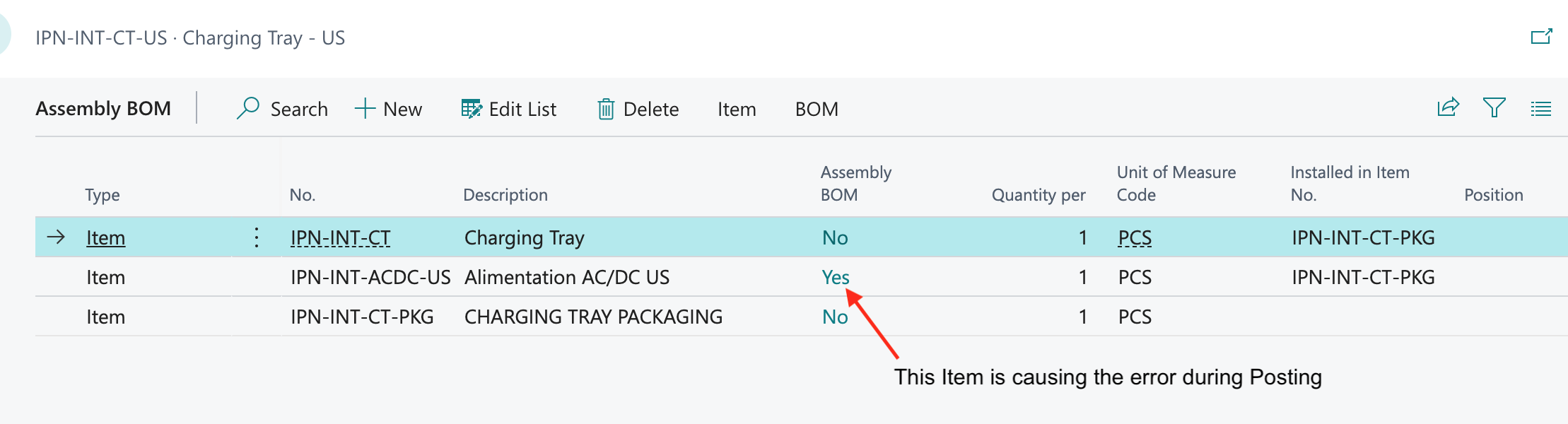
pastedimage1652211587987v4.png

the nested Item is causing the Posting issue, due to insufficient quantity, but the behavior should be recursive  - same for parent and all nested Assembly to Order Items - 

Thank you for your feedback.

I have the same question (0)
  • Suggested answer
    JAngle Profile Picture
    133 on at

    It’s not a posting issue per say. The assembly order associated to the sales line only handles the first level. If you run the planning worksheet an assembly order will be suggested for creation.

  • Suggested answer
    MahGah Profile Picture
    15,529 on at

    Hi Josh

    Does Assembly Order support something like phantom? Similar idea like using Production BOM in Production BOM?

  • IpanIpan Profile Picture
    25 on at

    Hello Josh,  thank you for your clarification. I have ran planning worksheet but no assembly order got generated for the child Item referenced by parent Item.

    This is assembly orders list

    pastedimage1652739238561v1.png

    this is detailed view with low qty warning : 

    pastedimage1652739315634v2.png

    and the corresponding modal window when clicking on Yes (warning);

    pastedimage1652739367529v3.png

    Here I don't understand why actions are purchase order, since Item replenishment strategy is assemble to order. Looping back to my initial issue with parent -> child assembly

    Thanks you for your light, I am still digging...

  • Suggested answer
    Alok.kulshreshtha Profile Picture
    934 on at

    Hi, 

    you can run Order planning, it will suggest you to create an Assembly order for 2nd level of BOM . 

    below is a my sales order where item has replenishment type is  Assembly and Assembly policy is Assembly to order

    pastedimage1652754005239v2.png

    As you can see system has created a 1st level of assembly order(for parent Item which is in sales order) while updating a quantity in "Quantity to assemble" column. 

    pastedimage1652754144973v3.png

    Now i'll run Order planning, which displays all new demand along with availability information and suggestions for supply. in  this screen press calculate plan button and system will suggest you demand along with replenishment type.

    pastedimage1652754379569v4.png

    once system has suggested , than press Make order. you will find make order under in process tab. after press make order, system will give you popup create order page and press OK. 

    you can see system has created two assembly order for the sub assembly item.

    pastedimage1652754686182v5.png

    Regards,

    Alok Kulshreshtha

    Please verify if you find my answer helpful


  • Verified answer
    IpanIpan Profile Picture
    25 on at

    Hi, Alok, thank you for your response as well,

    I understand running the order planning will compute all assembly orders for any assembly to order Item, at any level

    Thank you for your help anyway

Under review

Thank you for your reply! To ensure a great experience for everyone, your content is awaiting approval by our Community Managers. Please check back later.

Helpful resources

Quick Links

Responsible AI policies

As AI tools become more common, we’re introducing a Responsible AI Use…

Neeraj Kumar – Community Spotlight

We are honored to recognize Neeraj Kumar as our Community Spotlight honoree for…

Leaderboard > Small and medium business | Business Central, NAV, RMS

#1
OussamaSabbouh Profile Picture

OussamaSabbouh 2,785

#2
Jainam M. Kothari Profile Picture

Jainam M. Kothari 1,007 Super User 2025 Season 2

#3
YUN ZHU Profile Picture

YUN ZHU 948 Super User 2025 Season 2

Last 30 days Overall leaderboard

Featured topics

Product updates

Dynamics 365 release plans



