web
You’re offline. This is a read only version of the page.
close
Skip to main content

Notifications

Announcements

No record found.

Community site session details

Community site session details

Session Id :
Small and medium business | Business Central, N...
Answered

Group By in AL Query like SQL

(0) ShareShare
ReportReport
Posted on by 281

Dears, Good day to you all,

I'm creating a Query (Type API) with AL. Business Central Cloud

I want to group by the G/L Account No., Date, Global Dim1 , and Glob Dim 2

I searched but it's not clear how to achieve that in the Docs by MS, I did not know how and where to add my SQL query in the Query Object.

Query Totals and Grouping - Business Central | Microsoft Learn

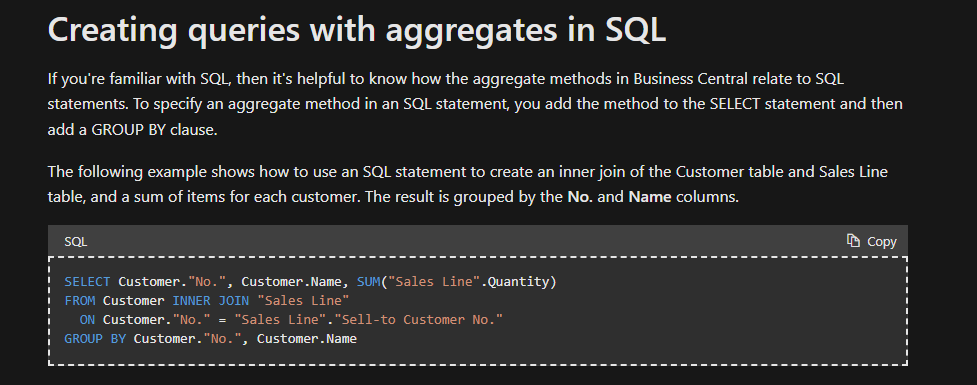
SELECT Customer."No.", Customer.Name, SUM("Sales Line".Quantity)  
FROM Customer INNER JOIN "Sales Line"  
  ON Customer."No." = "Sales Line"."Sell-to Customer No."  
GROUP BY Customer."No.", Customer.Name
pastedimage1667970698344v1.png

I have the same question (0)
  • Suggested answer
    DAnny3211 Profile Picture
    11,397 on at

    hi

    you only need to set a SUm field, for example, and the query will automatically group all other fields

    look this

    pastedimage1667990103162v1.png

    check my answer if it helped you, thanks

    DAniele

  • Suggested answer
    Teddy Herryanto (That NAV Guy) Profile Picture
    14,284 Super User 2025 Season 2 on at

    You need to use column with method Sum.

    This is an example of query but with method Count.

    thatnavguy.com/.../

  • Verified answer
    YUN ZHU Profile Picture
    95,331 Super User 2025 Season 2 on at

    Hi, just adding some info.

    Property Value of Method Property:

    Value Description
    Day Gets the day from the date expression for the field in the query column. The day is returned as an integer, in the range of 1 to 31, which represents the day of the month. If the day in the date expression is 0, then 1 is returned.
    Month Gets the month from the date expression for the field in the query column. The month is returned as an integer, in the range of 1 to 12, where 1 represents January and 12 represents December. If the month in the date expression is 0, then 1 is returned.
    Year Gets the year from the date expression for the field in the query column. The year is returned as an integer. If the year in the date expression is 0, then 1900 is returned.
    Sum Adds the values of all fields for the specified column within a group.
    Count Returns the number of rows that are included in the dataset within a group. Note: The Count method is associated with the DataItem and not with a specific column, so the DataSource property must be blank.
    Average Calculates the average value of the fields in the column within a group.

    When averaging fields that have an integer data type (such as Integer or BigInteger), integer division is used. This means that result is not rounded, and the remainder is discarded. For example, 5÷2=2 instead of 2.5 (or 2 1/2).
    Min Retrieves the lowest value of fields in the column within a group.
    Max Retrieves the highest value of fields in the column within a group.

    And a simple example for retrieving Date Data in Queries

    https://yzhums.com/14547/

    Hope this helps

    Thanks.

    ZHU

  • mahmoud_algindy Profile Picture
    281 on at

    Thanks yzhums 

    And thanks to everyone in Dynamics Community,

    I now want to create a new Column than Concat the Three Grouped Column

    Day-Month-Year  and convert it to Date

    The Same, I want to Create a new Column and Group by it

    G/L Account No. | Global Dim1 | Global Dim2 | Shortcut Dim 3

    query 60010 Grouped_GLEntriesWDims
    {
    
        APIGroup = 'BI';
        APIPublisher = '365Xperts';
        APIVersion = 'v1.0';
        EntityName = 'GroupedGLEntries';
        EntitySetName = 'GroupedGLEntries';
        DataAccessIntent = ReadOnly;
        QueryType = API;
    
    
        elements
        {
            dataitem(GLEntry; "G/L Entry")
            {
    
                column(PostingYear; "Posting Date")
                {
    
                    Method = Year;
                }
    
                column(PostingMonth; "Posting Date")
                {
    
                    Method = Month;
                }
    
                column(PostingDay; "Posting Date")
                {
    
                    Method = Day;
                }
    
    
                column(GLAccountNo; "G/L Account No.")
                {
                }


                column(Amount; Amount)
                {
                    Method = Sum;
                }


                column(VATAmount; "VAT Amount")
                {
                    Method = Sum;
    
                }
    
                column(GlobalDimension1Code; "Global Dimension 1 Code")
                {
                }
                column(GlobalDimension2Code; "Global Dimension 2 Code")
                {
                }
    
                column(Dimension3Code; "Shortcut Dimension 3 Code")
                {
                }
             
    		 
    		 column(DimensionsID ; Dimensions )
    		 {
    		 
    	 
    		 }
    		 
    		 
            }
    
        }
    	
    	VAR Dimensions: Text = GLAccountNo   '|'   GlobalDimension1Code   GlobalDimension2Code   '|'   Dimension3Code 
    
       
    }


Under review

Thank you for your reply! To ensure a great experience for everyone, your content is awaiting approval by our Community Managers. Please check back later.

Helpful resources

Quick Links

Responsible AI policies

As AI tools become more common, we’re introducing a Responsible AI Use…

Neeraj Kumar – Community Spotlight

We are honored to recognize Neeraj Kumar as our Community Spotlight honoree for…

Leaderboard > Small and medium business | Business Central, NAV, RMS

#1
OussamaSabbouh Profile Picture

OussamaSabbouh 3,143

#2
Jainam M. Kothari Profile Picture

Jainam M. Kothari 1,694 Super User 2025 Season 2

#3
YUN ZHU Profile Picture

YUN ZHU 1,067 Super User 2025 Season 2

Last 30 days Overall leaderboard

Featured topics

Product updates

Dynamics 365 release plans



