web
You’re offline. This is a read only version of the page.
close
Skip to main content

Notifications

Announcements

No record found.

Community site session details

Community site session details

Session Id :
Supply chain | Supply Chain Management, Commerce
Answered

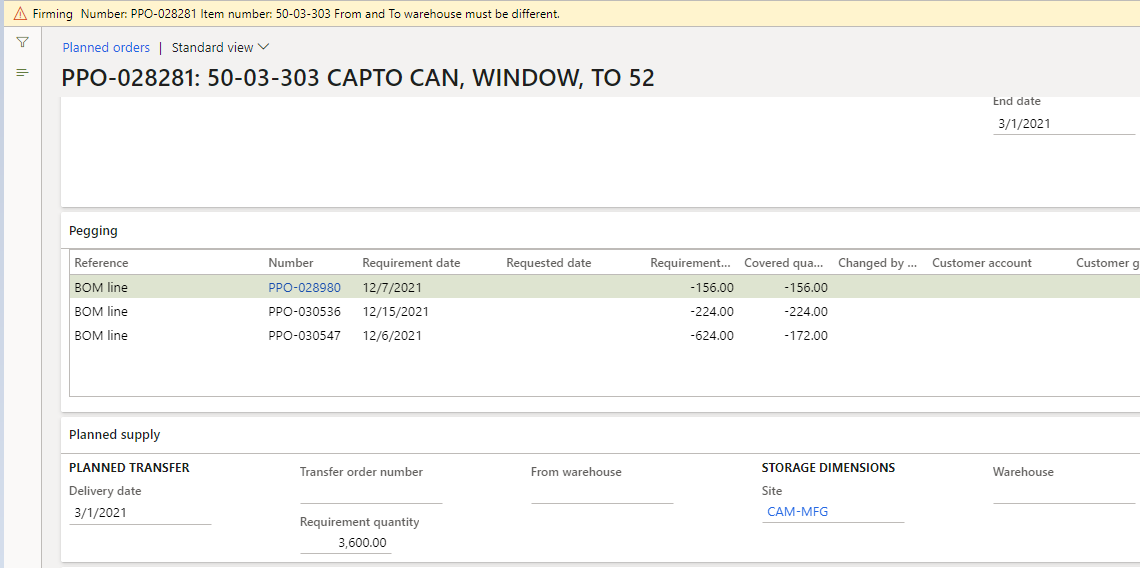
Planned Transfer order error during firming

(0) ShareShare
ReportReport
Posted on by

pastedimage1614156738670v1.png

i am encountering above error while firming planned transfer order. below screen is for my Tracking Dim ,and my coverage plan is by SITE.
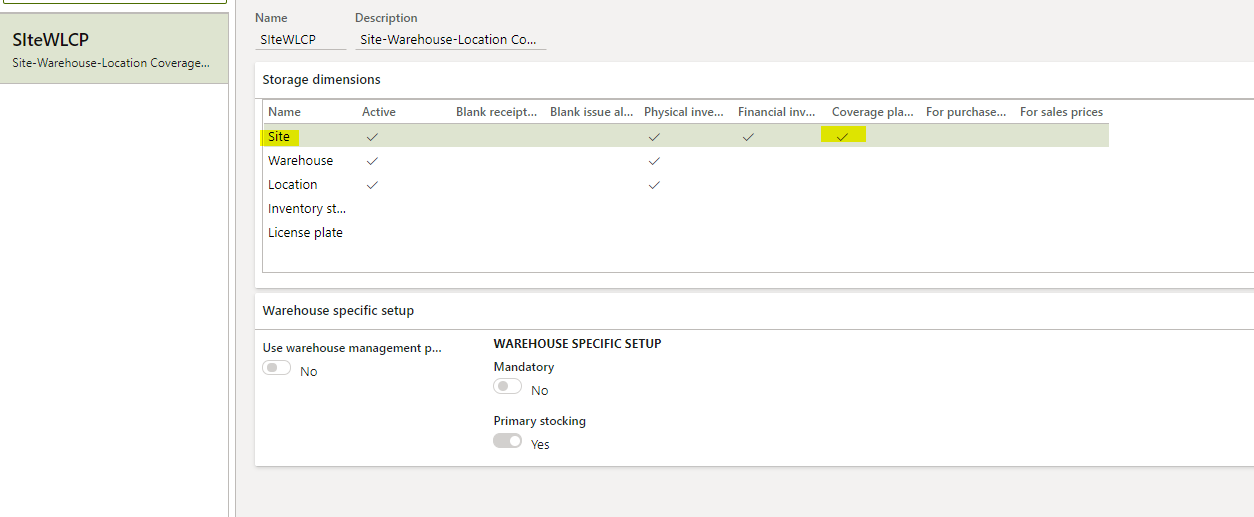
pastedimage1614156875305v2.png

business scenario is they have multiple warehouses under one site that are nettable, that's why my Coverage plan is by Site.

issue is they  want certain parts to be transferred from a warehouse in another site , for that we have done changes on Item Coverage
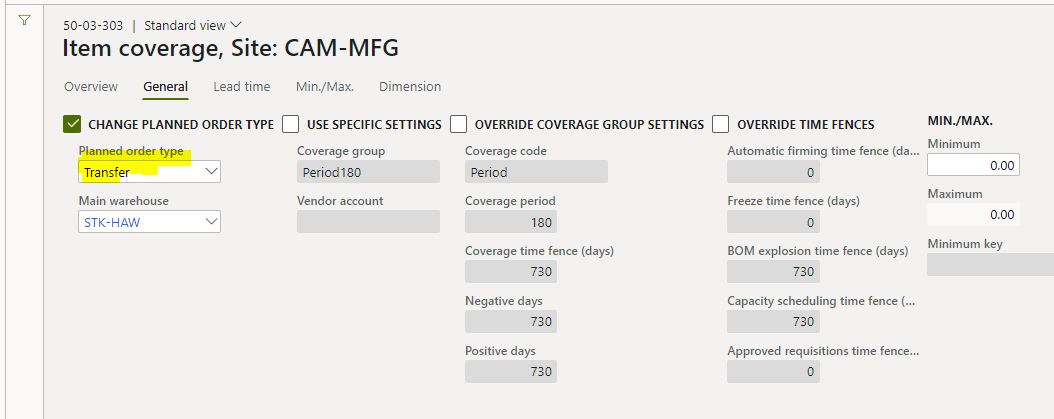
pastedimage1614157090166v3.png

MRP is giving me message to transfer , but its not populating warehouses , hence erroring out

is there any issue with my setup or we cannot do a intra Site-WH transfer with Coverage plan by Site.

I have the same question (0)
  • Verified answer
    MATTGUO Profile Picture
    22,349 Moderator on at

    Hi Yashpal,

    If the warehouse Coverage plan is not active, the planned order will search the "to warehouse" from the default warehouse field in default order settings of released product.

  • CU09060724-0 Profile Picture
    on at

    Thank You MATTGUO, i have default warehouse defined on default order settings , neither of warehouses are picked by MRP planned order, see screen shot below.

    pastedimage1614410586938v1.png

  • Verified answer
    GeorgeC Profile Picture
    1,865 on at

    Hi Yashpal,

    I was able to get your scenario to work - with the settings suggested by Mattguo.

    I created another entry in the Default order settings, it's specifically for the receiving site (CAM-MFG, right?). Then in the Inventory order fast tab I activated Override default storage dimension and set the Default warehouse to my "to warehouse" (the receiving warehouse for the transfer order).

    The "from warehouse" (STK-HAW) gets determined by the setup in the Item coverage, just as you've shown on your screenshot.

    Note that the planned order still shows blank "from warehouse" and "to warehouse" but the firming process works and the warehouses are populated on the transfer order.

    Here's a screenshot of my Default order settings setup:

    SiteCoverageTrOrder.jpg

  • CU09060724-0 Profile Picture
    on at

    Thank you George, its worked exactly as you explained.

Under review

Thank you for your reply! To ensure a great experience for everyone, your content is awaiting approval by our Community Managers. Please check back later.

Helpful resources

Quick Links

Responsible AI policies

As AI tools become more common, we’re introducing a Responsible AI Use…

Neeraj Kumar – Community Spotlight

We are honored to recognize Neeraj Kumar as our Community Spotlight honoree for…

Leaderboard > Supply chain | Supply Chain Management, Commerce

#1
Siv Sagar Profile Picture

Siv Sagar 266 Super User 2025 Season 2

#2
Laurens vd Tang Profile Picture

Laurens vd Tang 213 Super User 2025 Season 2

#3
André Arnaud de Calavon Profile Picture

André Arnaud de Cal... 140 Super User 2025 Season 2

Last 30 days Overall leaderboard

Featured topics

Product updates

Dynamics 365 release plans



