web
You’re offline. This is a read only version of the page.
close
Skip to main content

Announcements

No record found.

News and Announcements icon
Community site session details

Community site session details

Session Id :
Customer experience | Sales, Customer Insights,...
Answered

Filter lookup based on option set error

(0) ShareShare
ReportReport
Posted on by 410

Hi All, i'm trying to filter lookup based on a option set, however i found a couple of JS codes in the net and neither one of them seems to be working, so i'm guessing i'm not doing something correct in the code:

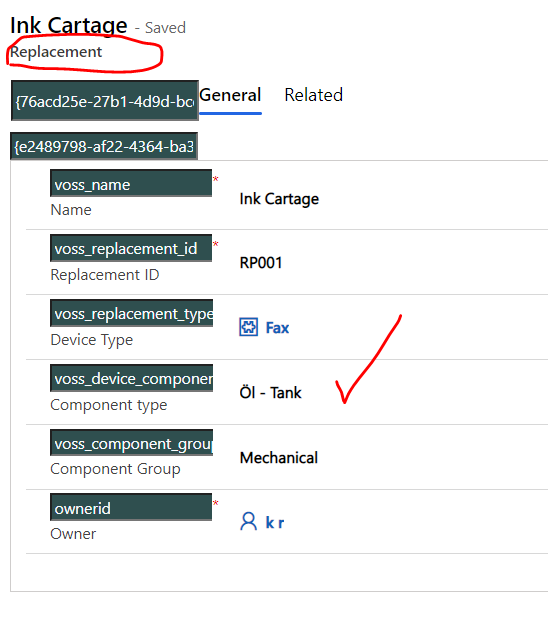
Here is the structure:

Entity: Replacement (voss_replacement)

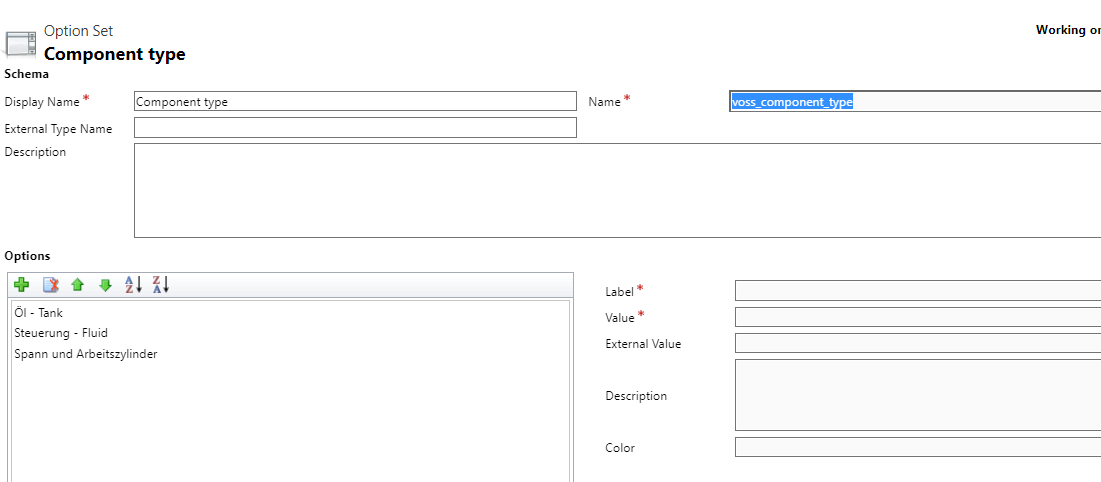
Fields: Component Type (voss_device_component_type) - global option set (Component Type - voss_component_type)

pastedimage1650963133893v1.png pastedimage1650963177467v2.png

pastedimage1650963223192v3.png

Entity: External repair (voss_externalrepair)

Fields: Replacement (voss_replacement_part) - Lookup, Component type (voss_repair_component_type) - global option set (Component Type - voss_component_type),
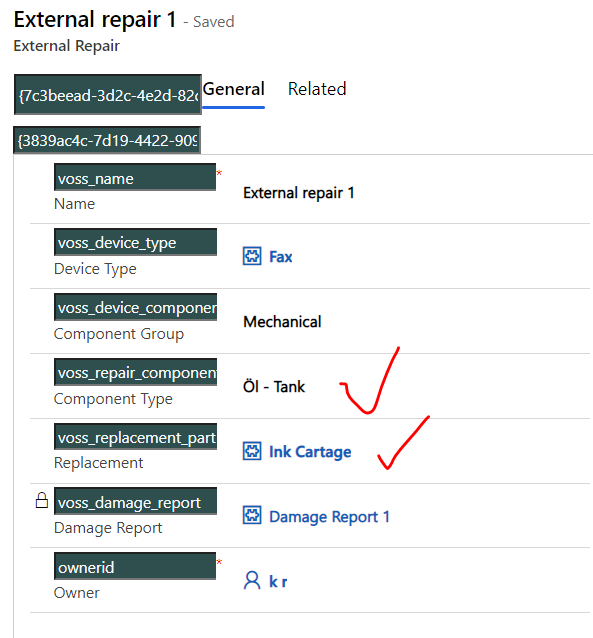
pastedimage1650963401218v4.png

Here is the code:

function filter_Lookup_Fields()

{

if (Xrm.Page.getControl('voss_device_component_type') != null)

{

Xrm.Page.getControl('voss_replacement_part').addPreSearch(addFilter);

}

}

function addFilter() {

var problemcategoryoptionset ;

var fetchQuery;

try {

problemcategoryoptionset = Xrm.Page.getControl('voss_device_component_type').getAttribute().getValue();

if (Xrm.Page.getControl('voss_device_component_type') != null && Xrm.Page.getControl('voss_device_component_type').getAttribute().getValue() != null) {

fetchQuery = "<filter type='and'>" +

"<condition attribute='statecode' operator='eq' value='0' />" +

"<condition attribute='voss_device_component_type' operator='eq' value='" + problemcategoryoptionset  + "' />" +

"</filter>";

//add custom filter

Xrm.Page.getControl('voss_replacement_part').addCustomFilter(fetchQuery);

}

}

catch (e) {

Xrm.Utility.alertDialog('addFilter Error: ' + (e.description || e.message));

}

}

Any help is appreciated.

Thank you in advance!

I have the same question (0)
  • Guido Preite Profile Picture
    54,086 Moderator on at

    the code has some minor issues but should work (for example you can switch to formContext syntax) but did you check (by debugging or writing to console) the generated FetchXML if is correct?

    you can technically just doing the getAttribute on the field without going first to getControl

  • Radoslavov Profile Picture
    410 on at

    Hi Guido Preite , the code seems to be alright, but nothing is happening when i select an option from the option set, the lookup is not filtering the items, and don't get any error message as well, just noting is happening. I've tried it both Pass execution parameters On and Off, but still nothing.

    pastedimage1650969694430v1.png

    Since I'm not a developer I'm not able to modify the code as you suggest because as mentioned this are codes provided from other community topics. Any suggestion what i should change to test it if will work?

  • Suggested answer
    Guido Preite Profile Picture
    54,086 Moderator on at

    this is how I would do it, but without accessing to your system and debugging it, it's difficult to understand what exactly is not working, hope it helps:
    The code requires to call the function called filter_Lookup_Fields and checking the checkbox pass execution context as first parameter.

    function filter_Lookup_Fields(executionContext)
    {
    	let formContext = executionContext.getFormContext();
        formContext.getControl("voss_replacement_part").addPreSearch(addFilter);
    }
    
    function addFilter(executionContext) {
    	let componentTypeValue = -1;
    	let formContext = executionContext.getFormContext();
    	let currentComponentTypeValue = formContext.getAttribute("voss_device_component_type").getValue();
    	if (currentComponentTypeValue !== null) { componentTypeValue = currentComponentTypeValue; }
    	let filter = "";
    	formContext.getControl("voss_replacement_part").addCustomFilter(filter);
    }

  • Radoslavov Profile Picture
    410 on at

    This time i got an error message:

    pastedimage1650974812626v1.png

    TypeError: Cannot read properties of undefined (reading 'getFormContext')
    at filter_Lookup_Fields (lrd21.crm4.dynamics.com/.../voss_dropdown_filter:3:37)
    at y._executeFunctionInternal (lrd21.crm4.dynamics.com/.../app.js
    at y.execute (lrd21.crm4.dynamics.com/.../app.js
    at lrd21.crm4.dynamics.com/.../app.js
    at i (lrd21.crm4.dynamics.com/.../app.js
    at ee._executeIndividualEvent (lrd21.crm4.dynamics.com/.../app.js
    at ee._executeEventHandler (lrd21.crm4.dynamics.com/.../app.js
    at Object.execute (lrd21.crm4.dynamics.com/.../app.js
    at N._executeSyncAction (lrd21.crm4.dynamics.com/.../app.js
    at N._executeSync (lrd21.crm4.dynamics.com/.../app.js

    Error Details:
    Event Name: onchange
    Function Name: filter_Lookup_Fields
    Web Resource Name: voss_dropdown_filter
    Solution Name: Active
    Publisher Name: DefaultPublisherlrd21

  • Guido Preite Profile Picture
    54,086 Moderator on at

    that error happens when the "pass context execution a first parameter" is not checked. please make sure it's checked and try again.

    If this happens also when that option is checked then I don't know what can be as I can't debug your script

    hope it helps

  • Radoslavov Profile Picture
    410 on at

    Yep it was that one, but now a new error:

    pastedimage1650977224760v1.png

    TypeError: Cannot read properties of null (reading 'getValue')
    at addFilter (lrd21.crm4.dynamics.com/.../voss_dropdown_filter:10:88)
    at y._executeFunctionInternal (lrd21.crm4.dynamics.com/.../app.js
    at y.execute (lrd21.crm4.dynamics.com/.../app.js
    at lrd21.crm4.dynamics.com/.../app.js
    at i (lrd21.crm4.dynamics.com/.../app.js
    at ee._executeIndividualEvent (lrd21.crm4.dynamics.com/.../app.js
    at ee._executeEventHandler (lrd21.crm4.dynamics.com/.../app.js
    at Object.execute (lrd21.crm4.dynamics.com/.../app.js
    at N._executeSyncAction (lrd21.crm4.dynamics.com/.../app.js
    at N._executeSync (lrd21.crm4.dynamics.com/.../app.js

    Error Details:
    Event Name: presearchevent
    Web Resource Name: voss_dropdown_filter
    Solution Name: Active
    Publisher Name: DefaultPublisherlrd21

    I think we are getting close.

  • Guido Preite Profile Picture
    54,086 Moderator on at

    that error refers to this line:

    	let currentComponentTypeValue = formContext.getAttribute("voss_device_component_type").getValue();

    it can mean:

    1) the field is not present inside the form

    2) the name (voss_device_component_type) is not the correct one, according to your screenshot it may be called voss_repair_component_type but the name does not appear complete, replace the name and try again

  • Radoslavov Profile Picture
    410 on at

    No error this time and back from where we started lol

    the code seems to be alright, but nothing is happening when i select an option from the option set, the lookup is not filtering the items, and don't get any error message as well, just noting is happening.

    Strange!

    Anyway, if you run out of ideas, don't worry about it, still thank you for the helping optimizing the code. :)

    Regards,

    Kiril

  • Verified answer
    Bipin D365 Profile Picture
    28,985 Moderator on at

    Hi,

    There is one mistake in code provided by Guido. I fixed it. Can you please try below code. I have lighlihted in red the change I did.

    function filter_Lookup_Fields(executionContext)

    {

    let formContext = executionContext.getFormContext();

       formContext.getControl("voss_replacement_part").addPreSearch(addFilter);

    }

    function addFilter(executionContext) {

    let componentTypeValue = -1;

    let formContext = executionContext.getFormContext();

    let currentComponentTypeValue = formContext.getAttribute("voss_device_component_type").getValue();

    if (currentComponentTypeValue !== null) { componentTypeValue = currentComponentTypeValue; }

    let filter = "<filter type='and'><condition attribute='statecode' operator='eq' value='0' /><condition attribute='voss_device_component_type' operator='eq' value='" + componentTypeValue  + "' /></filter>";

    formContext.getControl("voss_replacement_part").addCustomFilter(filter);

    }

    https://carldesouza.com/filtering-lookups-in-dynamics-365-addcustomfilter-addpresearch/

    I verified above code in my instance and it works as expected.

    Please mark my answer verified if this is helpful!

    Regards,

    Bipin Kumar

    Follow my Blog: xrmdynamicscrm.wordpress.com/

  • Radoslavov Profile Picture
    410 on at

    Yep, it was this little thing actually

    formContext.getControl("voss_replacement_part").addCustomFilter(filter);

    Thank you very much for the help

Under review

Thank you for your reply! To ensure a great experience for everyone, your content is awaiting approval by our Community Managers. Please check back later.

Helpful resources

Quick Links

Introducing the 2026 Season 1 community Super Users

Congratulations to our 2026 Super Stars!

Meet the Microsoft Dynamics 365 Contact Center Champions

We are thrilled to have these Champions in our Community!

Congratulations to the March Top 10 Community Leaders

These are the community rock stars!

Leaderboard > Customer experience | Sales, Customer Insights, CRM

#1
ManoVerse Profile Picture

ManoVerse 184 Super User 2026 Season 1

#2
11manish Profile Picture

11manish 125

#3
CU11031447-0 Profile Picture

CU11031447-0 100

Last 30 days Overall leaderboard

Product updates

Dynamics 365 release plans