web
You’re offline. This is a read only version of the page.
close
Skip to main content

Notifications

Announcements

No record found.

Community site session details

Community site session details

Session Id :
Finance | Project Operations, Human Resources, ...
Answered

WBS - Show Activity Number

(0) ShareShare
ReportReport
Posted on by 330

We are using D365FO Project Management & Accounting Module with WBS for each project.

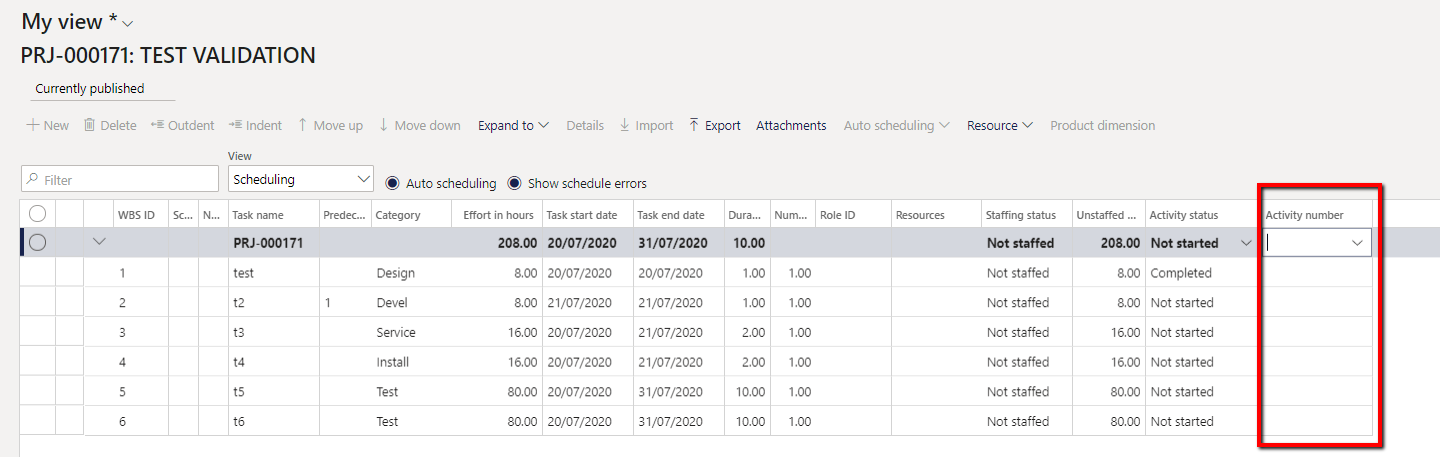
As we create new tasks in the WBS, this in turn creates new activities, however the activity number doesn't appear on the standard view

We wish to use the activity number when booking hours etc. but we need to be able to see the activity number as we plan the project using the WBS for it to be effective.

I have tried adding a new column to the grid but it is blank.

Is this possible?
pastedimage1595413889583v1.png

I have the same question (0)
  • Suggested answer
    Ludwig Reinhard Profile Picture
    Microsoft Employee on at

    Hi,

    After the WBS is published you can see the activity number in the details form.

    Simply switch to the effort tracking view and then click the details form.

    That's were you can find the activity number.

    Best regards,

    Ludwig

  • Andy_T Profile Picture
    330 on at

    Thank you Ludwig

    Is it not possible to see this in the planning view - it seems odd to me?

  • Suggested answer
    Ludwig Reinhard Profile Picture
    Microsoft Employee on at

    Hi, 

    I was able to get this personalized in my PU35 machine. 

    Please see the next screenprint. 

    wbs1.png

    Can you try in a different / more recent machine?

    Best regards, 

    Ludwig

  • Andy_T Profile Picture
    330 on at

    This is using the cost estimates view - I can see it there when I 'Expand All', however it still doesn't appear on the scheduling view.

  • Suggested answer
    Ludwig Reinhard Profile Picture
    Microsoft Employee on at

    Hi Andy,

    That's not available because the activity number seems to come from the PSAActivityestimates table; that were you have to your financial data and estimates. The estimates view is from the projplanversion table where you don't have this number included. You would need a modification if this is needed.

    Best regards,

    Ludwig

  • Suggested answer
    Andy_T Profile Picture
    330 on at

    Thank you for your help Ludwig

  • Ludwig Reinhard Profile Picture
    Microsoft Employee on at

    OK. If there is nothing else left open / not answered then lets please complete this thread by verifying the answers.

    Many thanks and best regards,

    Ludwig

  • Verified answer
    Ludwig Reinhard Profile Picture
    Microsoft Employee on at

    Good morning Andy,

    Is there any other help you need in respect to this question?

    Best regards,

    Ludwig

Under review

Thank you for your reply! To ensure a great experience for everyone, your content is awaiting approval by our Community Managers. Please check back later.

Helpful resources

Quick Links

Responsible AI policies

As AI tools become more common, we’re introducing a Responsible AI Use…

Neeraj Kumar – Community Spotlight

We are honored to recognize Neeraj Kumar as our Community Spotlight honoree for…

Leaderboard > Finance | Project Operations, Human Resources, AX, GP, SL

#1
Martin Dráb Profile Picture

Martin Dráb 664 Most Valuable Professional

#2
André Arnaud de Calavon Profile Picture

André Arnaud de Cal... 522 Super User 2025 Season 2

#3
Sohaib Cheema Profile Picture

Sohaib Cheema 303 User Group Leader

Last 30 days Overall leaderboard

Product updates

Dynamics 365 release plans
