web
You’re offline. This is a read only version of the page.
close
Skip to main content

Notifications

Announcements

No record found.

Community site session details

Community site session details

Session Id :
Small and medium business | Business Central, N...
Answered

SQL error "unvalid column name" when publishing from VSCode

(0) ShareShare
ReportReport
Posted on by 215

Hello everyone.

I've updated a database from BC17.3 to BC17.4 thanks to the powershell cmlet shown in this doc : Install a version 17 update - Business Central | Microsoft Docs. Everything seemed to work perfectly. I've already done the same tihng from BC17.2 to BC17.3, and it also worked.

But when I try to compile and publish my app extension on VSCode to this updated database, I have this error : 
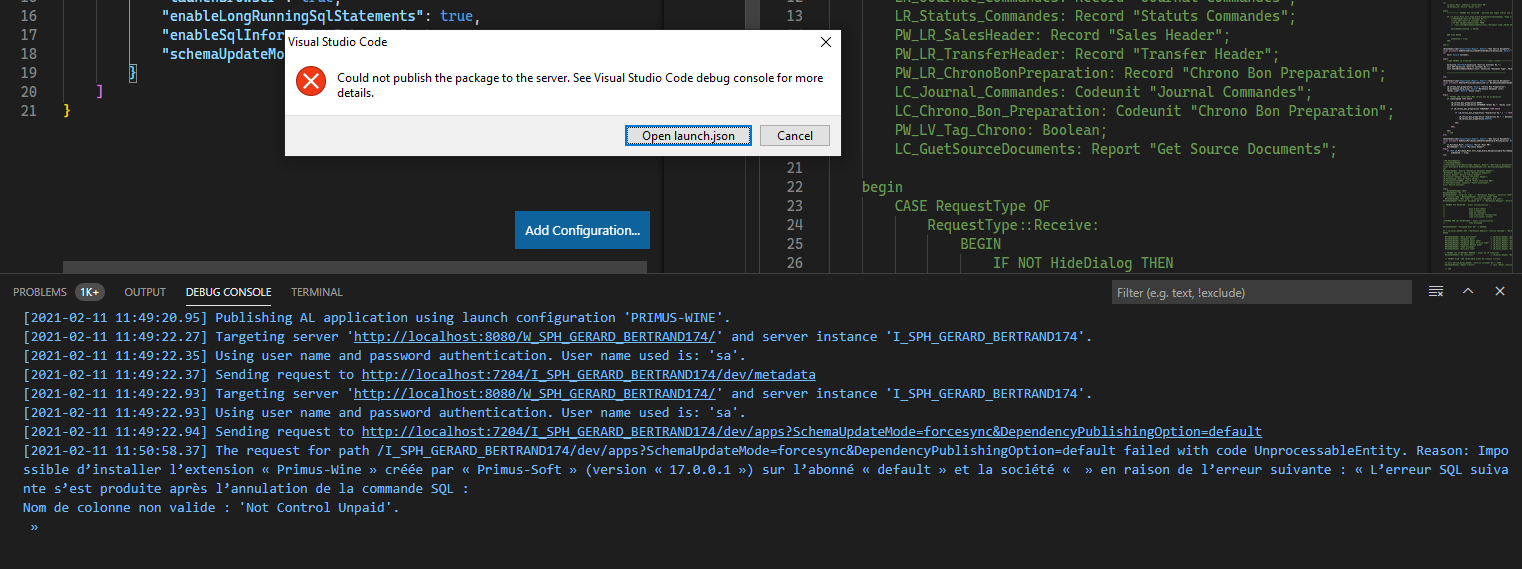
pastedimage1613040979392v1.png

(the end of the mesage is in french. In english it would be : "Reason : can't install extension "Primus-Wine" created by "Primus-Soft" (version 17.0.0.1) on tenant "default" and company " " because of following error : "the following SQL error happened after the cancel of the SQL command : "Invalid column name : 'Not  Control Unpaid')

The code compile and create the .app, but doesn't publish.

The column in question is a field I added on the database in 17.3. When I comment this field, I have the same error with other fields I added on 17.3.

Do you have any idea of the origin of this problem ?

Thank you.

I have the same question (0)
  • Verified answer
    Guillem Padilla Profile Picture
    427 on at

    Hi Magicrevette,

    When the tenant detects that you are trying to publish an .app with new fields but with the same version as the one that was already published, it returns that error.

    It is possible that when upgrading, it detects that you are trying to publish new fields (even if they are not).

    You could try just increasing the version of the .app, you could also try publishing the extension with "schemaUpdateMode""ForceSync" in your launch.json

  • Verified answer
    AliHamza Profile Picture
    175 on at

    Hi Magicrevette,

    Simply do the windows thing.

    Close VSCode and run it again as admininstrator.

    If this doesn't work then increase the app version and publish again.

    Don't forget to help the community by verifying the answer or at least like the suggestion if it did help in any way. It will let others know that the topic has verified answer and was beneficial to you.

  • Magicrevette Profile Picture
    215 on at

    I changed the number of version in app.json (from 17.0.0.1 to 17.0.0.2) and it worked. Thank you for your help.

    Does it mean I have to increase my version number everytime I add a new field ?

  • Suggested answer
    Guillem Padilla Profile Picture
    427 on at

    Yes, it does.

    It may not be necessary to increase the version if you recreate the extension (I don't remember), but if you are in a production environment it does not make much sense since you would lose all the data of your extension.

Under review

Thank you for your reply! To ensure a great experience for everyone, your content is awaiting approval by our Community Managers. Please check back later.

Helpful resources

Quick Links

Responsible AI policies

As AI tools become more common, we’re introducing a Responsible AI Use…

Neeraj Kumar – Community Spotlight

We are honored to recognize Neeraj Kumar as our Community Spotlight honoree for…

Leaderboard > Small and medium business | Business Central, NAV, RMS

#1
OussamaSabbouh Profile Picture

OussamaSabbouh 3,143

#2
Jainam M. Kothari Profile Picture

Jainam M. Kothari 1,694 Super User 2025 Season 2

#3
YUN ZHU Profile Picture

YUN ZHU 1,067 Super User 2025 Season 2

Last 30 days Overall leaderboard

Featured topics

Product updates

Dynamics 365 release plans



