web
You’re offline. This is a read only version of the page.
close
Skip to main content

Notifications

Announcements

No record found.

Community site session details

Community site session details

Session Id :
Small and medium business | Business Central, N...
Answered

Migration from QuickBooks Enterprise to D365 BC - batching sales Invoices?

(0) ShareShare
ReportReport
Posted on by 105

Does D365 Business Central have any function whereby you can "batch create invoices" for multiple customers at once? My client uses this feature extensively in QuickBooks Enterprise so that they can choose an item/items, select from a list of customers, and automatically create Sales Invoices for the entire list in one click. Thus far I've been unable to find similar capability in BC. Hoping the solution is baked into the product and doesn't require some custom "Power Automate" workflow.

Thanks in advance,
Bob

I have the same question (0)
  • Verified answer
    Valentin Castravet Profile Picture
    31,340 Super User 2025 Season 2 on at

    You could use the Recurring Sales Lines functionality to achieve something similar: https://learn.microsoft.com/en-ca/dynamics365/business-central/sales-how-work-standard-lines

  • Bob Manjoney Profile Picture
    105 on at

    Thanks, I probably should have given a concrete example. I'm not really sure that this feature addresses this situation.

    E.g., my client (a private country club) hosts an event, for which they have a list of several hundred participants, and they want to create an invoice for all participants for attending that event. There are other similar situations, like they annually admit several dozen new families and want to bill them initiation fees. The charges are not recurring. They are one-offs that happen to be billable to many different customers. This is why QB has this feature, as well as other similar features like memorized transactions to assist in repetitive/redundant charges.

    Edit: Is this what you're referring to? 

    Create multiple sales invoices based on recurring sales lines

  • Verified answer
    Valentin Castravet Profile Picture
    31,340 Super User 2025 Season 2 on at

    yes the Recurring Sales Lines would work for your example. The name of the functionality is somewhat misleading - it does not have to be recurring.

    This is how I would do it using your example:

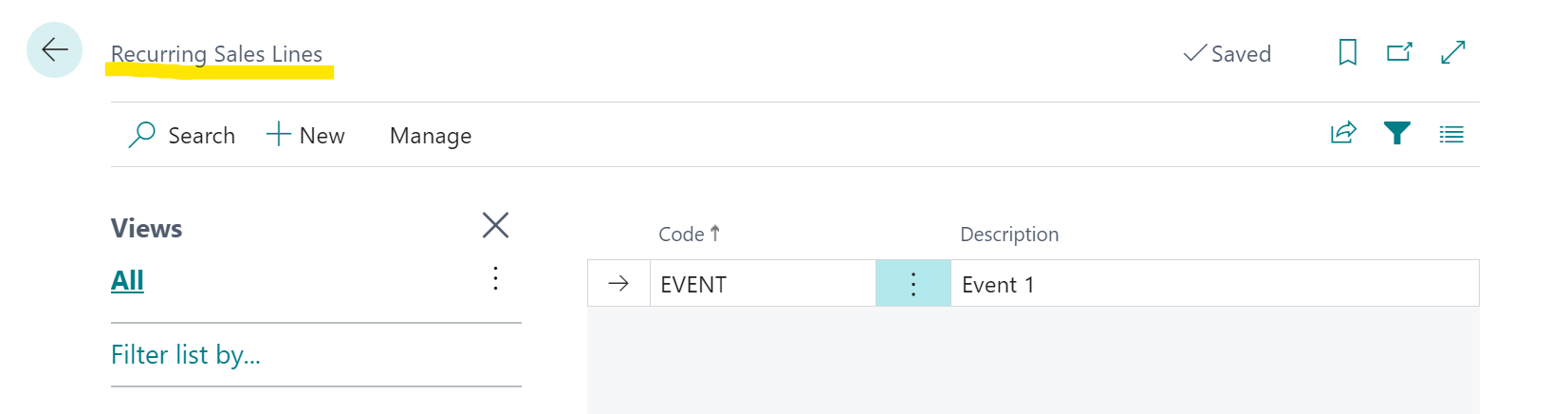
    1. In the Recurring Sales Lines Page create a new code, enter the expense details in the recurring sales lines card
    pastedimage1671299477210v1.png

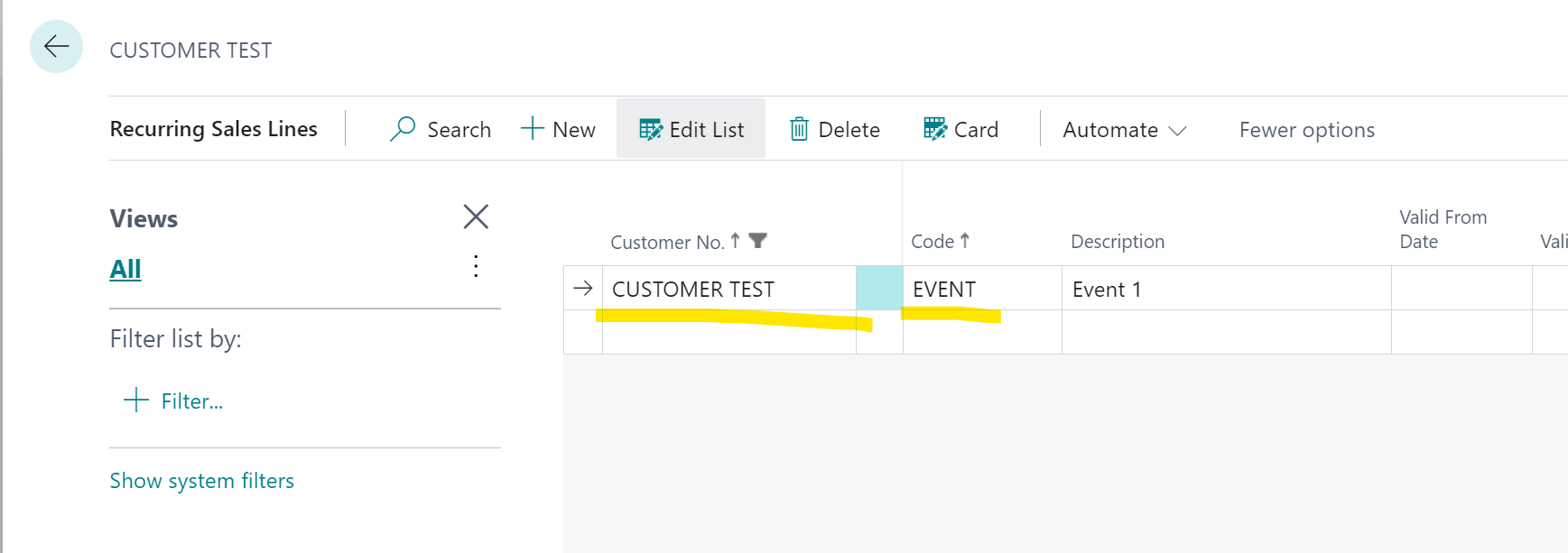
    2. Assign this recurring sales code to all your customers. Use Edit in Excel or Configuration Packages to not do it manually. 
    pastedimage1671299672189v2.png

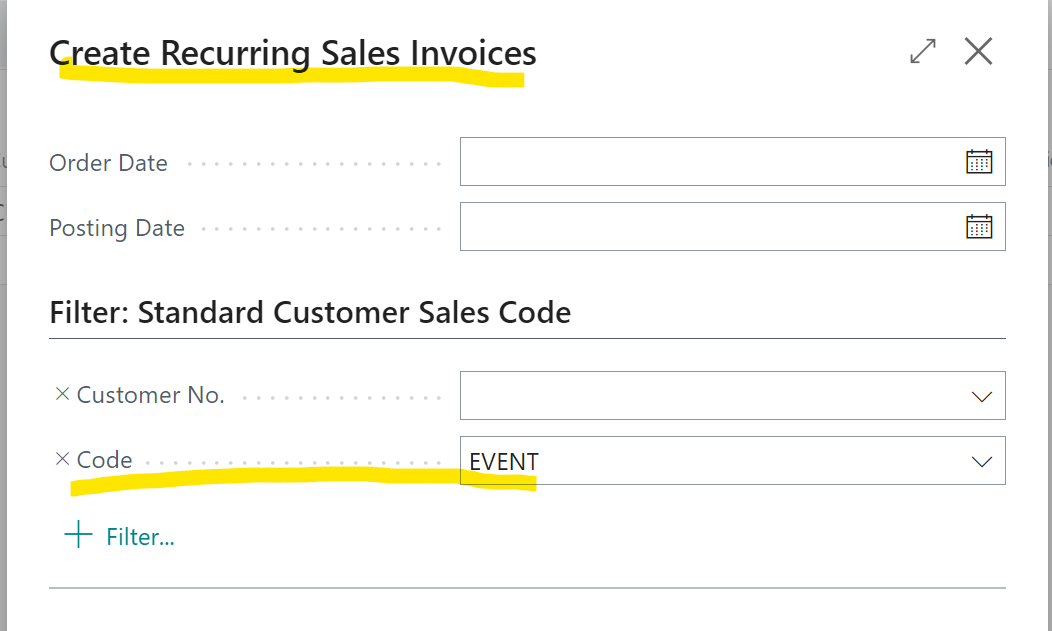
    3. Run the Create Recurring Sales Invoices batch job for the code created in step 1. This will create sales invoices for all the customers added in step 2
    pastedimage1671299744311v3.png

  • Valentin Castravet Profile Picture
    31,340 Super User 2025 Season 2 on at
    [quote user="Bob Manjoney"]

    Thanks, I probably should have given a concrete example. I'm not really sure that this feature addresses this situation.

    E.g., my client (a private country club) hosts an event, for which they have a list of several hundred participants, and they want to create an invoice for all participants for attending that event. There are other similar situations, like they annually admit several dozen new families and want to bill them initiation fees. The charges are not recurring. They are one-offs that happen to be billable to many different customers. This is why QB has this feature, as well as other similar features like memorized transactions to assist in repetitive/redundant charges.

    Edit: Is this what you're referring to? 

    Create multiple sales invoices based on recurring sales lines

    [/quote]

    yes i am referring that 

  • Community member Profile Picture
    on at

    Based on the questions you have I would recommend finding a CSP partner who can assist you with this.

    www.microsoft.com/.../search

    There is a built-in migration tool that will bring over master records and other data depending on whether you're migrating from QB Online or On-Prem.  They will not migrate over historical data.

Under review

Thank you for your reply! To ensure a great experience for everyone, your content is awaiting approval by our Community Managers. Please check back later.

Helpful resources

Quick Links

Responsible AI policies

As AI tools become more common, we’re introducing a Responsible AI Use…

Neeraj Kumar – Community Spotlight

We are honored to recognize Neeraj Kumar as our Community Spotlight honoree for…

Leaderboard > Small and medium business | Business Central, NAV, RMS

#1
OussamaSabbouh Profile Picture

OussamaSabbouh 3,143

#2
Jainam M. Kothari Profile Picture

Jainam M. Kothari 1,694 Super User 2025 Season 2

#3
YUN ZHU Profile Picture

YUN ZHU 1,067 Super User 2025 Season 2

Last 30 days Overall leaderboard

Featured topics

Product updates

Dynamics 365 release plans



