web
You’re offline. This is a read only version of the page.
close
Skip to main content

Notifications

Announcements

No record found.

Community site session details

Community site session details

Session Id :
Microsoft Dynamics 365 | Integration, Dataverse...
Answered

Share a personal or System View

(0) ShareShare
ReportReport
Posted on by 365

Hi,

how can I share a personal view that I've created on Dynamics CRM (online)?

And a system view?

I found a Share button on Advanced Find , but it's disabled:

share-button.png

I have the same question (0)
  • Suggested answer
    meelamri Profile Picture
    13,216 User Group Leader on at

    Hi,

    Please refer to this blog: ledgeviewpartners.com/.../

    It explains in detail how to share a view with other users or teams.

    Good Luck !!

  • Verified answer
    Community Member Profile Picture
    on at

    Hi Joel,

    This share button is to share the records displayed (it would be enabled when you select one or more records in the result list).

    For system view:

    The system view is displayed to all users.

    For personal view:

    A personal view can only be viewed by the user who created it, you would have to save the Advanced Find query as a Personal View and then Share that view to others.

    Security Roles required(Settings > Security > Security Roles):

    •    ‘Create a View’ privileges
    •    Saved View: Share Privilege

    pastedimage1634795762668v6.png

    pastedimage1634795560572v5.png

    1.Save the Advanced Find query as a Personal View.

    pastedimage1634795429628v4.png

    2.Select the personal view you just created.

    pastedimage1634794371717v1.png

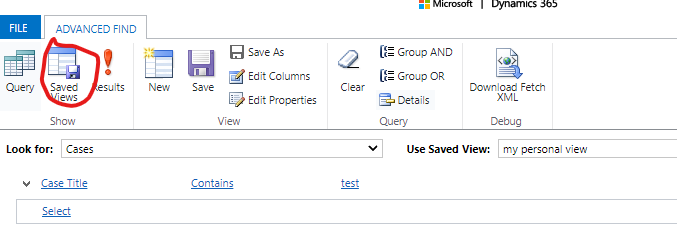
    3.Click the Saved Views button.

    pastedimage1634794432983v2.png

    4.Check the view and the share button will be enabled.

    pastedimage1634794462136v3.png

Under review

Thank you for your reply! To ensure a great experience for everyone, your content is awaiting approval by our Community Managers. Please check back later.

Helpful resources

Quick Links

Responsible AI policies

As AI tools become more common, we’re introducing a Responsible AI Use…

Neeraj Kumar – Community Spotlight

We are honored to recognize Neeraj Kumar as our Community Spotlight honoree for…

Leaderboard > Microsoft Dynamics 365 | Integration, Dataverse, and general topics

#1
iampranjal Profile Picture

iampranjal 51

#2
Martin Dráb Profile Picture

Martin Dráb 39 Most Valuable Professional

#3
André Arnaud de Calavon Profile Picture

André Arnaud de Cal... 26 Super User 2025 Season 2

Last 30 days Overall leaderboard

Product updates

Dynamics 365 release plans