web
You’re offline. This is a read only version of the page.
close
Skip to main content

Notifications

Announcements

No record found.

Community site session details

Community site session details

Session Id :
Finance | Project Operations, Human Resources, ...
Answered

Insufficient security permissions for user RetailServiceAccount.

(0) ShareShare
ReportReport
Posted on by 11,730

Hello All,

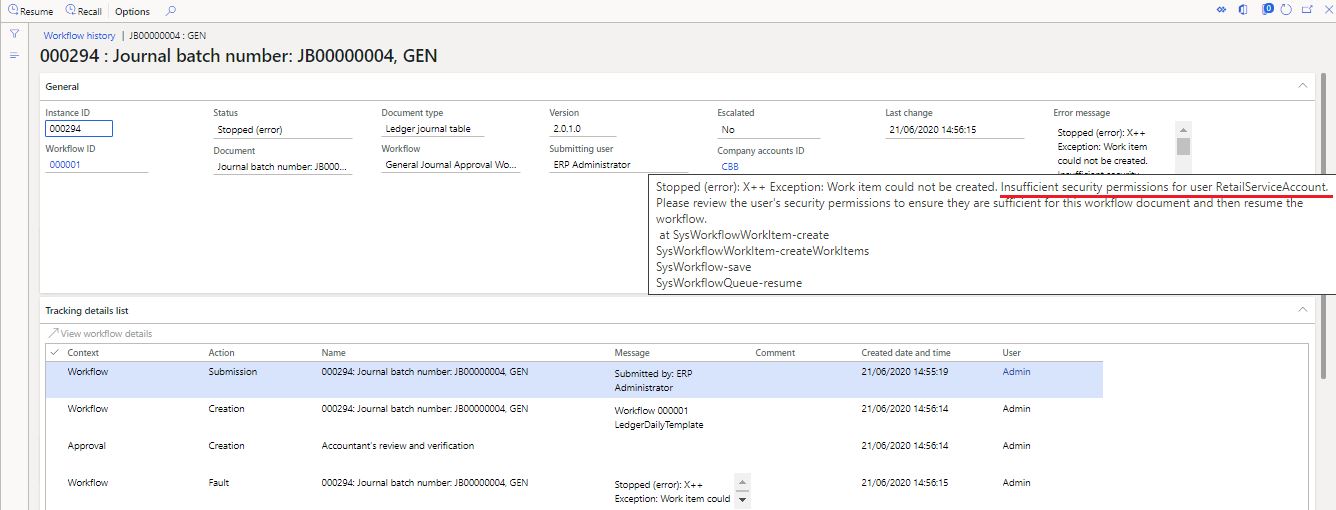
I am getting this after submitting the general journal in workflow approval process.

Checked from my side in below areas.

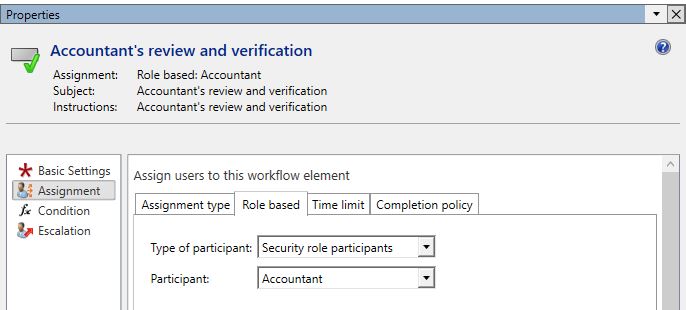
-- "Accountant" role is assigned to user 'A'.

-- User is enabled.

-- Provider is https://sts.windows.net/

-- 'Person' is linked in the user.

-- System admin role also assigned (for test purpose).

-- Same "Accountant" role is assigned to user 'A' in "Positions" form.

Stopped (error): X++ Exception: Work item could not be created. Insufficient security permissions for user RetailServiceAccount. Please review the user's security permissions to ensure they are sufficient for this workflow document and then resume the workflow.
at SysWorkflowWorkItem-create
SysWorkflowWorkItem-createWorkItems
SysWorkflow-save
SysWorkflowQueue-resume
1856.Capture.JPG

Workflow is participant based.

102723.JPG

Point: - If workflow is created on 'user based' with same user 'A'; then there is no issue and work items are created properly.

Kindly let me know if I am missing anything in this case!

Best regards,
Sourav Dam

I have the same question (0)
  • Verified answer
    André Arnaud de Calavon Profile Picture
    301,075 Super User 2025 Season 2 on at

    Hi Sourav,

    Is your accountant role assigned to the Retail service account? Does your accountant role have the permissions for approving the journals?

    If the retail service account is having the accountant role, you can remove it from this user to see if it solves this issue. However, it might be required for another permission for the retail service account.

  • Verified answer
    SouravDam Profile Picture
    11,730 on at

    Hi André,

    Sorry for late response!

    The reason what we identified is; client's admin team added a few additional privileges to the "Accountant" role which, being an accountant, not supposed to perform in general. And due to this, this error was coming. However; the issue is a bit awkward compared to what assigned to the role as the client is not in 'Retail' domain and they do not even use this module!

    Solution delivered as follows;

    -- First; suggested to remove those additional privileges from this role which client did not accept as they want the accountant to perform those tasks out of actual role assigned.

    -- Therefore; 2nd option we suggested to go to System admin > Security > Assign users to roles and remove the "RetailServiceAccount" role manually from the 'Accountant' role.

    Once this is done; the case got solved.

    Thanks for your feedback too as you highlighted to act on 2nd option in your post.

    Regards,
    Sourav

Under review

Thank you for your reply! To ensure a great experience for everyone, your content is awaiting approval by our Community Managers. Please check back later.

Helpful resources

Quick Links

Responsible AI policies

As AI tools become more common, we’re introducing a Responsible AI Use…

Neeraj Kumar – Community Spotlight

We are honored to recognize Neeraj Kumar as our Community Spotlight honoree for…

Leaderboard > Finance | Project Operations, Human Resources, AX, GP, SL

#1
Martin Dráb Profile Picture

Martin Dráb 503 Most Valuable Professional

#2
André Arnaud de Calavon Profile Picture

André Arnaud de Cal... 434 Super User 2025 Season 2

#3
BillurSamdancioglu Profile Picture

BillurSamdancioglu 278 Most Valuable Professional

Last 30 days Overall leaderboard

Product updates

Dynamics 365 release plans