web
You’re offline. This is a read only version of the page.
close
Skip to main content

Notifications

Announcements

No record found.

Community site session details

Community site session details

Session Id :
Small and medium business | Business Central, N...
Answered

Reinstall Web Client Nav 17

(0) ShareShare
ReportReport
Posted on by 70

I was coding ASPNET sites, and I needed to publish the site. I forgot to create a folder, I've selected delete files option and I published to wwwroot.
With that my NAV 17 Web Client folder was deleted.

I tried to repair, but the folder doesn't appear back.
I uninstalled and reinstalled Web Client, and the folder still doesn't appear.
Then I copy the folder form the DVD folder, and put it on wwwroot, and I tried to create a new site myself.
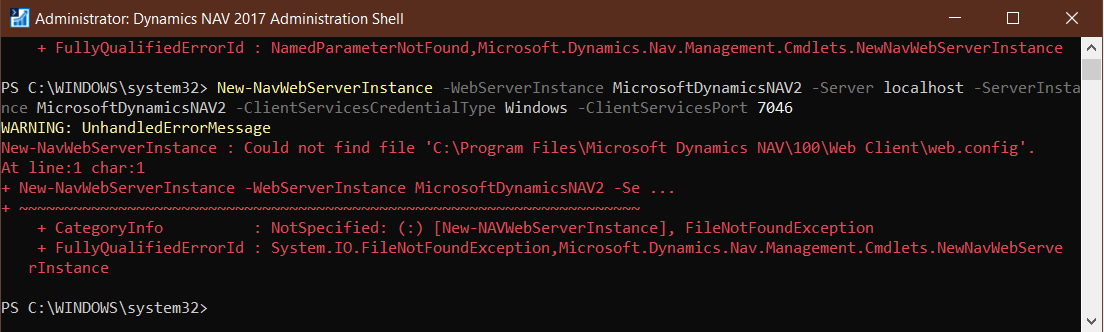
And now I got an error.
PS: I don't know if this folder (C:\Program Files\Microsoft Dynamics NAV\100\Web Client) had to have something in it.

I've read what's in here: https://docs.microsoft.com/en-us/previous-versions/dynamicsnav-2013/jj551768(v%3dnav.70)
And https://docs.microsoft.com/en-us/previous-versions/dynamicsnav-2013/hh167211(v=nav.70)?redirectedfrom=MSDN

Still didn't find a answer

Screenshot-_2800_252_2900_.pngScreenshot-_2800_253_2900_.pngScreenshot-_2800_254_2900_.pngScreenshot-_2800_255_2900_.png

I have the same question (0)
  • Suggested answer
    RockwithNav Profile Picture
    8,600 Super User 2025 Season 2 on at

    It's showing Application Error - Anything logged int Event Viewer?

  • Belarmino Vicenzo Profile Picture
    70 on at
    [quote user="RockwithNAV"

    It's showing Application Error - Anything logged int Event Viewer?

    [/quote

    Ths

  • Suggested answer
    Marco Mels Profile Picture
    on at

    Hello,

    Via setup.exe of the product DVD, you can uninstall WebClient and after that reinstall it. If everything is installed OK, you can start PowerShell ISE with Admin permissions on the server and user New-NavWebServerInstance to recreate it correctly.

    Thanks.

  • Suggested answer
    RockwithNav Profile Picture
    8,600 Super User 2025 Season 2 on at

    There could be many things ,  I would also suggest to complete uninstall it and do a fresh installation with all cookies and caches cleared.

    Install a new one and then provide all necessary configuration settings and see the outcome.

  • Belarmino Vicenzo Profile Picture
    70 on at
    [quote user="Marco Mels"]

    Hello,

    Via setup.exe of the product DVD, you can uninstall WebClient and after that reinstall it. If everything is installed OK, you can start PowerShell ISE with Admin permissions on the server and user New-NavWebServerInstance to recreate it correctly.

    Thanks.

    [/quote]

    Don't know how to use powershell, and since I'm already failing at this. I wouldn't like to try and make things worst
    Can u explain the steps with images.

  • Belarmino Vicenzo Profile Picture
    70 on at
    [quote user="RockwithNAV"]

    There could be many things ,  I would also suggest to complete uninstall it and do a fresh installation with all cookies and caches cleared.

    Install a new one and then provide all necessary configuration settings and see the outcome.

    [/quote]

    Compliete uninstall NAV our just the web server?

  • Suggested answer
    RockwithNav Profile Picture
    8,600 Super User 2025 Season 2 on at

    Web Server Components will be OK.

    Check service tier is correctly configured.

  • Suggested answer
    Marco Mels Profile Picture
    on at

    Hello,

    On your IIS server or PC, in the Start menu, right click on "Dynamics NAV 2017 Administration Shell" and choose Run as Administrator.

    E.g.:

    New-NAVWebServerInstance -WebServerInstance <<name>> -Server localhost -ServerInstance <<serverinstance>> -ClientServicesCredentialType Windows `

    >> -ClientServicesPort <<clientservicesport>> -ManagementServicesPort <<managementservicesport>> -Force

    A sample of possible values:

    New-NAVWebServerInstance -WebServerInstance DynamicsNAV100 -Server localhost -ServerInstance DynamicsNAV100-ClientServicesCredentialType Windows -ClientServicesPort 7046 -ManagementServicesPort 7045 -Force

    You need to replace the possible values with your own that does apply to your situation.  Alternatively, raise a support ticket to Microsoft support via your CSP and we will assist you to get up and running. It must be frustrating when the application fails with errors. We are here to assist.

    Thanks.

  • Belarmino Vicenzo Profile Picture
    70 on at
    [quote user="Belarmino Vicenzo"]
    RockwithNAV said:

    There could be many things ,  I would also suggest to complete uninstall it and do a fresh installation with all cookies and caches cleared.

    Install a new one and then provide all necessary configuration settings and see the outcome.

    Compliete uninstall NAV our just the web server?

    [/quote]

    Done.
    Don't know about caches, but no cookies on the browser.
    Still didn't work  :( 

  • Belarmino Vicenzo Profile Picture
    70 on at
    [quote user="Marco Mels"]

    Hello,

    On your IIS server or PC, in the Start menu, right click on "Dynamics NAV 2017 Administration Shell" and choose Run as Administrator.

    E.g.:

    New-NAVWebServerInstance -WebServerInstance <<name>> -Server localhost -ServerInstance <<serverinstance>> -ClientServicesCredentialType Windows `

    >> -ClientServicesPort <<clientservicesport>> -ManagementServicesPort <<managementservicesport>> -Force

    A sample of possible values:

    New-NAVWebServerInstance -WebServerInstance DynamicsNAV100 -Server localhost -ServerInstance DynamicsNAV100-ClientServicesCredentialType Windows -ClientServicesPort 7046 -ManagementServicesPort 7045 -Force

    You need to replace the possible values with your own that does apply to your situation.  Alternatively, raise a support ticket to Microsoft support via your CSP and we will assist you to get up and running. It must be frustrating when the application fails with errors. We are here to assist.

    Thanks.

    [/quote]

    I've tried with all parameters and I got this error
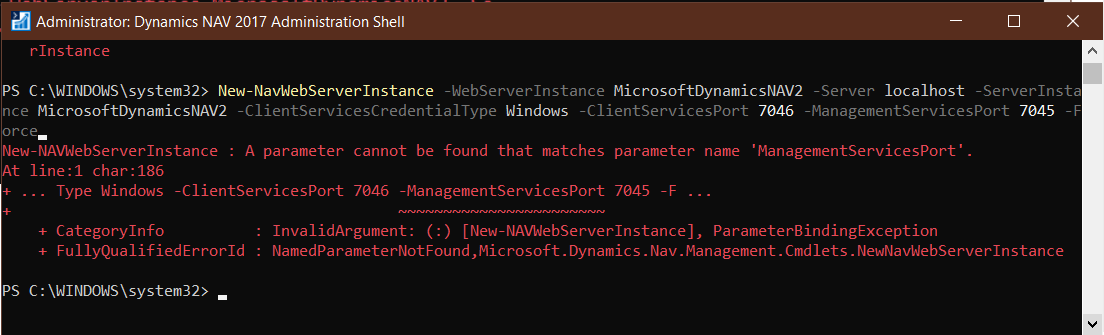
    Screenshot-_2800_263_2900_-_2D00_-Copy.png

    Then I removed a few ones and I got those two.
    My C:\Program Files\Microsoft Dynamics NAV\100\Web Client folder is empty, is that a problem?
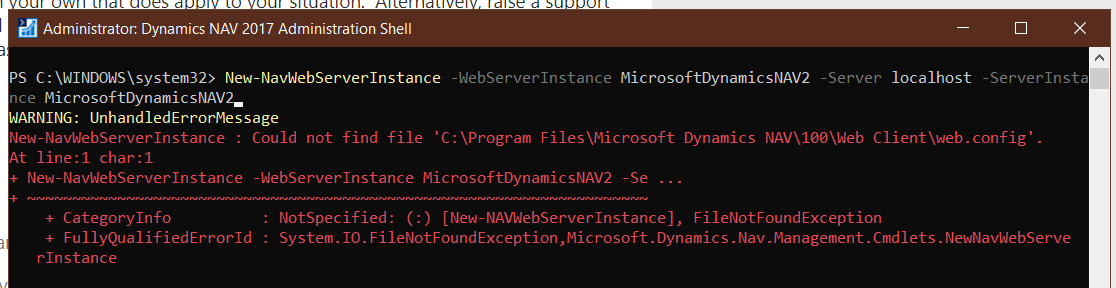
    Screenshot-_2800_262_2900_.pngScreenshot-_2800_263_2900_.png

Under review

Thank you for your reply! To ensure a great experience for everyone, your content is awaiting approval by our Community Managers. Please check back later.

Helpful resources

Quick Links

Responsible AI policies

As AI tools become more common, we’re introducing a Responsible AI Use…

Neeraj Kumar – Community Spotlight

We are honored to recognize Neeraj Kumar as our Community Spotlight honoree for…

Leaderboard > Small and medium business | Business Central, NAV, RMS

#1
OussamaSabbouh Profile Picture

OussamaSabbouh 3,143

#2
Jainam M. Kothari Profile Picture

Jainam M. Kothari 1,694 Super User 2025 Season 2

#3
YUN ZHU Profile Picture

YUN ZHU 1,067 Super User 2025 Season 2

Last 30 days Overall leaderboard

Featured topics

Product updates

Dynamics 365 release plans