web
You’re offline. This is a read only version of the page.
close
Skip to main content

Notifications

Announcements

No record found.

Community site session details

Community site session details

Session Id :
Customer experience | Sales, Customer Insights,...
Answered

Get text value of option set on quick view form

(0) ShareShare
ReportReport
Posted on by 35

I have a quick view form that I added to a Contact Form that pulls data from the Account entity.  On the Account entity I have a field called 'new_atriskindicator' which is an option set.  I can access the field on the Account form using the following javascript and display an alert.  

function atRisk() {
     var obj = Xrm.Page.getAttribute("new_atriskindicator");
          if (obj != null)
               {
                    //Get OptionSet Text
                    if (obj.getText() != null)
               {
          alert("At Risk Indicator: " + obj.getText());
          Xrm.Page.ui.setFormNotification("At Risk Indicator: " + obj.getText(), "WARNING", "Info1");
          }
     }
}

I've been unsuccessful in accessing the text of the option set field from the quick view form on the Contact form.  I'm very close but and unclear as to how to access the field value text although I can see the value in the console log when I expand the second entry.  In the image below my text, it's the numeric value of 500000001 that I'm trying to collect and translate to the formatted description.  Although the field is on the quick view form, I want to display an alert when someone access the Contact form when my at risk indicator contains a value.  If I can get this working on the Contact form, I intend to add this to the Case form as the same quick view form is displayed on the Caller field is populated.

I am on CRM version 2016 version 8.2 on-premise.  

function atRisk() {
     var quickViewControl = Xrm.Page.ui.quickForms.get("contactquickform").getControl("new_atriskindicator");
     var field = (quickViewControl.getAttribute("new_atriskindicator"));

     console.log(quickViewControl);
     console.log(field);
     return;
}
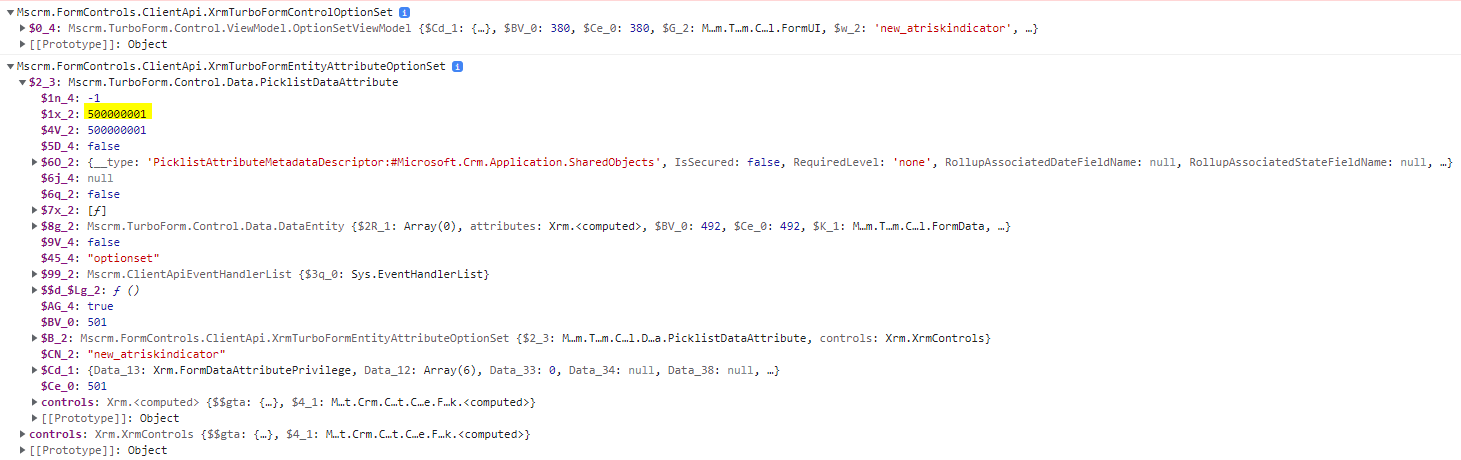
controlLog.PNG

I have the same question (0)
  • Verified answer
    Bipin D365 Profile Picture
    28,983 Moderator on at

    Hi,

    Try below code

    function getAttributeValue() {

       var quickViewControl = Xrm.Page.ui.quickForms.get("<QuickViewControlName>");

       if (quickViewControl != undefined) {

           if (quickViewControl.isLoaded()) {

               // Access the value of the column bound to the constituent control

               var myValue = quickViewControl.getControl("new_atriskindicator").getAttribute().getText();

               console.log(myValue);

               // Search by a specific column present in the control      

               var myValue2 =  quickViewControl.getControl().find(control => control.getName() == "new_atriskindicator").getAttribute().getText();

               console.log(myValue2);

               return;

           }

           else {

               // Wait for some time and check again

               setTimeout(getAttributeValue, 10, executionContext);

           }

       }

       else {

           console.log("No data to display in the quick view control.");

           return;

       }

    }

    learn.microsoft.com/.../isloaded

  • Mason Profile Picture
    35 on at

    It returns the following error, executionContext is not defined.

  • Mason Profile Picture
    35 on at

    I removed that parameter value after the comma, and it worked.  

Under review

Thank you for your reply! To ensure a great experience for everyone, your content is awaiting approval by our Community Managers. Please check back later.

Helpful resources

Quick Links

Responsible AI policies

As AI tools become more common, we’re introducing a Responsible AI Use…

Neeraj Kumar – Community Spotlight

We are honored to recognize Neeraj Kumar as our Community Spotlight honoree for…

Leaderboard > Customer experience | Sales, Customer Insights, CRM

#1
Tom_Gioielli Profile Picture

Tom_Gioielli 70 Super User 2025 Season 2

#2
Gerardo Rentería García Profile Picture

Gerardo Rentería Ga... 33 Most Valuable Professional

#3
Daniyal Khaleel Profile Picture

Daniyal Khaleel 32 Most Valuable Professional

Last 30 days Overall leaderboard

Product updates

Dynamics 365 release plans


