web
You’re offline. This is a read only version of the page.
close
Skip to main content

Notifications

Announcements

Community site session details

Community site session details

Session Id :
Supply chain | Supply Chain Management, Commerce
Answered

Filtered view of a list page can no longer be saved as a Tile?

(0) ShareShare
ReportReport
Posted on by 175

Hi,

I got an issue with saving a filtered view as a Tile? Before I can filter a list view of a table, say for example Purchase orders where order pool = 10. After applying filter I can click on the option "Add to workspace" and I do have the option to add that view as a Tile and show a record count. However when I tried it today I cannot see that option any more and the "Add to workspace" button is already disabled. Any one of you here who knows on what's wrong with it? Thank you.

Riel

I have the same question (0)
  • Verified answer
    Tom Berry Profile Picture
    93 on at

    Hi Riel,

    One thing you may want to check, did you save your grid changes before trying to add to Workspace. If there is an asterisk next to view name then you need to save your changes. Once you do that, you should be able to use Add to Workspace. Below is an example:

    pastedimage1643205574595v1.png

    After Save

    pastedimage1643205620775v2.png

  • Riel A. Mallorca Profile Picture
    175 on at

    Hi Tom,

    Thanks for your feedback, I did the following steps after your suggestion:

    1. Opened the All purchase orders grid view. Default view is set to "Standard view".

    2. Applied filter on "Purchase pool" field.

    3. Now I can see the * (asterisk) sign just after the standard view label, but there is no option to "Save" instead there is "Save as" option.
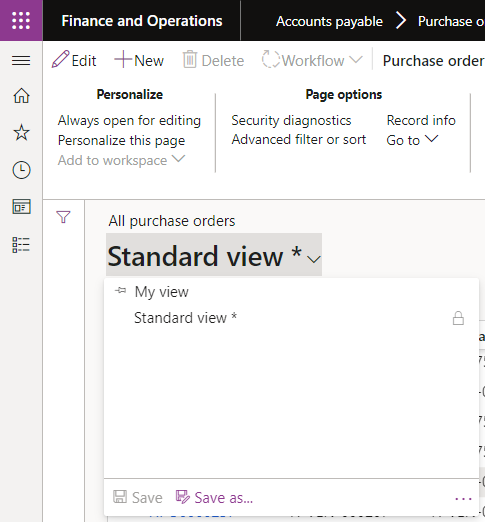
    pastedimage1643209741485v3.png

    4. I saved the view and named it "PO with Pool 10" and now the "Add to workspace" button is enabled.
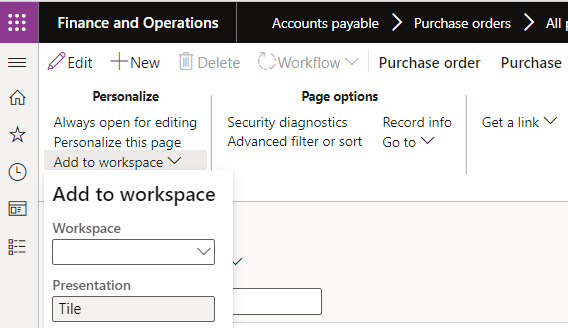
    pastedimage1643209672934v2.png

    Appreciate the help extended.

    Cheers!

    Riel

Under review

Thank you for your reply! To ensure a great experience for everyone, your content is awaiting approval by our Community Managers. Please check back later.

Helpful resources

News and Announcements

Season of Giving Solutions is Here!

Quick Links

Responsible AI policies

As AI tools become more common, we’re introducing a Responsible AI Use…

Neeraj Kumar – Community Spotlight

We are honored to recognize Neeraj Kumar as our Community Spotlight honoree for…

Leaderboard > Supply chain | Supply Chain Management, Commerce

#1
Laurens vd Tang Profile Picture

Laurens vd Tang 258 Super User 2025 Season 2

#2
André Arnaud de Calavon Profile Picture

André Arnaud de Cal... 164 Super User 2025 Season 2

#3
Sumit Singh Profile Picture

Sumit Singh 46

Last 30 days Overall leaderboard

Product updates

Dynamics 365 release plans



