web
You’re offline. This is a read only version of the page.
close
Skip to main content

Notifications

Announcements

No record found.

Community site session details

Community site session details

Session Id :
Microsoft Dynamics CRM (Archived)
Answered

Global Search Text Box in Title Header

(0) ShareShare
ReportReport
Posted on by 465

Greetings all,

My company recently received the 2015 update to our CRM Online system.  I love the cross-entity global search, but I feel like I'm missing out.  Every article I read that refers to the new Global Quick Find search, shows a Text Box in the Title bar like this:
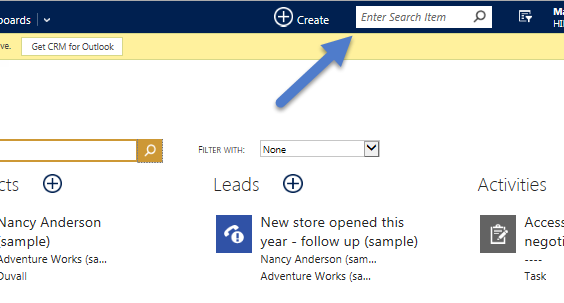
2015_2D00_01_2D00_23-12_5F00_15_5F00_07_2D00_Customization-_2D00_-Microsoft-Dynamics-CRM-_2D00_-Internet-Explorer.png

But our system doesn't have that.  It just has the magnifying glass icon.  If you click on it, it has to load a whole new page before entering your search text.  How do I get the text box up there?  Here's what mine looks like:
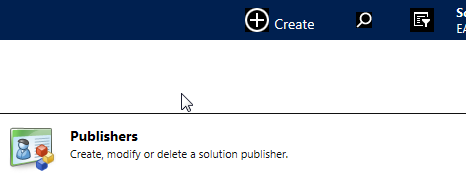
Any assistance would be greatly appreciated!

*This post is locked for comments

I have the same question (0)
  • Verified answer
    PS Profile Picture
    23,577 on at

    Hi There

    Please check your screen resolution. it seems to be an issue of either your screen size or resolution:

    For Smaller screens/window it looks like:

    0638.capture-2.PNG

    For Average screens/window it looks like:

  • Verified answer
    Aileen Gusni Profile Picture
    44,524 on at

    Hi Multiguy,

    FYI, my current PC by default also shows like your:

    globalsearch2.png

    It is related to the screen size and resolution and you can change the resolution or I can adjust my browser page size, I reduce the font and page size then it will become like this:

    globalsearch3.png

    And I also can increase the size, it even makes the "+ Create" disappears, just showing  the "+" button :)

    *I use only a little thing, that is CTRL + scroll up/down to adjust the page size. of my IE (my browser) :)

    So, just play around with this :)

    Hope this helps!

    Thanks.

  • multiguy Profile Picture
    465 on at

    Well how about that? Cool. That definitely did the trick!  Thanks everyone!

Under review

Thank you for your reply! To ensure a great experience for everyone, your content is awaiting approval by our Community Managers. Please check back later.

Helpful resources

Quick Links

Responsible AI policies

As AI tools become more common, we’re introducing a Responsible AI Use…

Neeraj Kumar – Community Spotlight

We are honored to recognize Neeraj Kumar as our Community Spotlight honoree for…

Leaderboard > 🔒一 Microsoft Dynamics CRM (Archived)

#1
SA-08121319-0 Profile Picture

SA-08121319-0 4

#1
Calum MacFarlane Profile Picture

Calum MacFarlane 4

#3
Alex Fun Wei Jie Profile Picture

Alex Fun Wei Jie 2

Last 30 days Overall leaderboard

Featured topics

Product updates

Dynamics 365 release plans



