web
You’re offline. This is a read only version of the page.
close
Skip to main content

Notifications

Announcements

No record found.

Community site session details

Community site session details

Session Id :
Supply chain | Supply Chain Management, Commerce
Answered

Excel Add in for importing and exporting Bom header and Line

(0) ShareShare
ReportReport
Posted on by 143

Do we have any excel Add in for importing and exporting Bom header and line in d365 finance and operations?

Client is looking for some excel add in to quickly make changes in the bom header and lines and import it back to F&O.

Please help on this.

I have the same question (0)
  • Suggested answer
    AR-01121610-0 Profile Picture
    4,967 Moderator on at

    Hy Ashish,

    as far as I remember there are three entities you need for Import/Export of BOM's.

    Bill of materials Header (is current)

    Bill of materials Versions V3 (is current)

    OR

    Bill of materials Headers and Versions V3 (is current)

    and

    Bill of materials Lines V3 (is current)

    BOM Headers and Version Entity is available for "open in Excel" from the BOM form.
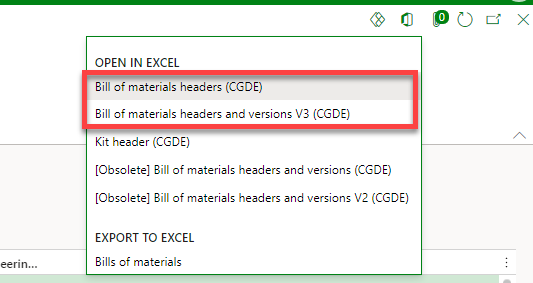
    7838.pastedimage1617206722827v1.png

    For Bil of material lines i did not see an option for "Open in Excel", but it should be importable with the Excel addIn.

  • Ashish AX Functional Profile Picture
    143 on at

    Thanks Andreas for the help. Can suggest me how i can import bom lines via Excel add in?

    Is there a way i can add excel add in option for Bom lines.

  • Suggested answer
    AR-01121610-0 Profile Picture
    4,967 Moderator on at

    Hy Ashish,

    yes there are more ways to import BOM lines via Excel Addin.

    As I just found you can call the "Open in Excel" feature from BOM Designer (Releases Products/Engineer/BOM/Designer).

    3225.pastedimage1617213219883v1.png

    In BOM Designer the BOM Lines V3 Entity is available for "Open in Excel".

    5756.pastedimage1617213288423v2.png

    As this feature opens all BOM lines of all items you can add a filter to your BOM ID an edit (insert/edit/delete) the BOM Lines.

    If you are not used to work with Excel Addin you can start your journey with Excel Addin here: Office integration overview - Finance & Operations | Dynamics 365 | Microsoft Docs

    Furthermore you could create a customized Excel Addin Workbook using Office Integration templates with workbook designer Office integration overview - Finance & Operations | Dynamics 365 | Microsoft Docs

  • Ashish AX Functional Profile Picture
    143 on at

    Thanks a ton :)

Under review

Thank you for your reply! To ensure a great experience for everyone, your content is awaiting approval by our Community Managers. Please check back later.

Helpful resources

Quick Links

Responsible AI policies

As AI tools become more common, we’re introducing a Responsible AI Use…

Neeraj Kumar – Community Spotlight

We are honored to recognize Neeraj Kumar as our Community Spotlight honoree for…

Leaderboard > Supply chain | Supply Chain Management, Commerce

#1
Siv Sagar Profile Picture

Siv Sagar 266 Super User 2025 Season 2

#2
Laurens vd Tang Profile Picture

Laurens vd Tang 213 Super User 2025 Season 2

#3
André Arnaud de Calavon Profile Picture

André Arnaud de Cal... 140 Super User 2025 Season 2

Last 30 days Overall leaderboard

Featured topics

Product updates

Dynamics 365 release plans



