web
You’re offline. This is a read only version of the page.
close
Skip to main content

Notifications

Announcements

No record found.

Community site session details

Community site session details

Session Id :
Microsoft Dynamics CRM (Archived)

Probability Field not Updating upon change of Opportunity Stage

(0) ShareShare
ReportReport
Posted on by 2,175

Hi

I was wondering if someone can help me in terms of why my Workflow process isn't working to change the probability field on my opportunity  automatically upon change of sales stage.

Below is a screenshot of the logic I have applied to the workflow process but for some reason it just doesn't work when I create a new opportunity and test it along the sales stages (identify, discovery, propose and close).
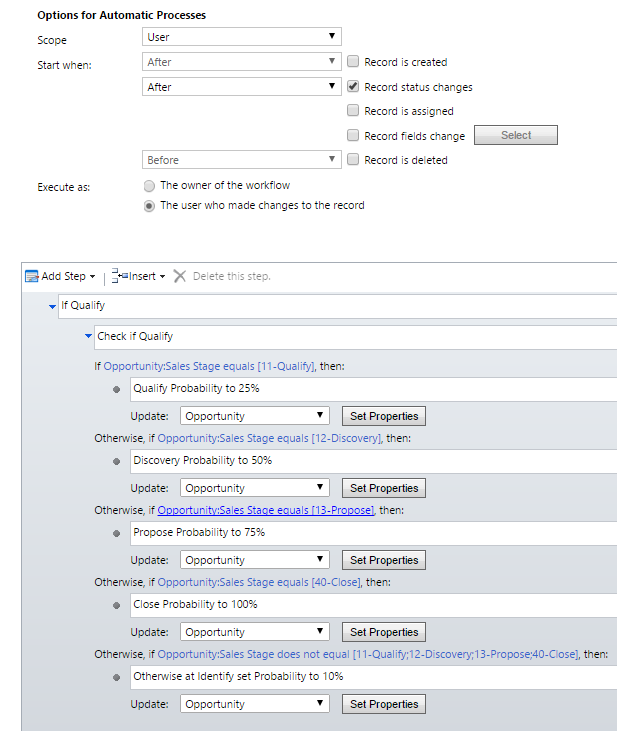
Automating-Probability.PNG

Kind Regards

Mike

*This post is locked for comments

I have the same question (0)
  • MikeC282 Profile Picture
    2,175 on at

    So I got this working by having the process start when record fields change via process stage but now I've got another issue. Everything else seems to work fine except for Discovery which when I set the stage to Discovery, it just stays at 25%.

  • Suggested answer
    Tushar2016CRM Profile Picture
    1,130 on at

    HI  Mike ,

    Can you check adding a business rule for the same .

    Another reason might be due to a Async workflow ,it might reflect the changes after sometime .

    Thanks

  • Community Member Profile Picture
    on at

    It seem your Workflow Scope is "User" it can only be run for your owned opportunities and only you can run this workflow

    so try to change Scope to "Organization" so every sales person who change the stag so for workflow trigger and update the probability field.

  • MikeC282 Profile Picture
    2,175 on at

    Hi Tushar

    Thanks for the reply. I tried adding a business rule before and the probability doesn't even change for some reason. That was why I went with a workflow

  • MikeC282 Profile Picture
    2,175 on at

    Thanks Muhammad

    I didn't know about this. I did test the workflow by creating new opportunities under me so it should of worked anyway. The problem is that the probability changes for qualify, propose and close but when it hits discovery (after qualify) the probability stays as the same percentage as qualify. Only after I switch to the next stage which is propose, does the probability go back to working as how it should work.

  • MikeC282 Profile Picture
    2,175 on at

    Hi All

    So I updated the workflow so that it's checking for the Pipeline Phase instead of the sales stage. This seems to resolve it but Discovery is still causing an issue in that the probability just doesn't update for that specific phase. I read about a option set specifically for sales stages and noticed that Discovery was not there. I then added Discovery into the option set and set the Stage Category in the Business Process Flow to Discovery but it still won't update. can someone help me here? I'm really lost as to why Discovery is the only stage that doesn't update

  • Community Member Profile Picture
    on at

    Hi, are you aware of a way that I can make the % of probability field in CRM automatically corrected. For example, if a user enter "1" but should really enter ".10", how can I edit CRM to automatically correct the field?

  • Karuna Karan Profile Picture
    1,212 on at

    Mike,

    I had faced a similar issue in the past and I was able to resolve it. I used Business rules not WF as those are heavy.

    Follow this step and let me know the results.

    5086.Untitled.png

    1. Go to the global Optionset and modify the Stage Category (Assuming you've done this). In my example i've added 2 stages (Solution & Approval) then move/place them after the stage you want, this is mandatory.

    2. Create a Business Rule: Use the Screenshot to get the idea.

    3. Put the pipeline phase filed in the form and make it visible. Once your solution works you can make it hidden.

    4. Lock the Probability field so that users dont manually enter data. Also verify that your BPF has all the stages mapped properly.

    Now save and publish your customization. Test by moving the sales stages in Opportunity, and verify both pipeline phase and probability changes. Pipeline phase is the key here.

  • Verified answer
    Karuna Karan Profile Picture
    1,212 on at

    @JGumbs, there are 2 methods I would recommend for you.

    1. Create a custom optionset field for probability with values, so users can only select a range, e.g. 10, 20.

    2. Use WF (Synchronous) which triggers upon OOB probability field on change. Logic should be,

    a. check if probability contains data

    b. check if probability is less than or equal to 10, then update field data with 10.

    c. check if probability is greater than 10 but less than or equal to 20, then update field data with 20.

    You the above WF logic to update the probability value to a round figure.

    Let me know the results.

  • Community Member Profile Picture
    on at

    Thank you very much. This info helps immensely. 

Under review

Thank you for your reply! To ensure a great experience for everyone, your content is awaiting approval by our Community Managers. Please check back later.

Helpful resources

Quick Links

Responsible AI policies

As AI tools become more common, we’re introducing a Responsible AI Use…

Neeraj Kumar – Community Spotlight

We are honored to recognize Neeraj Kumar as our Community Spotlight honoree for…

Leaderboard > 🔒一 Microsoft Dynamics CRM (Archived)

#1
SA-08121319-0 Profile Picture

SA-08121319-0 4

#1
Calum MacFarlane Profile Picture

Calum MacFarlane 4

#3
Alex Fun Wei Jie Profile Picture

Alex Fun Wei Jie 2

Last 30 days Overall leaderboard

Featured topics

Product updates

Dynamics 365 release plans



