web
You’re offline. This is a read only version of the page.
close
Skip to main content

Notifications

Announcements

No record found.

Community site session details

Community site session details

Session Id :
Microsoft Dynamics 365 | Integration, Dataverse...
Answered

SSRS Report Format based on Parameter

(0) ShareShare
ReportReport
Posted on by 45

Hi Team,


I am seeking support for the following.


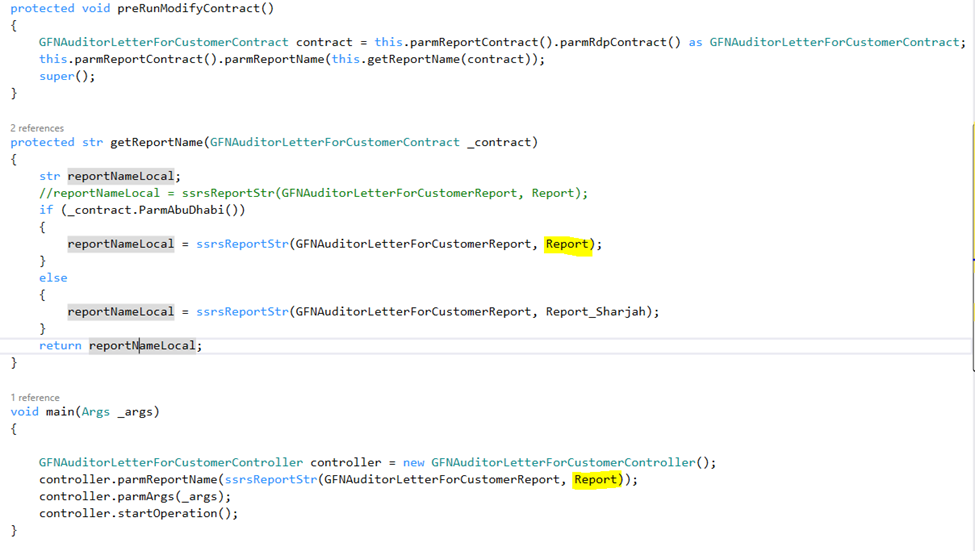
There are two report formats and I want to run the report based on a parameter. Kindly see the controller class as well. I have defined the controller logic as per below screen shot.


Report Parameter
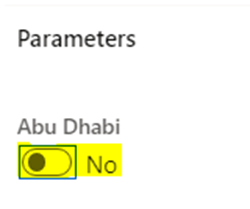
pastedimage1671426638425v1.png

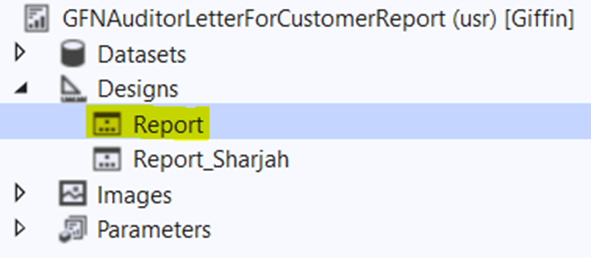
Report Formats

pastedimage1671426672810v2.png

Controller Class

pastedimage1671426698475v3.png

I have the same question (0)
  • Suggested answer
    Haig Liu Profile Picture
    Microsoft Employee on at

    Hi Bibin TV,

    You can try changing the conditional statement to:

    if(enum2str(_contract.ParmAbuiDhabi()) == "Yes")

    Here's the link to my reference: https://dhruvrthakar.blogspot.com/2018/07/change-ssrs-report-design-based-on.html

    The enum2str function converts the specified enumerated text to a character representation.

  • Bibin TV Profile Picture
    45 on at

    Hi Haig,

    Thank you for answering. I have tried with your solution, Still the report design is not changing.

  • Suggested answer
    GirishS Profile Picture
    27,827 Moderator on at

    Hi Bibin,

    Have you mention the controller class in the menu item?

    Also remove the super call on the "preRunModifyContract" method and check.

    Thanks,

    Girish S.

  • Suggested answer
    Bibin TV Profile Picture
    45 on at

    Hi Girish,

    Thank you, now it is working fine.

  • Verified answer
    GirishS Profile Picture
    27,827 Moderator on at

    If it's solved your issue, please mark the answers as verified so others can make use of it. It's done by clicking Did this answer your question? > Yes on the particular reply.

    Thanks,

    Girish S.

Under review

Thank you for your reply! To ensure a great experience for everyone, your content is awaiting approval by our Community Managers. Please check back later.

Helpful resources

Quick Links

Responsible AI policies

As AI tools become more common, we’re introducing a Responsible AI Use…

Neeraj Kumar – Community Spotlight

We are honored to recognize Neeraj Kumar as our Community Spotlight honoree for…

Leaderboard > Microsoft Dynamics 365 | Integration, Dataverse, and general topics

#1
iampranjal Profile Picture

iampranjal 41

#2
Martin Dráb Profile Picture

Martin Dráb 38 Most Valuable Professional

#3
Satyam Prakash Profile Picture

Satyam Prakash 35

Last 30 days Overall leaderboard

Product updates

Dynamics 365 release plans