web
You’re offline. This is a read only version of the page.
close
Skip to main content

Notifications

Announcements

Community site session details

Community site session details

Session Id :
Supply chain | Supply Chain Management, Commerce
Answered

Quality Test Result not updating Batch attribute

(0) ShareShare
ReportReport
Posted on by 208

I am trying to test the update of batch attributes using quality orders (tests) but I'm seeing an error on Quality order validation.

I have included some screen shots to try to explain:

Item set up
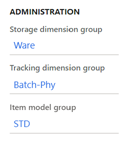
pastedimage1603884380837v1.png

Batch attribute added as Temperature deg C
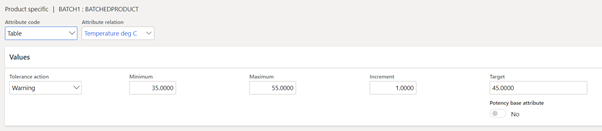
pastedimage1603884897962v9.png

Test Group Header and the Temperature test shown below (there is also a simple Appearance test before this)
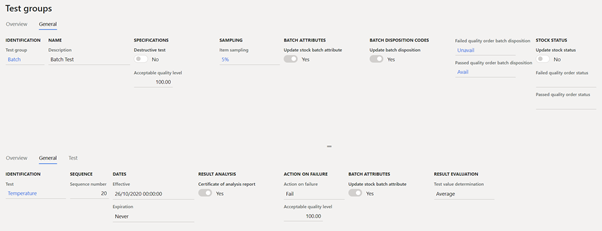
pastedimage1603884465996v3.png

Raise a Purchase Order, Confirm and Receive parts

A Quality order is automatically created

Batch is Auto Created:

pastedimage1603884524349v4.png

Enter Test results (result within tolerance)
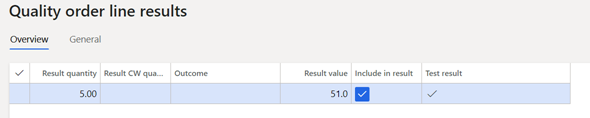
pastedimage1603884556802v5.png

Validate Quality Order. Message Returned:

pastedimage1603884583425v6.png

General Tab of Temperature Test – no attribute value

pastedimage1603884613862v7.png

Check the attributes of 000036 – no value assigned

pastedimage1603884645770v8.png

Sorry for all the screen shots but I thought it may make it easier to find the root of the problem.

I know this works for some people so I must have my set up incorrect. Thanks in advance for any comments/suggestions

I have the same question (0)
  • Verified answer
    MATTGUO Profile Picture
    22,349 Moderator on at

    Hi,

    According to my test, only when the batch number in PO line is filled in, then it can work. Please try, if so, please create a support ticket in LCS for this case.

  • Moribund Profile Picture
    208 on at

    Many thanks Mattguo, you are correct - if I add the batch at line level rather than autogenerate it I my batch attribute is updated successfully. This is definitely a bug because the batch exists and it is referenced by the quality order.

    Unfortunately I don't know how to access LCS - I work for a Microsoft partner rather than a customer

    Many thanks for your help!

  • Verified answer
    Moribund Profile Picture
    208 on at

    Had an answer from Microsoft today after creating a ticket.

    When setting up the item sampling set the Batch number to Yes in the Per Tracking Dimension section. Once this is set automatically generated batches will have their attributes updated without error.

    I have asked for a further explanation of the logic here as that is not what I thought this field is for. However on test this works.

    Best Regards

    Moribund

Under review

Thank you for your reply! To ensure a great experience for everyone, your content is awaiting approval by our Community Managers. Please check back later.

Helpful resources

News and Announcements

Season of Giving Solutions is Here!

Quick Links

Responsible AI policies

As AI tools become more common, we’re introducing a Responsible AI Use…

Neeraj Kumar – Community Spotlight

We are honored to recognize Neeraj Kumar as our Community Spotlight honoree for…

Leaderboard > Supply chain | Supply Chain Management, Commerce

#1
Laurens vd Tang Profile Picture

Laurens vd Tang 267 Super User 2025 Season 2

#2
André Arnaud de Calavon Profile Picture

André Arnaud de Cal... 117 Super User 2025 Season 2

#3
Sumit Singh Profile Picture

Sumit Singh 46

Last 30 days Overall leaderboard

Product updates

Dynamics 365 release plans



