web
You’re offline. This is a read only version of the page.
close
Skip to main content

Notifications

Announcements

No record found.

Community site session details

Community site session details

Session Id :
Microsoft Dynamics 365 | Integration, Dataverse...
Answered

Unable to Call JavaScript from Custom Button on Ribbon Workbench

(0) ShareShare
ReportReport
Posted on by 30

Hi,

In my Dynamics environment, I have created a custom entity 'Car', that has two custom form fields:

  1. Cost in Source Currency
  2. Cost in Target Currency.


I have also created a custom button, in Ribbon Workbench, on the Car entity, which calculates the amount in the target currency, when the source currency is taken as an input.

Note: I have installed Ribbon Workbench directly on Dynamics 365 interface, not XrmToolBox.


For this, here is the sequence of steps that I've used:

  1. The custom button is clicked on.
  2. A JavaScript should be called that calculates accepts the source currency, and calculates the target currency.
  3. The target currency should be displayed on the form of the Car entity.


I have followed the exact same steps as per the documentation available. Which means:

The custom button is linked to the command, which in turn calls an action.

Within the action, my web resource is registered. The primary control is passed as the execution context.


But while attempting the above, I came across the following problem:

On click of the ribbon button, my JavaScript is not getting called. Nothing is happening. I am neither getting an error, nor the desired output.


Is there any reason behind this? Because when I tried registering another JavaScript on the account entity form, the script is successfully being called, on button click.

Therefore, I had a doubt whether my script is correct. It turns out, when I register my script using 'OnSave' event, the script runs perfectly with the correct output.


Here are the screenshots:


ACCOUNT ALERT button works perfectly

pastedimage1665724871417v1.png


FIND INR COST button unable to call JS file
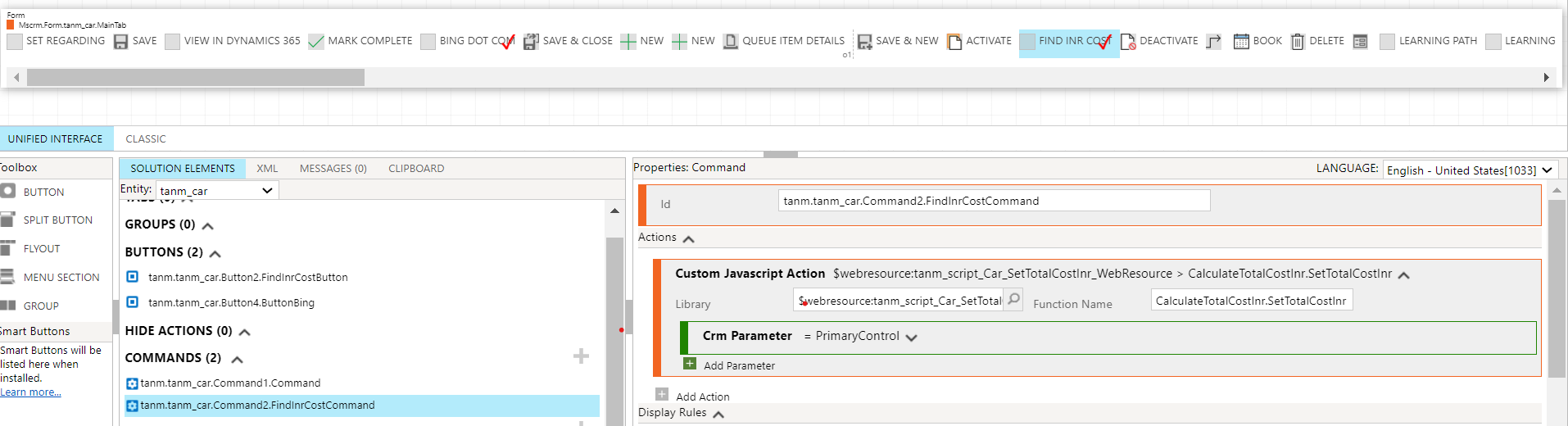
pastedimage1665724871424v2.png


Has anyone come across a similar issue while using Ribbon Workbench?

If I follow the same steps on XrmToolBox instead, will it make a difference?

Would be really helpful if anyone could suggest a solution.


Thanks and Best Regards,

Tanmay

I have the same question (0)
  • Verified answer
    Bipin D365 Profile Picture
    28,983 Moderator on at

    Hi,

    Can you please add debugger in your code.

    Add alert in your code at the very first line.

    Try to Delete Action from command and recreate again

    I hope you don't have any syntax error in your code.

    Please share your js code

  • Tanmay D365 Profile Picture
    30 on at

    Here is the JS code:

    var CalculateTotalCostInr =

    {

       SetTotalCostInr: function(executionContext)

       {

            debugger;

           "use-strict";

           var formContext = executionContext.getFormContext();

           var totalCostUsd = formContext.getAttribute("tanm_totalcostusd").getValue();

    var exchangeRate = 82.26;

           var totalCostInr = totalCostUsd * exchangeRate;

    formContext.getAttribute("tanm_totalcostinr").setValue();

    alert(totalCostUsd);

       }

    }

    Seems likes there isn't an issue with the syntax, since my script works when I add it on OnSave event. The only time when it doesn't run, is when I try to call it via the ribbon button.

    I'll try removing and then re-adding the button, as suggested.

    Best Regards,

    Tanmay

  • Verified answer
    Bipin D365 Profile Picture
    28,983 Moderator on at

    Hi,

    Replace below line of code

    Var formContext=executionContext.getFormContext();

    With

    Var formContext=executionContext;

  • Tanmay D365 Profile Picture
    30 on at

    Hi,

    Thank you so much for your help!

    I've made the necessary changes in my JS code, as suggested, and now it runs perfectly, on button click.

    Would be really helpful to know why the syntax works.

    Any reason why the getFormContext() method should be removed, when ribbon button is the trigger?

    But in the case where JS is invoked either OnSave/OnLoad/OnChange, I have to add getFormContext().

    Thanks!

    Best Regards,

    Tanmay

  • Suggested answer
    Bipin D365 Profile Picture
    28,983 Moderator on at

    Hi,

    Yes we don't need getFormContext when you pass Primary Control as parameter from ribbon but you do need when you attach your javascript function on onload/onchange.

    d365demystified.com/.../

  • Suggested answer
    Saeid G Profile Picture
    144 on at

    For any future Ribbon Button I would suggest start using new Power App functionality

    learn.microsoft.com/.../use-command-designer

    OOB and I found it very easy to use. You can use either FX or JScript.

    The only downside is that for current release, you can only add new Button and not remove the OOB buttons.  

Under review

Thank you for your reply! To ensure a great experience for everyone, your content is awaiting approval by our Community Managers. Please check back later.

Helpful resources

Quick Links

Responsible AI policies

As AI tools become more common, we’re introducing a Responsible AI Use…

Neeraj Kumar – Community Spotlight

We are honored to recognize Neeraj Kumar as our Community Spotlight honoree for…

Leaderboard > Microsoft Dynamics 365 | Integration, Dataverse, and general topics

#1
Siv Sagar Profile Picture

Siv Sagar 93 Super User 2025 Season 2

#2
#ManoVerse Profile Picture

#ManoVerse 76

#3
Martin Dráb Profile Picture

Martin Dráb 64 Most Valuable Professional

Last 30 days Overall leaderboard

Product updates

Dynamics 365 release plans



