web
You’re offline. This is a read only version of the page.
close
Skip to main content

Notifications

Announcements

No record found.

Community site session details

Community site session details

Session Id :
Microsoft Dynamics 365 | Integration, Dataverse...
Answered

Assign Country/Region to update custom Territory (choice) field

(0) ShareShare
ReportReport
Posted on by 187

Hi all,

I am trying copy the Address1: Country/Region data on a Contact summary tab to populate a Territory (custom field) option set which already has various Countries as options. But the Territory field is hidden on the custom contact form. For instance: if Address1: Country/Region field is : Spain then Territory field becomes Spain in the background. Can anyone share tips/guidance of a a better way of achieving this without using workflow?

I have the same question (0)
  • Verified answer
    Leah Ju Profile Picture
    Microsoft Employee on at

    Hi Sol007,

    According to your description, you are trying to copy and auto-populate another field value.

    Generally, you can achieve it through many ways: Business rules, workflow, flow, javascript and plugin.

    However, two fields you are using have different type, 'Address1: Country/Region' field is single text, but 'Territory (custom field)' is choice.

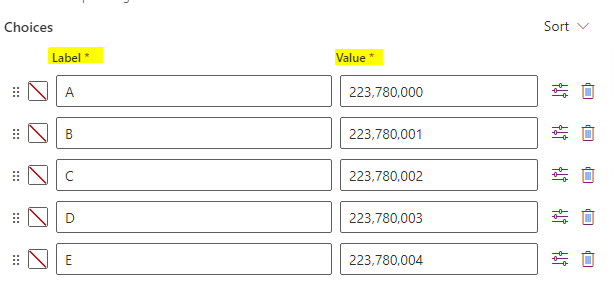
    The choice field consists of two parts: Label and Value, it displays the label externally but actually stores the value.
    pastedimage1673502344163v1.png

    When you get value from 'Address1: Country/Region' field, it is text(label), so you need get choice value based on the label firstly, then you can use the value to populate the choice field.

    Refer to the following link to get choice value based on the label:


  • Suggested answer
    furkank Profile Picture
    535 on at

    Hi,

    I don't see a better way than using Power Automate flows or old legacy workflows for doing this. Your other options would be writing plugins or javascript code which is unnecessary effort. Because with flows you can do this without writing any code.

  • Sol007 Profile Picture
    187 on at

    Hi Furkan, yes I am leaning towards using power automate flow to achieve it as old legal workflow might slow form performance. With using power automate flow, are able to share any steps i seem stuck?

  • Sol007 Profile Picture
    187 on at

    Hi Leah, with suggestion can it be used in power automate flow?

  • furkank Profile Picture
    535 on at

    Yes you are.

  • Suggested answer
    Leah Ju Profile Picture
    Microsoft Employee on at

    Hi Sol007,

    Yes, you can use power automate to achieve your goal.

    But one question, the Territory custom field must be choice type?

    If the Territory field type is same with the 'Address1: Country/Region' field, steps are very easily, you can populate custom field with value from region field directly.

    If the Territory field type must be choice, you need add another step to get value based on the label.

    pastedimage1673516486360v1.png

    Refer to the following detailed steps:

    1.Trigger:

    pastedimage1673515922117v3.png

    2.List rows--Retrieve String Maps to get value based on label:

    objecttypecode eq 'contact' and attributename eq 'crd9d_territory' and value eq ''

    pastedimage1673516003503v4.png

    3.Update a row:

    pastedimage1673516203136v9.png

    Test:

    pastedimage1673514711561v1.png

    pastedimage1673515884063v2.png

  • Sol007 Profile Picture
    187 on at

    Thanks Leah for the detailed steps. Will give it a try. Just to be curious does the String Maps entity only exists in one environment? if I do an import of the power automate flow to another environment that use Contact will it throw an error.

  • Leah Ju Profile Picture
    Microsoft Employee on at

    Hi Sol007,

    The 'String Maps' entity is one OOB entity.

    If anything is wrong, you can share specific information at that time.

  • Sol007 Profile Picture
    187 on at

    Hi Leah

    Just clarifying in your step the 'Territory' field you have used is a text field type? If that is the case, the 'Territory' to achive my scenario musst be a choice field type. Similar to the OOB Territory choice field type in your (Update a row) step. Is this complete not possible to achieve with a choice field type? Thanks

  • Leah Ju Profile Picture
    Microsoft Employee on at

    Hi Sol007,

    Yes, The type of 'Territory' field that i have used is choice:

    pastedimage1673832233663v1.png

Under review

Thank you for your reply! To ensure a great experience for everyone, your content is awaiting approval by our Community Managers. Please check back later.

Helpful resources

Quick Links

Responsible AI policies

As AI tools become more common, we’re introducing a Responsible AI Use…

Neeraj Kumar – Community Spotlight

We are honored to recognize Neeraj Kumar as our Community Spotlight honoree for…

Leaderboard > Microsoft Dynamics 365 | Integration, Dataverse, and general topics

#1
Siv Sagar Profile Picture

Siv Sagar 93 Super User 2025 Season 2

#2
#ManoVerse Profile Picture

#ManoVerse 76

#3
Martin Dráb Profile Picture

Martin Dráb 64 Most Valuable Professional

Last 30 days Overall leaderboard

Product updates

Dynamics 365 release plans



