web
You’re offline. This is a read only version of the page.
close
Skip to main content

Announcements

No record found.

News and Announcements icon
Community site session details

Community site session details

Session Id :
Finance | Project Operations, Human Resources, ...
Answered

Intrastat Commodity Codes Set-up

(0) ShareShare
ReportReport
Posted on by 215

Hi,

Under the Intrastat Category Hierarchy we can add a product to a specific node:

pastedimage1681718812046v1.png

If we do this, it means on the product record we only have only one option when we select Intrastat Commodity Code: 
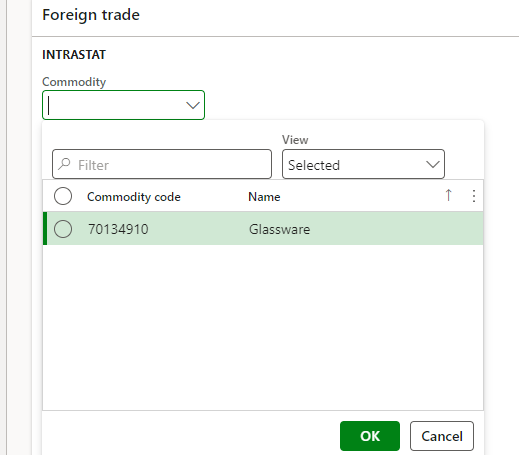
pastedimage1681718891936v2.png

However when we don't link the product to a specific node, we can select any commodity code from the drop down. 

Is there any advantage to linking the product to a specific node and thus limiting the selection? Struggling to see why this is part of the set-up, it just seems like more admin.

I have the same question (0)
  • Verified answer
    Hana Xue Profile Picture
    Microsoft Employee on at

    Hi James,

    You can add products in multiple intrastat category hierarchies, when selecting the intrastat commodity code for a product, the corresponding options will appear. Using this function helps us to link products and category hierarchies more conveniently. This functionality is similar to adding products in a purchasing category hierarchy.

    For you to find out the benefits of using category hierarchies and using products, you can check it as needed:

    pastedimage1681801069010v1.png

    pastedimage1681801082975v2.png

    pastedimage1681801112957v4.png

    Best Regards,

    Hana

  • James-Mc Profile Picture
    215 on at

    Thanks Hana - There doesn't appear to be any real advantage based on this but I suspect this is the best answer I'll get. Do you have a link to where you got those screenshots?

  • Hana Xue Profile Picture
    Microsoft Employee on at

    Hi James,

    The screenshots are found in the following link you can check it.

    About category hierarchies | Microsoft Learn

    Best Regards,

    Hana

Under review

Thank you for your reply! To ensure a great experience for everyone, your content is awaiting approval by our Community Managers. Please check back later.

Helpful resources

Quick Links

Introducing the 2026 Season 1 community Super Users

Congratulations to our 2026 Super Stars!

Meet the Microsoft Dynamics 365 Contact Center Champions

We are thrilled to have these Champions in our Community!

Congratulations to the March Top 10 Community Leaders

These are the community rock stars!

Leaderboard > Finance | Project Operations, Human Resources, AX, GP, SL

#1
Giorgio Bonacorsi Profile Picture

Giorgio Bonacorsi 669

#2
André Arnaud de Calavon Profile Picture

André Arnaud de Cal... 445 Super User 2026 Season 1

#3
Syed Haris Shah Profile Picture

Syed Haris Shah 331 Super User 2026 Season 1

Last 30 days Overall leaderboard

Product updates

Dynamics 365 release plans
