web
You’re offline. This is a read only version of the page.
close
Skip to main content

Notifications

Announcements

No record found.

Community site session details

Community site session details

Session Id :
Small and medium business | Business Central, N...
Answered

Create Entry in General Journal using Postman and API or ODATA

(0) ShareShare
ReportReport
Posted on by 15,529

Hi 

Is it possible to create General Journal Entry using Postman? If yes how I can do that? 

Thanks 

I have the same question (1)
  • Suggested answer
    YUN ZHU Profile Picture
    95,729 Super User 2025 Season 2 on at

    Hi, Unfortunately, this cannot be done directly as far as I know.
    You can insert data to general journal first and then post in Postman.

    For posting, you can use the following standard API

    https://github.com/microsoft/ALAppExtensions/blob/1b4179b94c1bca9f6e445bf67737e2f143040364/Apps/W1/APIV2/app/src/pages/APIV2Journals.Page.al

    pastedimage1682036158589v2.png

    Hope this helps.

    Thanks.

    ZHU

  • MahGah Profile Picture
    15,529 on at

    Thanks Mr yzhums

    The first part which is insert data to general journal is my issue. I do not know how to insert data into general journal using POSTMAN. I always get many errors about BODY.

    Can you share how to insert data into general journal using POSTMAN? I mean here or in your blog?

    Thanks

  • Suggested answer
    Inge M. Bruvik Profile Picture
    1,111 Moderator on at

    You should use this API

    learn.microsoft.com/.../dynamics_journalline_create

    And here is a sample body.

    {

    "accountNumber": "1090",

    "postingDate": "2023-04-22",

    "documentNumber": "1000",

    "externalDocumentNumber": "123",

    "amount": -100.00,

    "description": "MyDocument",

    "comment": "CommunityRocks"

    }

    Reach out if you need a Postman collection

  • Verified answer
    YUN ZHU Profile Picture
    95,729 Super User 2025 Season 2 on at

    Hi, let me do a simple test.

    1. Get batch name

    https://api.businesscentral.dynamics.com/v2.0/d8f36038-1f93-4543-affc-5dc92b6ee871/Sandbox220/api/v2.0/companies(028e612e-fbc9-ed11-94c9-000d3a260b8c)/journals(12eaab7a-72d2-ed11-a7c7-6045bd6326d4)

    pastedimage1682295140780v1.png

    pastedimage1682295174166v2.png

    2. Get the journal lines under the batch

    https://api.businesscentral.dynamics.com/v2.0/d8f36038-1f93-4543-affc-5dc92b6ee871/Sandbox220/api/v2.0/companies(028e612e-fbc9-ed11-94c9-000d3a260b8c)/journals(12eaab7a-72d2-ed11-a7c7-6045bd6326d4)/journalLines

    pastedimage1682295216320v3.png

    Generally, the following fields are the fields that can be posted.
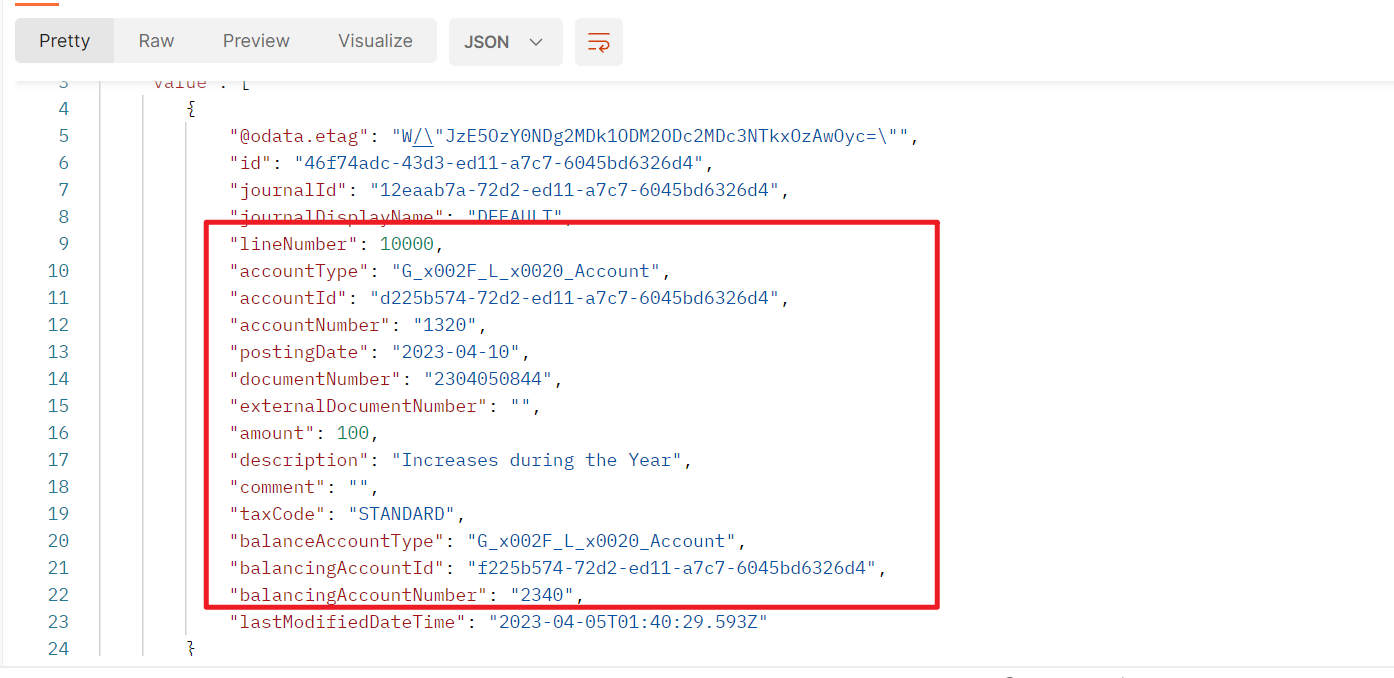
    pastedimage1682295320188v4.png

    3. Post:

    https://api.businesscentral.dynamics.com/v2.0/d8f36038-1f93-4543-affc-5dc92b6ee871/Sandbox220/api/v2.0/companies(028e612e-fbc9-ed11-94c9-000d3a260b8c)/journals(12eaab7a-72d2-ed11-a7c7-6045bd6326d4)/journalLines

    {
        "lineNumber": 20000,
        "accountType": "G_x002F_L_x0020_Account",
        "accountNumber": "1320",
        "postingDate": "2023-04-10",
        "documentNumber": "2304050844",
        "externalDocumentNumber": "",
        "amount": 200,
        "balanceAccountType": "G_x002F_L_x0020_Account",
        "balancingAccountNumber": "2340"
    }

    pastedimage1682295517876v5.png

    pastedimage1682295538083v6.png

    pastedimage1682295560754v7.png

    Hope this helps.

    Thanks.

    ZHU

  • MahGah Profile Picture
    15,529 on at

    Thanks Mr Bruvik and Mr Zhu

    This was really helpful. I am learning API and Postman and this helped a lot. I was even able to use the method to create journal using HTTP in Power Automate. I want to use HTTP to create line with dimension since BC Create record has no dimension

    The only strange part is I need to convert GL Account to  G_x002F_L_x0020_Account for HTTP to work. Maybe as a newbie I do not know enough and making mistake here. 

    Thanks 

    pastedimage1682351257629v1.png

Under review

Thank you for your reply! To ensure a great experience for everyone, your content is awaiting approval by our Community Managers. Please check back later.

Helpful resources

Quick Links

Responsible AI policies

As AI tools become more common, we’re introducing a Responsible AI Use…

Neeraj Kumar – Community Spotlight

We are honored to recognize Neeraj Kumar as our Community Spotlight honoree for…

Leaderboard > Small and medium business | Business Central, NAV, RMS

#1
OussamaSabbouh Profile Picture

OussamaSabbouh 2,238

#2
YUN ZHU Profile Picture

YUN ZHU 773 Super User 2025 Season 2

#3
Sumit Singh Profile Picture

Sumit Singh 630

Last 30 days Overall leaderboard

Featured topics

Product updates

Dynamics 365 release plans


