web
You’re offline. This is a read only version of the page.
close
Skip to main content

Notifications

Announcements

No record found.

Community site session details

Community site session details

Session Id :
Customer experience | Sales, Customer Insights,...
Answered

Using Knowledge Base and Knowledge Articles in Sales Hub

(0) ShareShare
ReportReport
Posted on by

Is it possible to surface the Knowledge Base, Knowledge Articles, and Knowledge Search in Sales Hub like it is in Customer Service Hub? We want to use KB with Sales as a help database, product documentation database, etc in the field. They are not Customer Service reps. :)  I know and understand the Context Help and Guided Tasks which are great. We will use them but I want to also use the KB for more robust detailed help and documentation.

All the documentation I read is gearing KB to Customer Service. 

Thank you in advance, 

~Kendra 

I have the same question (1)
  • Verified answer
    Wahaj Rashid Profile Picture
    11,321 on at

    Hi,

    Thank you for your query.

    Normally, we use sales literature for this purpose in the Sales module:

    Manage sales literature - Sales Enterprise | Microsoft Docs

    I would recommend you to use the Sales Literature.

    KB Articles are designed for the Service module, the search you mentioned is only limited to cases.

    However, you can still enable KB Artiles for Sales Hub, this means, you can show the KB Articles in the Sales app, but they are not related to Sales Records (Opps, Orders, Quotes, etc.).

    To list KB Articles in the Sales Hub, here are steps to follow:

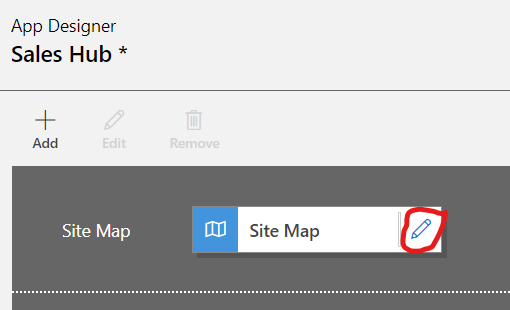
    • Open the Sales Hub app in the App Designer.

    pastedimage1626721642775v1.png

    • On the right-hand side, Click on Artifacts -> Entities.
    • Search for Knowledge Article and select Knowledge Article entity.
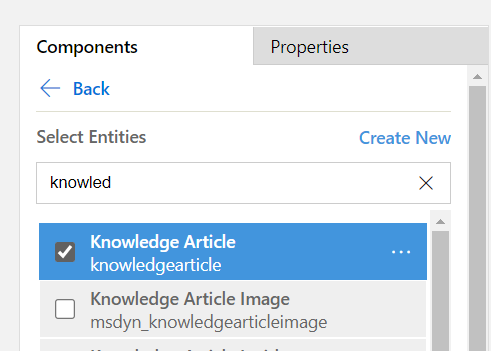
    pastedimage1626721765692v3.png

    • Save the app.
    • Next Edit the Site Map.

    pastedimage1626721825856v4.png

    • Add a new Sub-area under Service (or you can add a separate Area if you would like to).
    • Select type Entity and choose Knowledge Article option under entities.
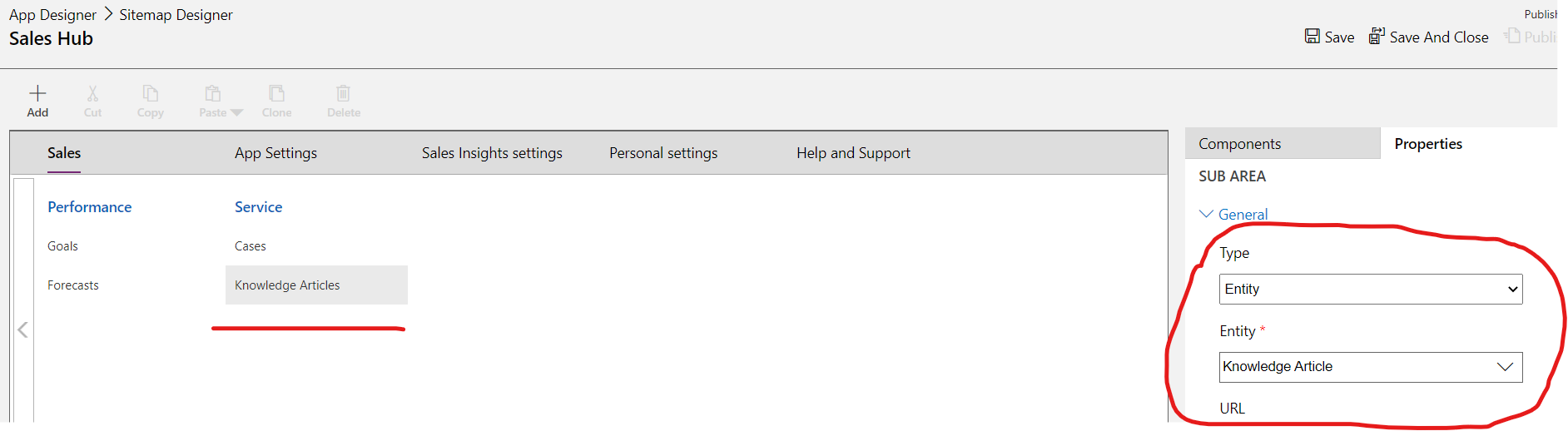
    pastedimage1626722060278v5.png

    • Save the Sitemap, and then Save and Publish the App.

    Now refresh Sales Hub, and you see KB Articles under the Service section.
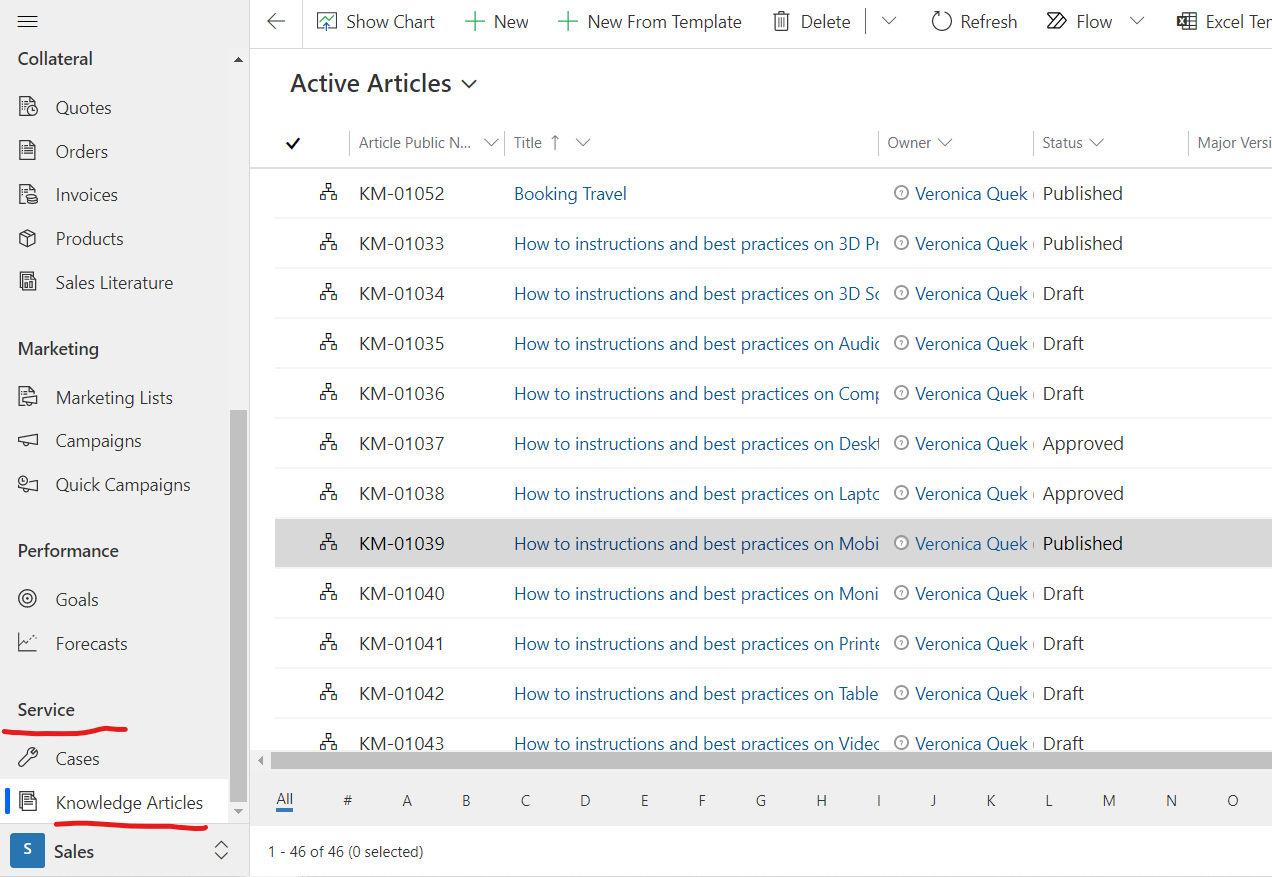
    pastedimage1626722188752v6.png

  • Community Member Profile Picture
    on at

    Thank you Wahaj - this is very helpful. And thank you for the step by step. :)  

    I am glad to have the KB Articles and I used the same principal you gave and put a Knowledge Search in the Sales Hub app. Voila! Perfect! That's what I wanted. I would like to have more contextual help, but they will have that with the Guided Tasks.

Under review

Thank you for your reply! To ensure a great experience for everyone, your content is awaiting approval by our Community Managers. Please check back later.

Helpful resources

Quick Links

Responsible AI policies

As AI tools become more common, we’re introducing a Responsible AI Use…

Neeraj Kumar – Community Spotlight

We are honored to recognize Neeraj Kumar as our Community Spotlight honoree for…

Leaderboard > Customer experience | Sales, Customer Insights, CRM

#1
Tom_Gioielli Profile Picture

Tom_Gioielli 171 Super User 2025 Season 2

#2
#ManoVerse Profile Picture

#ManoVerse 83

#3
Jimmy Passeti Profile Picture

Jimmy Passeti 50 Most Valuable Professional

Last 30 days Overall leaderboard

Product updates

Dynamics 365 release plans