web
You’re offline. This is a read only version of the page.
close
Skip to main content

Announcements

No record found.

News and Announcements icon
Community site session details

Community site session details

Session Id :
Finance | Project Operations, Human Resources, ...
Answered

can't find Auto-shutdown in resource menu of Azure portal

(0) ShareShare
ReportReport
Posted on by 460

Hi All,

I have created a development environment via cloud-hosted environment of LCS. So my dev environment was created by LCS automatically and I can find the VM created in the Azure portal. I also hope the VM to be shut down automatically everyday. I think it can't be config in LCS and it is supposed to be config via 'Auto-shutdown' of the VM in Azure portal.

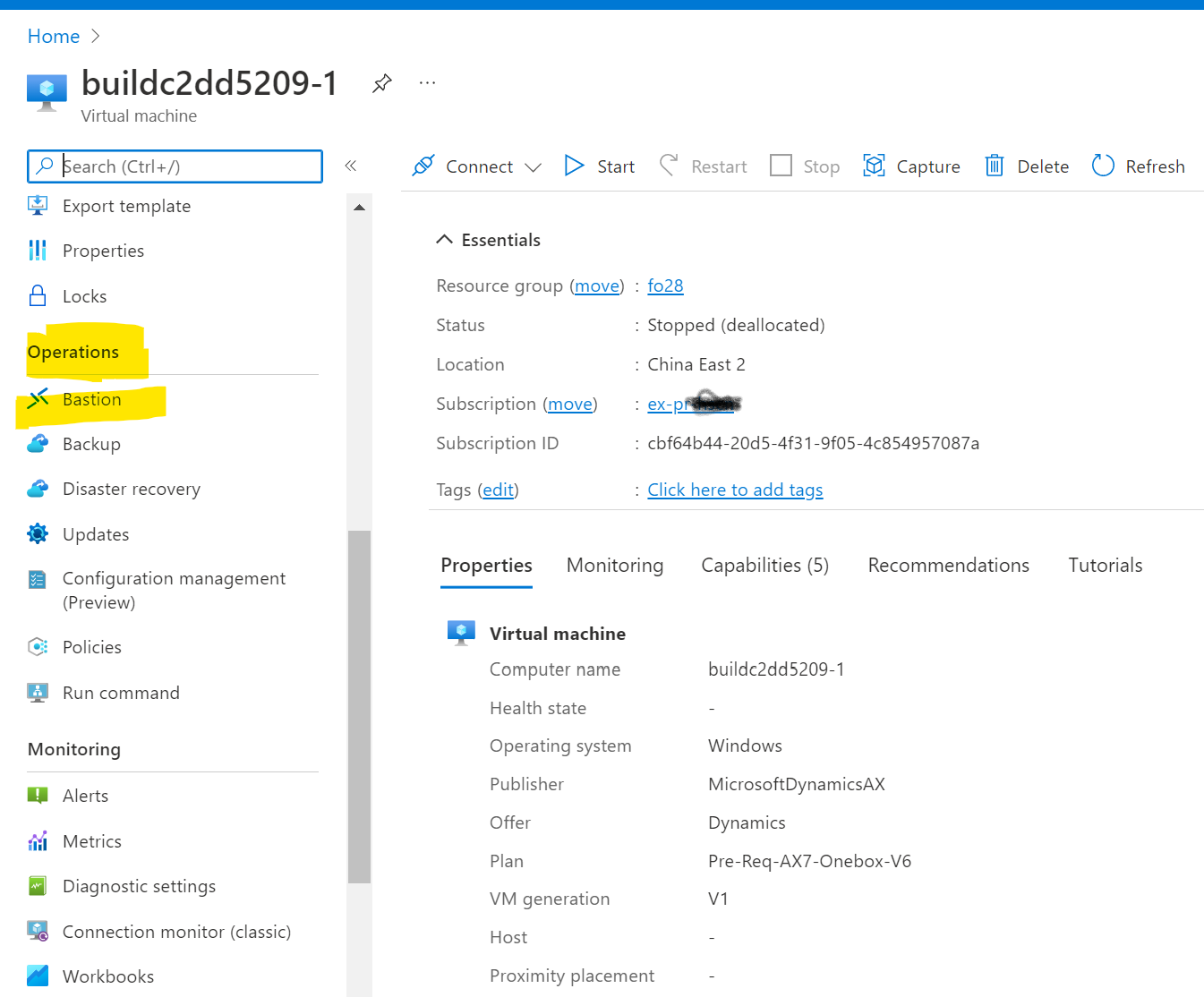
When I went to Azue portl, unfortunately, I can't  find Auto-shutdown in resource menu in Azure portal.Could you please give me some suggestion on how to config this auto-shutdown for a VM?
pastedimage1661359885627v1.png

Auto-shutdown is supposed to be list under Bastion, but it doesn't.

Best regards.

I have the same question (0)
  • Suggested answer
    Komi Siabi Profile Picture
    13,208 Most Valuable Professional on at

    Hello,

    In the search bar, Type "Auto" , you will see the auto- shut down.

    An alternative way is to configure the auto-shutdown using Azure devops pipeline.

    blog.monsieurwinner.com/.../

  • Jacky Qian Profile Picture
    460 on at

    Hi Komi,

    Thanks for your replying. 

    I still couldn't find Auto-shutdown, although I typed 'Auto'.

    pastedimage1661361490956v1.png

    pastedimage1661361554373v2.png

    Best regards

  • Suggested answer
    Komi Siabi Profile Picture
    13,208 Most Valuable Professional on at

    Could please confirm that you follow the part Home -> Virtual machines ?

    VMMM.png

  • Jacky Qian Profile Picture
    460 on at

    Hi Komi

    I did what you have suggested me, but I couldn't find Auto-shutdown under my VM which name is buildc2dd5209-1. 

    In fact, I also could't find Automation resources.

    pastedimage1661362710553v1.png

  • Verified answer
    Komi Siabi Profile Picture
    13,208 Most Valuable Professional on at

    This could be an access right issue.

  • Jacky Qian Profile Picture
    460 on at

    I'm the admin of the tenant.

  • Suggested answer
    Komi Siabi Profile Picture
    13,208 Most Valuable Professional on at

    I suggest you create a support ticket then.

    azure.microsoft.com/.../

  • Suggested answer
    Jacky Qian Profile Picture
    460 on at

    Hi Komi,

    I sent a tickets to 21V who is the operator and vendor of China Version of Azure and Dynamics 365. They didn't give me a clear reasons why the menu Auto-shutdown hadn't appeared,but they suggested me schedule a task for shut-down directly in the VM. Certainly, it could work.

    Best regards

  • Suggested answer
    Komi Siabi Profile Picture
    13,208 Most Valuable Professional on at

    Great, at least, there is a work around.

Under review

Thank you for your reply! To ensure a great experience for everyone, your content is awaiting approval by our Community Managers. Please check back later.

Helpful resources

Quick Links

Introducing the 2026 Season 1 community Super Users

Congratulations to our 2026 Super Stars!

Meet the Microsoft Dynamics 365 Contact Center Champions

We are thrilled to have these Champions in our Community!

Congratulations to the March Top 10 Community Leaders

These are the community rock stars!

Leaderboard > Finance | Project Operations, Human Resources, AX, GP, SL

#1
Giorgio Bonacorsi Profile Picture

Giorgio Bonacorsi 658

#2
André Arnaud de Calavon Profile Picture

André Arnaud de Cal... 468 Super User 2026 Season 1

#3
Syed Haris Shah Profile Picture

Syed Haris Shah 333 Super User 2026 Season 1

Last 30 days Overall leaderboard

Product updates

Dynamics 365 release plans
