web
You’re offline. This is a read only version of the page.
close
Skip to main content

Notifications

Announcements

No record found.

Community site session details

Community site session details

Session Id :
Microsoft Dynamics 365 | Integration, Dataverse...
Answered

I can't see any record inside the stage of a Business Process Flow

(0) ShareShare
ReportReport
Posted on by 363

Hi,

I'm learning Business Process Flows and I have two doubts:

1)  RECORDS NOT FOUND

I am looking at the Lead to Opportunity Business Process Flow. When I try to go through the Next step I can't see any record under Select Opportunity Flyout:

no_5F00_record_5F00_found.png

But I actually have some records stored:
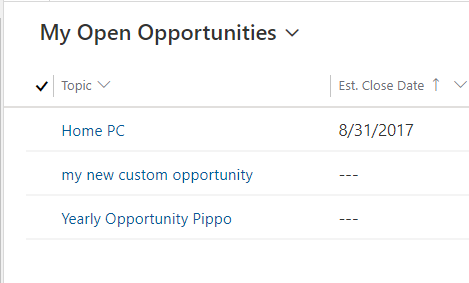
I_5F00_have_5F00_opportunitites.png

Why I can't select them within the Business Process Flow?

---------------------------------------------------------------------------------------------------------------------------------------------------

---------------------------------------------------------------------------------------------------------------------------------------------------

2)  WHERE ARE THE NEW ENTITIES STORED?

Quote from this article :

"All data that is collected while you are completing a business process flow is stored in one or more entities in Microsoft Dataverse."


Where should I look in order to find these entities? 
I am currently looking in the Flows Menu option on Power Apps, but I'm not sure whether I'm doing well: will these new entities be added here as soon as a user will complete the Business Process Flow?

entities_5F00_in_5F00_business_5F00_process_5F00_flows.png

For instance, let suppose that I'll complete the Lead To Opportunity Business Process Flow: should I see a new record named "Lead to Opportunity Sales Process" here, with the current date and time under the column "Last Modified"? 
In other terms, should I see two records "Lead to Opportunity Sales Process", the newest of which is related to the last time when the process was completed?

Or these mentioned entities are to be found elsewhere?
I have the same question (0)
  • Verified answer
    Wahaj Rashid Profile Picture
    11,321 on at

    Hi,

    Thank you for your queries.

    Let me answer these in the same sequence:

    1 - RECORDS NOT FOUND

    The Lead to Opportunity Business Process is designed in a way that you first have to Qualify the Lead before you move to the Opportunity stage.

     When you click on the Qualify button (in the Ribbon), the following actions are completed behind the scene:

    • Lead Status is changed to Qualified.
    • An Account is created.
    • A Contact is created.
    • An Opportunity is created and linked with Lead (Originating Lead).
    • Business Process Flow is moved to the Next stage and created Opportunity is shown on the form.

    You cannot select an existing Opportunity here (at least in a straightforward way).

    For existing Opportunities, there is another Business Process flow named Opportunity Sales Process. Which starts from Opportunity instead of Lead.

    To summarize, Qualify the Lead and it should create Opportunity and move you to the next stage.

    2 - WHERE ARE THE NEW ENTITIES STORED

    The flow menu shows the Business Process Flows, their design, and configuration.

    The instances of a Business Process flows are stored in an entity (named after BPF) as Data.

    You can find these in the Data ->Tables section, make sure the All tables are shown.

    Search by the name of Business Process Flow:

    pastedimage1622278779223v1.png

    Open a table, and click on Data to see the records in this table:

    pastedimage1622278830899v3.png

    To see all the records, go to the Advanced Find:

    pastedimage1622278980194v4.png

    pastedimage1622279029136v5.png

    You can apply filters or get details from the Lead/Opportunity as per your needs here. 

  • Joel D Profile Picture
    363 on at

    Hi,

    Thank you for your reply.

    Unfortunately, I still can't qualify the lead, as even after having filled all the fields in the data steps I can't move to the next stage (when I click on Next stage" it still says "Select Opportunity - No records found"). It depends on the trial version maybe?

    As regards the second point, why the search results show more records when I perform the query on Advanced Find?

  • Suggested answer
    Wahaj Rashid Profile Picture
    11,321 on at

    Hi,

    Did you click on the Qualify button in the ribbon? It should Qualify the lead and take you to the Next stage.

    pastedimage1622458441405v2.png

    If Qualify button do not work, please share a screenshot if you get any error.

    For the second question, you get multiple results because for each Lead, there is one Business Process Flow instance is created.

    If you need to see result only for a specific lead, add a filter in your Advanced Find Query:

    pastedimage1622458406840v1.png

  • Joel D Profile Picture
    363 on at

    business_5F00_proc_5F00_flow.png

    Hi, thank you.
    Here is the screen, I don't get an error message, but I can't move to the Next Stage (Develop). In fact, when I click on "Next Stage", I get "No records found", as if there were no opportunities available...

  • Verified answer
    Wahaj Rashid Profile Picture
    11,321 on at

    Hi,

    I am still not sure if you click on the Qualify button (in the menu on top).

    What is the lead status? Can you please share full screenshot of lead?

  • Joel D Profile Picture
    363 on at

    Hi Wahaj,

    thank you for your answer.
    Yes, you're right, I was looking at the wrong Qualify button, now I clicked on the right one and I succeeded in completing the process.

    Apart from that, I was looking at the "Lead to Opportunity Sales Process" Business Process Flow editor.
    As in the process on CRM there are some "elements" that I don't see here (the flyout which asks to select an existing opportunity), I wonder whether there are some other places I can look at in order to edit this business process flow, or at least analyze it to see how it really works (including those parts which are "hidden" in the editor window)...

    next_5F00_stage.png

    next_5F00_stage_5F00_1.png

  • Suggested answer
    Wahaj Rashid Profile Picture
    11,321 on at

    Hi,

    You are welcome.

    The flyout you see in the BPF to select existing opportunities is generated by the system and is not customizable (and you can find it in any designer).

    When a BPF moves from one entity to another, this flyout shows (to select related record).

    From your second screenshot, Triggered processes are used to trigger a process (before/after) current stage.

    For example, if you need to send an email after the BPF moves from the Lead to Opportunity stage, you can select that process here.

    Its a good idea that you go through following tutorial on BPF:

    Create a business process flow in Power Apps - Power Automate | Microsoft Docs

    Also, you should find several videos regarding Business Process flows on youtube.

Under review

Thank you for your reply! To ensure a great experience for everyone, your content is awaiting approval by our Community Managers. Please check back later.

Helpful resources

Quick Links

Responsible AI policies

As AI tools become more common, we’re introducing a Responsible AI Use…

Neeraj Kumar – Community Spotlight

We are honored to recognize Neeraj Kumar as our Community Spotlight honoree for…

Leaderboard > Microsoft Dynamics 365 | Integration, Dataverse, and general topics

#1
Siv Sagar Profile Picture

Siv Sagar 93 Super User 2025 Season 2

#2
#ManoVerse Profile Picture

#ManoVerse 76

#3
Martin Dráb Profile Picture

Martin Dráb 64 Most Valuable Professional

Last 30 days Overall leaderboard

Product updates

Dynamics 365 release plans



