web
You’re offline. This is a read only version of the page.
close
Skip to main content

Notifications

Announcements

No record found.

Community site session details

Community site session details

Session Id :
Microsoft Dynamics 365 | Integration, Dataverse...
Answered

I crated a canvas app and try to deploy it from our sandbox to production instance. But we get some problems

(0) ShareShare
ReportReport
Posted on by 390

Hi all,

I have create a basic Power App that has a connection to our internal DB for Sales stats, it works great in our sandbox instance. 

So I added te Canvas App to our solution en export it as managed solution. And when I import the manages solution on our Prod instance and go to Account Form we get this error and cannot continue?
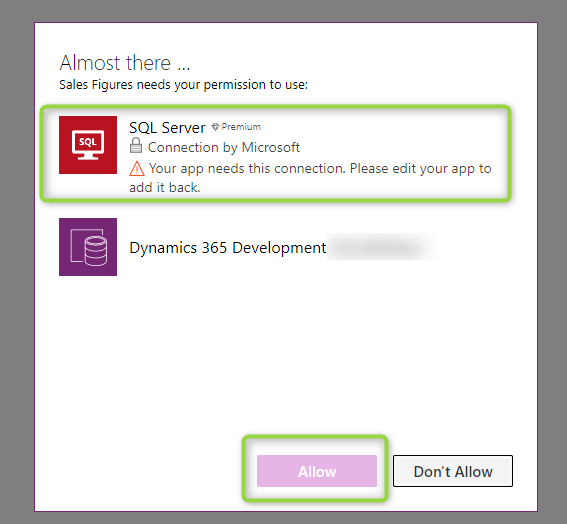
2020_2D00_03_2D00_10_5F00_11h05_5F00_20.png

Im not able to click Allow, and I also wonder why there is still a connection to the dev instance..

best regards

Martin

I have the same question (0)
  • Tetsu Profile Picture
    on at

    Hi Martin

    Connections cannot be migrated with the solution.

    If you migrated with the solution, the connection information from the original environment remains, and you need to recreate it in the new environment.

    SQL Server Connector is a premium connector. Do you have a standalone license(per apps or per user)?

  • icimasa Profile Picture
    390 on at

    Hi Tetsu,

    yes I found that the connection was not migrated, however I recreated the same connection on the prod server with the same name and all,. However I still got the message above. 

    So what I had to to was to export the app from the dev instance and import it on the prod instance, which of course gave it a new app ID, so I had to go into the Account form and just update the App ID and I got it up and running on the Prod server.. Just doing it this why seems not very enterprise to me.. A lot of manual work. 

    best regards

    Martin 

  • Tetsu Profile Picture
    on at

    Hi Marvin

    Thank you for reply.

    Recreating the connection is not enough.

    Even if the name and settings are the same, the app does not recognize the connection.

    I understand your concerns.

    We are striving to improve, as you can see in the ideas below.

    powerusers.microsoft.com/.../199518

    Please contact support if you want to understand the specifics.

    Best Regards,

    Tetsuo

  • icimasa Profile Picture
    390 on at

    hi  Tetsu,

    ok so they why I did this with the export import is for now the only way to do this, just so I know or is there a more correct way?

    best regards
    Martin

  • Verified answer
    Tetsu Profile Picture
    on at

    Hi Martin,

    The method you implemented is correct.
    At this time, it is the only way to migrate apps that contain connections. It is necessary to create a new connection in the Prod environment and link it to the app.
    Recreating the connection is not enough.

    Best Regards,
    Tetsuo

Under review

Thank you for your reply! To ensure a great experience for everyone, your content is awaiting approval by our Community Managers. Please check back later.

Helpful resources

Quick Links

Responsible AI policies

As AI tools become more common, we’re introducing a Responsible AI Use…

Neeraj Kumar – Community Spotlight

We are honored to recognize Neeraj Kumar as our Community Spotlight honoree for…

Leaderboard > Microsoft Dynamics 365 | Integration, Dataverse, and general topics

#1
Siv Sagar Profile Picture

Siv Sagar 93 Super User 2025 Season 2

#2
#ManoVerse Profile Picture

#ManoVerse 80

#3
Martin Dráb Profile Picture

Martin Dráb 64 Most Valuable Professional

Last 30 days Overall leaderboard

Product updates

Dynamics 365 release plans



