web
You’re offline. This is a read only version of the page.
close
Skip to main content

Notifications

Announcements

No record found.

Community site session details

Community site session details

Session Id :
Microsoft Dynamics AX (Archived)

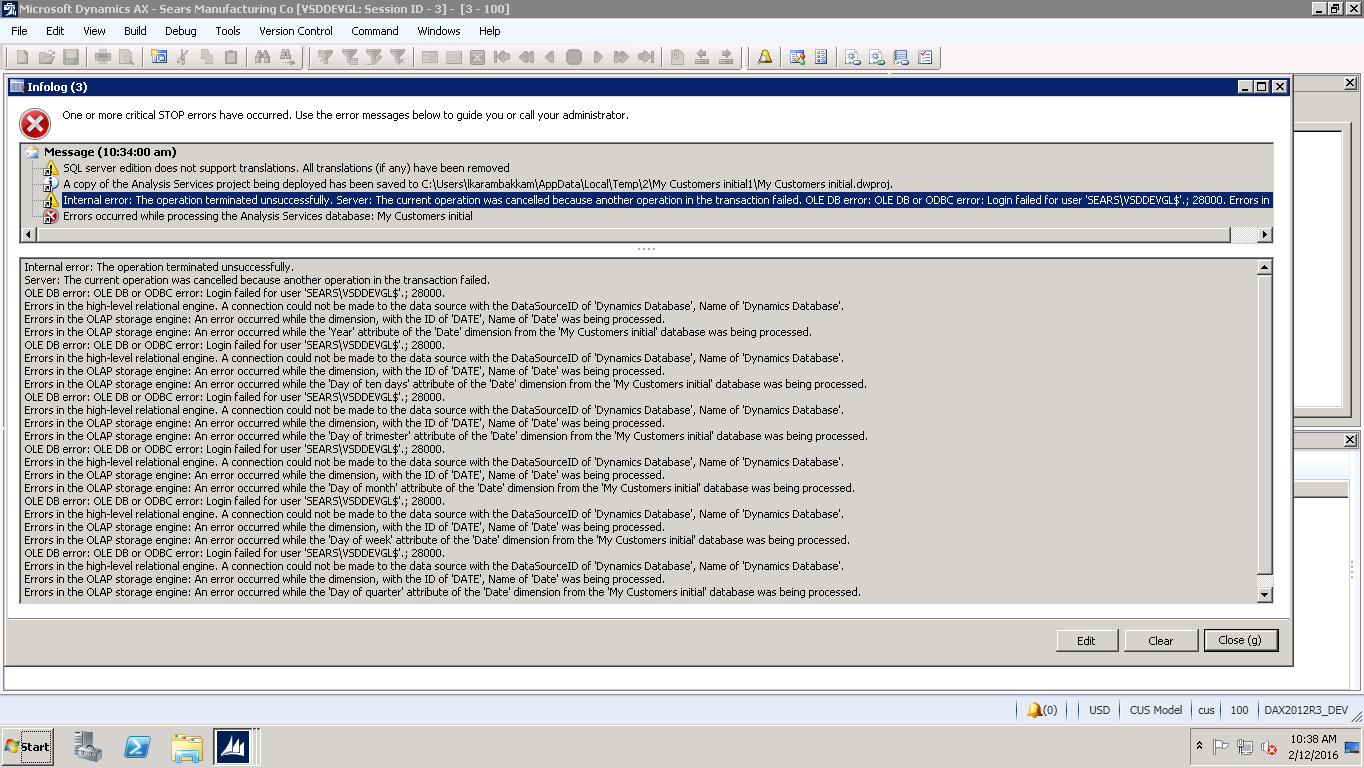
OLE DB error: OLE DB or ODBC error: Login failed for user 'SEARS\VSDDEVGL$'.; 28000.

(0) ShareShare
ReportReport
Posted on by 1,307

Hi,

I am getting the below error when I am trying to create an SSAS project using BI Tools --> SSAS Project Wizard.

Whenever I try to create a new project, this error pops up. I tried different solutions I found in search engine but still the error pops up.

I am first confused with 28000 as it is neither my login id nor any id from SQL server side. So what 28000 is meant by?

Also I have administrator access permissions in SQL server. So what extra permissions is this project wizard expecting me to have to create a successful SSAS project.

I have also attached the snapshot which will give you the clear picture of this error.SSAS-Project-Wizard-error.png
Thanks,

Lakshmi

*This post is locked for comments

I have the same question (0)
  • Suggested answer
    Brandon Wiese Profile Picture
    17,788 on at

    The login referenced in the error message is SEARS\VSDDEVGL$, which is a computer account and not a user.

    From this we can infer that the SQL Server Analysis Services is running under the Network Service account on a machine named VSDDEVGL.  It is unable to logon to your SQL Server business database.

    Even though you are creating the project and have administrator access to probably everything, you are merely telling SSAS what to do, and it is doing it under its own credentials.  Remember that eventually you'll want it processing cubes by itself. 

    To resolve this, you can either grant access to SEARS\VSDDEVGL$ to your business data, probably as the DataReader database role, or you can change the service account associated with SSAS to a domain account with the needed access.  The latter is often the recommended approach per best practice, even when running SSAS and SQL Server on the same machine.

  • Lakshmi Karambakkam Profile Picture
    1,307 on at

    Hi,

    Access was given to the service account associated with SSAS. Still the same error exists. Any other way of handling this situation??

    Thanks,

    Lakshmi

  • Brandon Wiese Profile Picture
    17,788 on at

    If the error message still says "Login failed", then you have not properly granted a Login to the computer account.

  • Brandon Wiese Profile Picture
    17,788 on at

    What is the service account being used for SSAS?

Under review

Thank you for your reply! To ensure a great experience for everyone, your content is awaiting approval by our Community Managers. Please check back later.

Helpful resources

Quick Links

Responsible AI policies

As AI tools become more common, we’re introducing a Responsible AI Use…

Neeraj Kumar – Community Spotlight

We are honored to recognize Neeraj Kumar as our Community Spotlight honoree for…

Leaderboard > 🔒一 Microsoft Dynamics AX (Archived)

#1
Martin Dráb Profile Picture

Martin Dráb 4 Most Valuable Professional

#1
Priya_K Profile Picture

Priya_K 4

#3
MyDynamicsNAV Profile Picture

MyDynamicsNAV 2

Last 30 days Overall leaderboard

Featured topics

Product updates

Dynamics 365 release plans
