Hi Roxane
Please follow the below steps:
1. Check in General Ledger Setup (Posting date from and to ) and in User Setup (Your user has some posting date restriction on Posting date from and to fields). if yes then kindly change it for temporary basis.
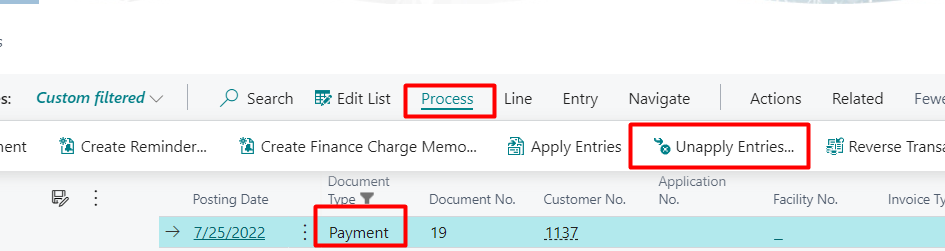
2. Go to Customer Ledger Entries then select the incorrect payment you have made.
Click on Process-> Unapply Entries.
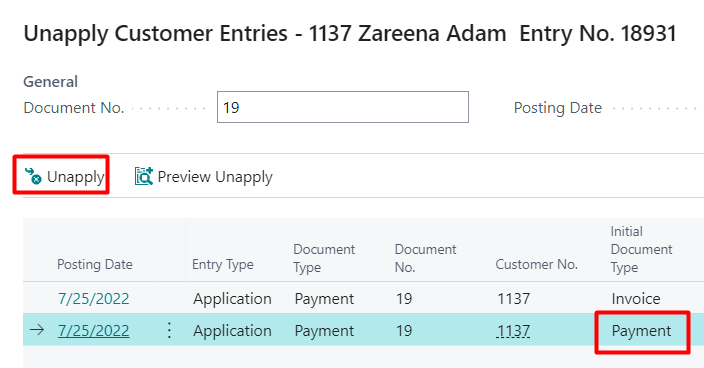
3. A screen appears the click on UnApply action. This will remove the application of the payment with the invoice.
4. Since you have made the payment entry with incorrect customer you need to also reverse the payment entry.
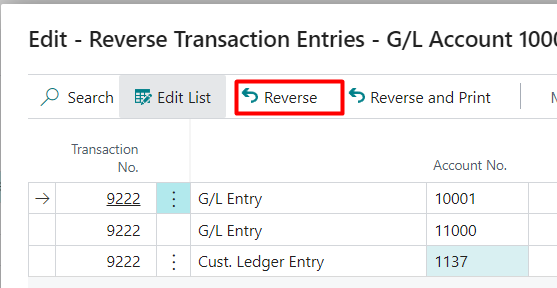
so click on Payment Entry and click on Reverse Transaction.

5. A screen will appear click on Reverse Action.
6. Go to Journal and make the correct payment and apply the invoice and post it.
If my answer was helpful to you, please verify it so that other users know it worked. Thank you very much




