web
You’re offline. This is a read only version of the page.
close
Skip to main content

Notifications

Announcements

No record found.

Community site session details

Community site session details

Session Id :
Microsoft Dynamics CRM (Archived)

How to get selected value of an autopopulate text input

(0) ShareShare
ReportReport
Posted on by 235

Hi all,

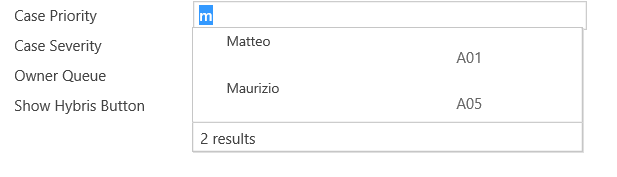
I was able to auto populate a string field in order to get right suggestions using addOnkeyPress,
I need to get the selected value so I call the changeAutocomplete() during the OnChange field event

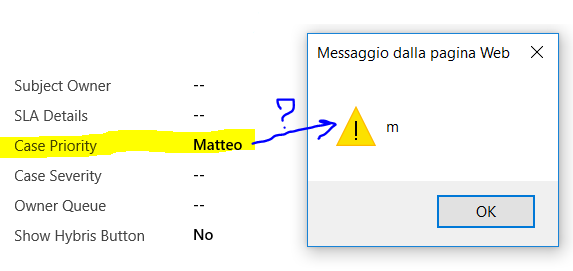
but in the alert, I get just what the user wrote in the field and not the complete resultSet value of my autocomplete array values.

I need "Matteo" in the alert and not only "m".

var keyPressFcn = function (ext) {

try {

var userInput = Xrm.Page.getControl("tclab_casepriority").getValue();
resultSet = {
results: new Array(),
commands: null
};

var userInputLowerCase = userInput.toLowerCase();

for (i = 0; i < persona.length; i++) {

if (userInputLowerCase === persona[i].name.substring(0, userInputLowerCase.length).toLowerCase()) {
resultSet.results.push({
id: i,
fields: [persona[i].name,persona[i].code
]});
}

}

if (resultSet.results.length > 0) {

ext.getEventSource().showAutoComplete(resultSet);

}

else {

ext.getEventSource().hideAutoComplete();

}}

catch (e) {

console.log(e);
}};

var a = Xrm.Page.getControl("tclab_casepriority");

if (a!=null) {

a.addOnKeyPress(keyPressFcn)

}}
function changeAutocomplete() {

var b = Xrm.Page.getAttribute("tclab_casepriority").getValue();

//This is happening also using getControl method

// var b = Xrm.Page.getControl("tclab_casepriority").getValue();

alert(b);

}
Cattura2.PNG

2388.Cattura.PNG

At The end I will need also to do the same thing with the Case Severity field, filtering auto-populate suggestions based on the CasePriority autocomplete field. I think when I will get the right value I would replicate the autocomplete also for the case severity field.

THANK YOU IN ADVANCE FOR YOUR SUGGESTIONS

*This post is locked for comments

I have the same question (0)
  • MNarmeen Profile Picture
    1,848 on at

    which event are you using to call  this function.

    onsave , onload etc ?

  • MNarmeen Profile Picture
    1,848 on at

    If you are calling this onload please save explicitly before calling your function changeAutocomplete()

    Xrm.Page.data.entity.save();

  • Davide Cerqua Profile Picture
    235 on at

    Yes, I am calling the auto complete on load event and the changeAutocomplete function at the field on change. Unfortunately I cannot save without fill every mandatory fields before. It seems like the addonkeypress generate an array windows not attached to the input field, intact onchange happen when I click the suggestions before set the value selected, this is what seems to me. Any advices?

  • MNarmeen Profile Picture
    1,848 on at

    you are right, I think the same .

  • Suresh Bharadwaj Kala Profile Picture
    15 on at

    DId you find any workaround to get the value in onchange, I am stuck with it unable to retrieve the value of the item selected in AutoComplete suggestion

  • OrchidC Profile Picture
    200 on at

    I have same issue, I can't get the selected item from the list, it is returning always the typed in characters.

Under review

Thank you for your reply! To ensure a great experience for everyone, your content is awaiting approval by our Community Managers. Please check back later.

Helpful resources

Quick Links

Responsible AI policies

As AI tools become more common, we’re introducing a Responsible AI Use…

Neeraj Kumar – Community Spotlight

We are honored to recognize Neeraj Kumar as our Community Spotlight honoree for…

Leaderboard > 🔒一 Microsoft Dynamics CRM (Archived)

#1
SA-08121319-0 Profile Picture

SA-08121319-0 4

#1
Calum MacFarlane Profile Picture

Calum MacFarlane 4

#3
Alex Fun Wei Jie Profile Picture

Alex Fun Wei Jie 2

Last 30 days Overall leaderboard

Featured topics

Product updates

Dynamics 365 release plans