Hi Teh,
You can create your own custom duplication rule by QueryExpression class with some criterias,
if the retrieved result length is greater than 0, then display the duplicated record and throw an custom error to prevent creation or update.
1. Create a plug-in library and register it to Dynamics environment.
https://docs.microsoft.com/en-us/powerapps/developer/common-data-service/tutorial-write-plug-in
2. My sample code: if new created lead last name could match to existing lead, then throw an exception error.
using System;
using Microsoft.Xrm.Sdk;
using Microsoft.Xrm.Sdk.Query;

namespace DynamicsPlugins
{
    public class plugin1 : IPlugin
    {
        public void Execute(IServiceProvider serviceProvider)
        {
            IPluginExecutionContext context = (IPluginExecutionContext)serviceProvider.GetService(typeof(IPluginExecutionContext));
            ITracingService tracingService = (ITracingService)serviceProvider.GetService(typeof(ITracingService));

            IOrganizationServiceFactory servicefactory =
                (IOrganizationServiceFactory)serviceProvider.GetService(typeof(IOrganizationServiceFactory));
            IOrganizationService service =
                servicefactory.CreateOrganizationService(context.UserId);

            if (context.InputParameters.Contains("Target") && context.InputParameters["Target"] is Entity)
            {
                Entity entity = (Entity)context.InputParameters["Target"];
                if (entity.LogicalName != "lead")
                {
                    return;
                }
                if (context.Depth > 1)
                {
                    return;
                }
                try
                {
                    if (entity.Attributes.Contains("lastname"))
                    {
                        string lastname = entity.GetAttributeValue("lastname").ToString();
                        QueryExpression query = new QueryExpression("lead");
                        query.ColumnSet = new ColumnSet("fullname", "emailaddress1", "createdon");
                        query.Criteria.AddCondition("lastname", ConditionOperator.Equal, lastname);
                        EntityCollection collection = service.RetrieveMultiple(query);
                        if (collection.Entities.Count > 0)
                        {
                            // display customized exception in dialog in UCI
                            throw new InvalidPluginExecutionException("Duplicated record exists!\n"   collection[0].Attributes["fullname"]);
                                //"Full name: "   collection[0].Attributes["fullname"]   "  "
                                //"Email: "   collection[0].Attributes["emailaddress1"]   "  "   email field is required to has value(not null)
                                //"Created Time: "   collection[0].Attributes["createdon"]);
                        }
                    }
                }
                catch (Exception ex)
                {
                    tracingService.Trace("Error of Plugin: {0}", ex.ToString());
                    throw;
                }
            }

        }
    }
}
Above code is modified from the code in this article:
https://mylearnings26.wordpress.com/2018/06/26/detect-duplicate-records-in-ms-crm-using-plugin-c/
I made a change to origin code:
" throw new Exception("Duplicates found !!!"); " snippet won't display a dialog with custom exception in UCI,
so I changed it to " throw new InvalidPluginExecutionException("Duplicated record exists!\n" collection[0.Attributes["fullname"); "
Also, I added tracing service code for debug.
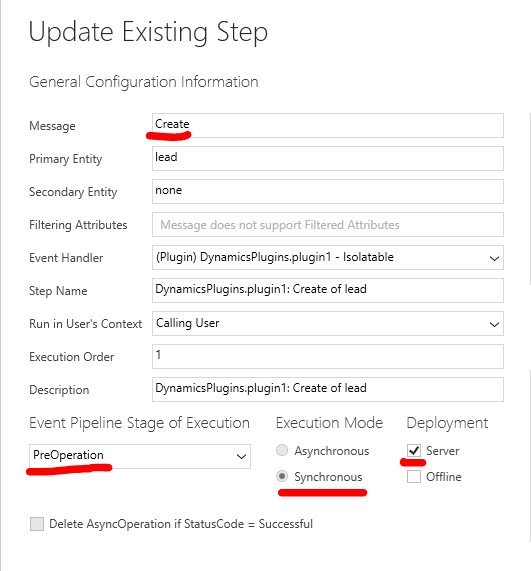
3. Trigger of my demo plugin: (when a lead is created.)
4. Result of test:
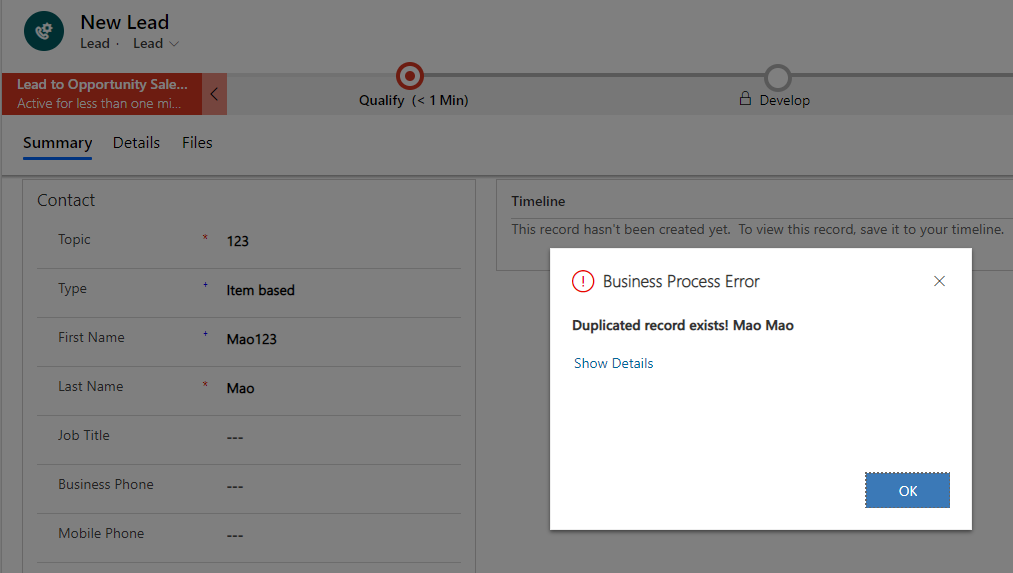
However, you may find that the dialog is too simple without rich format and hasn't too much information.
That because Duplicate Records Detected dialog could be only invoked by system duplicate detection process.
To display more information with custom duplication rule, you need to do more jobs:
1. Check whether all of retrieved fields of the matching record are not null.(have value), and handle this situation in C# code.
2. You might create a list and covert it to string if multiple duplicated records exist.
In a word, that's what a custom duplicate rule could provide with.
Another option is that you could call RetrieveDuplicatesRequest for context entity in your plugin, it'll use published duplicate rules to do match job.
https://www.inogic.com/blog/2015/11/use-retrieveduplicaterequest-in-dynamics-crm/(But it might not match your requirement about custom duplication rule, it's still system rules.)
Regards,
Clofly


