web
You’re offline. This is a read only version of the page.
close
Skip to main content

Announcements

No record found.

News and Announcements icon
Community site session details

Community site session details

Session Id :
Microsoft Dynamics AX (Archived)

How to apply x++ updates to D365 for Ops environments.

(0) ShareShare
ReportReport
Posted on by 205

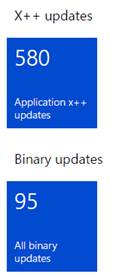
In one of our dev environments, we do have the option of applying updates available even though there is some known issue of not being this option available for certain build toplogies. We are able to apply the published platform updates using that option. Even after applying the latest platform updates, we still have to apply X++ and binary updates, However, I don’t see a way to apply the following updates. I created a deployable package of these KBs and downloaded it through LCS, then uploaded it to Asset Library but the library is not validating it. What are the steps to apply these x++ and binary updates?
 5672.Untitled.png

*This post is locked for comments

I have the same question (0)
  • Verified answer
    André Arnaud de Calavon Profile Picture
    304,553 Super User 2026 Season 1 on at

    Hi Fahad,

    In your dev environment, open Visual Studio (run as administrator) and choose from the menu: Dynamics 365 > Add ins > Apply Hotfix. Then select your downloaded file and the process will start.

    When it is all complete, you can create deployable packages containing the standard models which are updated.

  • Verified answer
    Mea_ Profile Picture
    60,286 on at

    Hi FahadAhmed,

    All steps are documented on docs docs.microsoft.com/.../install-metadata-hotfix-package

    You can follow them or use approach proposed by Andre.

  • Suggested answer
    FahadAhmed Profile Picture
    205 on at

    Thanks Andre - I applied that through VS add-ins and still see 580 being shown in the tile. I thought they are inter-related. 

  • Community Member Profile Picture
    on at

    Hi, I'm facing the exact same problem. Downloaded about 578 X++ hotfixes.

    Tried installing them by using the not recomended - SCDPBundleInstall.exe -install -packagepath=<scdp file containing the hotfix> -metadatastorepath=<metadata packages root folder>

    This command reported success, but I still had the same ammount of X++ hotfixes in LCS.

    The tried to build all models in VSTS with the option synchronize database - but still no change

    Now I have just tried to apply the entire hotfix-package with VS and apply hotfix - operation successful and all the hotfixes appear in the tab "Installed Hotfixes" but LCS still shows tha same number of X++ hotfixes.

    I have restarted the OneBox Azure instance several times without any result.

    So something is obiously not working as it should eventhough its well documented.

    //Hansi

  • Mea_ Profile Picture
    60,286 on at

    Hi Hansi, this issue has been discussed here already, please refer to this thread community.dynamics.com/.../226974

  • Community Member Profile Picture
    on at

    Thanx Ievgen,

    I checked the other thread from feb. 2017 and there does not seem to be any solution to this issue. Just tried to run the task  LifeCycleSerivcesDiagnosticsService, which completed with success but LCS is still showing the same X++ hotfixes.

    Maybe I will place an incident to Microsoft about this beacause this cant be right.

  • Community Member Profile Picture
    on at

    in an other fourm this topic was mentioned: https://kaya-consulting.com/16095-2/

    seems to be a work around (have not tested it so far) but in my opinion this is still a pending issue since a time. the last request i opened at MS did not give a solution so far.

Under review

Thank you for your reply! To ensure a great experience for everyone, your content is awaiting approval by our Community Managers. Please check back later.

Helpful resources

Quick Links

Introducing the 2026 Season 1 community Super Users

Congratulations to our 2026 Super Stars!

Meet the Microsoft Dynamics 365 Contact Center Champions

We are thrilled to have these Champions in our Community!

Congratulations to the March Top 10 Community Leaders

These are the community rock stars!

Leaderboard > 🔒一 Microsoft Dynamics AX (Archived)

#1
CP04-islander Profile Picture

CP04-islander 39

#2
Michel ROY Profile Picture

Michel ROY 14

#3
imran ul haq Profile Picture

imran ul haq 8

Last 30 days Overall leaderboard

Featured topics

Product updates

Dynamics 365 release plans
