web
You’re offline. This is a read only version of the page.
close
Skip to main content

Announcements

No record found.

News and Announcements icon
Community site session details

Community site session details

Session Id :
Finance | Project Operations, Human Resources, ...
Suggested Answer

Data source relation on form parts

(0) ShareShare
ReportReport
Posted on by 5

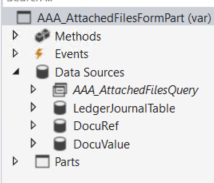
I have created a form part AAA_AttachedFilesFormPart. The form part will show information about attached files in general journal.

The form parts data source is a query with LedgerJournalTable as root source.
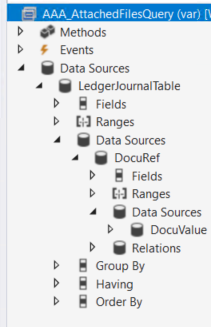
3073.Picture1.png_2D00_640x480.png_2D00_640x480.png_2D00_640x480.png

1781.Picture2.png

I have added AAA_AttachedFilesFormPart to LedgerJournalTable form.
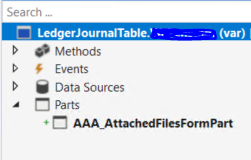
8055.pastedimage1664903440052v1.png

But how do I set the Data source relation? When I look at the form parts property the lookup for data source relation is empty. I have read somewhere that I can manually write Selflink (LedgerJournalTable in both forms) but this doesn’t work, my form part is empty even when there are several attachments on a journal.
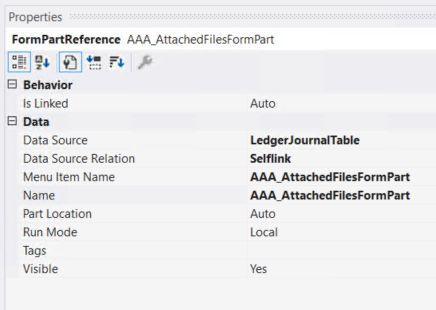
1856.pastedimage1664903480013v2.png

I have the same question (0)
  • Suggested answer
    GirishS Profile Picture
    27,843 Moderator on at

    Hi AgOs,

    If your form part and main form has same table as a primary datasource then data source relation lookup won't show nothing. Try the below work around.

    In the init method of the AAA_AttachedFilesPart form  try to get the caller record using.

    LedgerJournalTable journalTable;
    
    Public void init()
    {
        super();
        journalTable = element.args().record();
    }

    On the DocuRef data source execute query method of AAA_AttachedFilesPart form add the below logic.

    Public void executeQuery()
    {
        DocuRef_ds.queryBuildDatasource(fieldnum(DocuRef, RefRecId)).value(queryvalue(journalTable.RecId));
        super();
    }

    Thanks,

    Girish S.

  • AgOs Profile Picture
    5 on at

    Thank you GirishS for your reply. I get an error on the executeQuery method when I try to build it.

    'DocuRef.queryBuildDataSource' expects 0 argument(s), but 1 specified.

  • GirishS Profile Picture
    27,843 Moderator on at

    Hi AgOs,

    Seems I have typed the code wrongly. try the below one.

    DocuRef_ds.queryBuildDatasource().addRange(fieldnum(DocuRef, RefRecId)).value(queryvalue(journalTable.RecId));
       

    Thanks,

    Girish S.

  • AgOs Profile Picture
    5 on at

    Thank you Girish S, now the build works fine. When I open my form part in general journal I still don´t see any attachments. When I debug my code in init method I don´t get any record from args, RecId is 0

    .pastedimage1665035768649v1.png_2D00_640x480.png

    The menu item property is set to Needs Record Yes.

  • Suggested answer
    GirishS Profile Picture
    27,843 Moderator on at

    Hi AgOs,

    Try setting the form reference "IsLinked" property to "Yes" and check.

    Data source relation property will be "SelfLink". 

    Also see if there is a record in all the three tables you have added in your query. 

    pastedimage1665042665223v1.png

    Remove the code added in init and executequery method.

    Thanks,

    Girish S.

  • AgOs Profile Picture
    5 on at

    I have set Is Linked to "Yes" and removed the code from init and executequery but the result is the same unfortunately, no lines. Shouldn´t Selflink be a value that I can select in the lookup? It is strange that I have to add it manually, maybe that is the reason the relation is not working

  • GirishS Profile Picture
    27,843 Moderator on at

    No if the primary datasource are same then you need to manually type SelfLink as datasource relation, it will work.

    Can you tell me what type of file you are uploading in document management.

    Also can you show me the form part query relation between all the tables.

    Thanks,

    Girish S.

  • AgOs Profile Picture
    5 on at

    Thank you Girish S, it worked :)

    I tested this on migrated attachments and the files were currupted. When I added a new attachment I can see it in my form part. Thank you again for your support

Under review

Thank you for your reply! To ensure a great experience for everyone, your content is awaiting approval by our Community Managers. Please check back later.

Helpful resources

Quick Links

Introducing the 2026 Season 1 community Super Users

Congratulations to our 2026 Super Stars!

Meet the Microsoft Dynamics 365 Contact Center Champions

We are thrilled to have these Champions in our Community!

Congratulations to the April Top 10 Community Leaders

These are the community rock stars!

Leaderboard > Finance | Project Operations, Human Resources, AX, GP, SL

#1
Giorgio Bonacorsi Profile Picture

Giorgio Bonacorsi 608

#2
André Arnaud de Calavon Profile Picture

André Arnaud de Cal... 591 Super User 2026 Season 1

#3
CP04-islander Profile Picture

CP04-islander 430

Last 30 days Overall leaderboard

Product updates

Dynamics 365 release plans