web
You’re offline. This is a read only version of the page.
close
Skip to main content

Announcements

No record found.

News and Announcements icon
Community site session details

Community site session details

Session Id :
Finance | Project Operations, Human Resources, ...
Answered

Mass re-assignment of timesheet period for Workers under specific legal entity

(0) ShareShare
ReportReport
Posted on by 106

Hi 

We have a legal entity which used to run their working week Sunday to Thursday but now they have moved over to Monday to Friday. The Timesheet period type for this legal entity was setup to reflect the Sunday to Thursday working so I need to change this. 

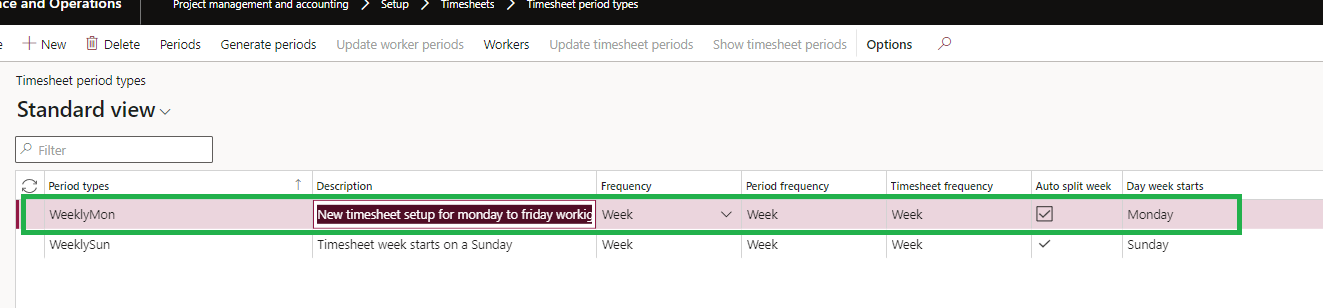
After investigating I found I can't edit the existing setup so I made a second period for this legal entity which I intend to start when the periods on the current Period setup ends which gets around the lack of ability to edit the existing period setup.
pastedimage1678889795668v1.png

The issue I have is this period type option is setup per user and there are 60 odd people under this entity so I need a way of mass assigning the new period type to there employee records, is there a way to do this or do I need to access each users record under this entity one by one then change it?

Cheers;

Neil

I have the same question (0)
  • Suggested answer
    GirishS Profile Picture
    27,833 Moderator on at

    Hi Median,

    You can make use of open in excel option to update worker timesheet period code.

    Thanks,

    Girish S.

  • Median Profile Picture
    106 on at

    Hi Girish

    Thanks for your response, I'm not sure I follow what you mean, but let me explain what I think you meant and go form there -

    Do you mean editing it via the excel option from the list view of under Employees or Workers? If so below is a list of columns I can add to the Employees under this Entity when I go to the Employees or Workers section -

    employee-columns.png

    I ordered the above by alphabetical order so I could show the period code isn't a selectable option.

    I also tried to view the list of Workers by clicking the "Workers option within the Timesheet period type section, but the list view brought up was ultimately the same column options as above -

    pastedimage1678950315730v1.png

    Cheers;

    Median

  • Verified answer
    GirishS Profile Picture
    27,833 Moderator on at

    I assume that you are talking about assigning period type to the worker. Its available under Worker >> Select any worker >> Project >> Project Setup >> Under Timesheet Group you can see "Period code".

    Inside this form on the top right corner there will be office button - You can click on that download the open in excel option >> Sign in with your login inside excel - Add period code for all the workers and click on publish.

    Thanks,

    Girish S.

  • Median Profile Picture
    106 on at

    As always thank you Girish.

    I assumed if I clicked on the excel edit option once your in the Project Setup part against a user it would just pull through that users information for that section.

    Thanks I'm good now :)

    Cheers;

    Median

Under review

Thank you for your reply! To ensure a great experience for everyone, your content is awaiting approval by our Community Managers. Please check back later.

Helpful resources

Quick Links

Introducing the 2026 Season 1 community Super Users

Congratulations to our 2026 Super Stars!

Congratulations to our 2025 Community Spotlights

Thanks to all of our 2025 Community Spotlight stars!

Leaderboard > Finance | Project Operations, Human Resources, AX, GP, SL

#1
André Arnaud de Calavon Profile Picture

André Arnaud de Cal... 512 Super User 2026 Season 1

#2
Giorgio Bonacorsi Profile Picture

Giorgio Bonacorsi 386

#3
Adis Profile Picture

Adis 259 Super User 2026 Season 1

Last 30 days Overall leaderboard

Product updates

Dynamics 365 release plans
