web
You’re offline. This is a read only version of the page.
close
Skip to main content

Announcements

No record found.

News and Announcements icon
Community site session details

Community site session details

Session Id :
Microsoft Dynamics AX (Archived)

Update a customer record using DIXF

(0) ShareShare
ReportReport
Posted on by

DIXF-Cust-load.PNG

I am trying to update a field in the CustTable using DIXF. "Price group" is a field we started using recently. I am trying to update this field for all customers using DIXF.

I didnt want to use the customer master Entity so I created another Customer Pricing Entity on the CustTable. I generated the source file with AccountNum, PriceGroup, (custGroup and Currency as well because they are mandatory fields). When i try to upload data (for customer 15668), it gives me this error;

Results. Record ('15668') . Cannot create a record in Customers (CustTable). Name: 0.
The record already exists.
Data written to target 'Customer Pricing' ('0' records created, '0' records updated)

Which i think makes sense. It is trying to create a customer record with this account number. But I only want DIXF to update the price group field for this customer.

What can I do to make sure it's updated and not have it try to create a new customer?

*This post is locked for comments

I have the same question (0)
  • Martin Dráb Profile Picture
    239,036 Most Valuable Professional on at

    Maybe you don't have a correct relation to CustTable and therefore the framework skips the step of trying to find existing records for update.

  • Community Member Profile Picture
    on at

    Hi Martin,

    My staging table is linked with the CustTable on "AccountNum" field. Is this wrong?

  • André Arnaud de Calavon Profile Picture
    303,728 Super User 2026 Season 1 on at

    Hi Lohit,

    The relation should be OK on the AccountNum field. Can you tell in more details what exactly you have done to get the new entity? Why aren't you using the standard entity and provide only the mandatory fields and your Price group?

  • Community Member Profile Picture
    on at

    Hi Andre,

    I used the wizard to create a new entity on the CustTable and renamed it as "DMFCustPricingEntity". It created the target and the entity class. I didnt make any code change, just picked the fields I want and the mandatory ones. I tried to do a load, but it tries to create a customer instead of updating it.

    As for your second question;

    The customer master (standard) Entity is already being used for a "new customer" load. This requirement is to update the price group field separately. Can i use the same entity in a different processing group to only load the field I want? That would make it so much more easier.. Pleas advise.

  • Community Member Profile Picture
    on at

    Hi again,

    I tried using the standard Customer entity to load only the mandatory fields and the Price Group; The load updated the price group just fine but wiped out every other field for that customer.

  • Martin Dráb Profile Picture
    239,036 Most Valuable Professional on at

    I suspect you left those fields in mapping.

  • Community Member Profile Picture
    on at

    Hi Martin,

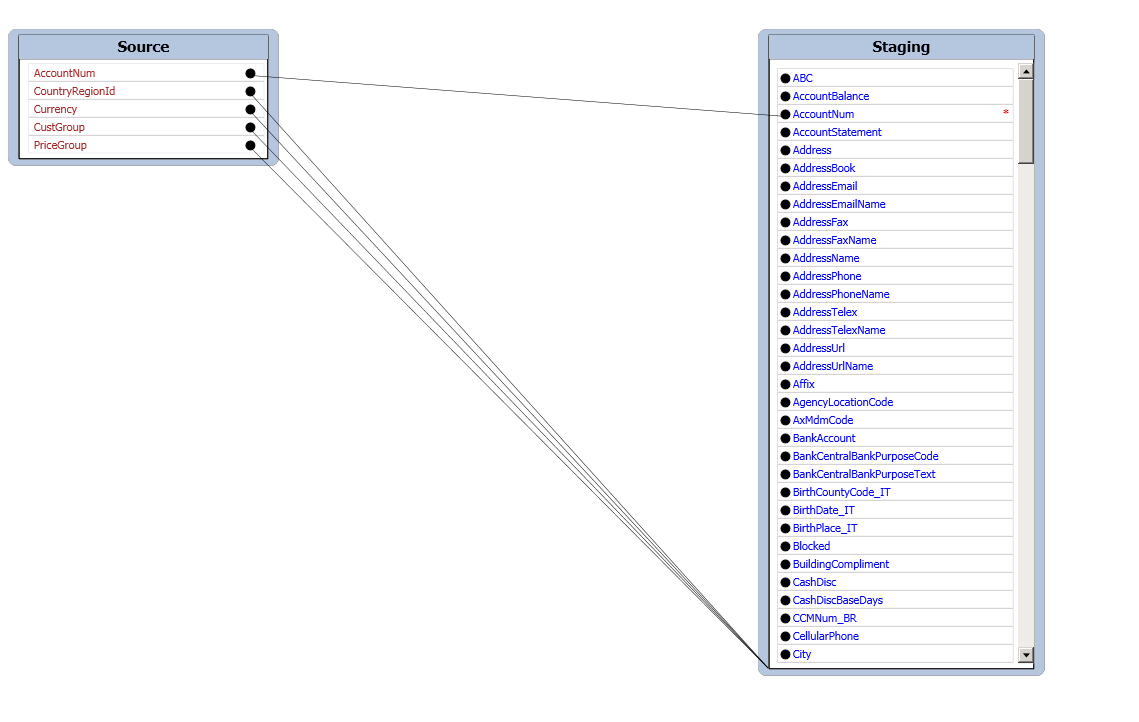
    I updated my question with a screenshot of how the mapping looks like from source to staging.

  • Martin Dráb Profile Picture
    239,036 Most Valuable Professional on at

    But we're talking about the opposite direction, aren't we? (Staging to target instead of target to staging)

  • Suggested answer
    Sangram Shinde Profile Picture
    2,114 on at

    Hi Lohit,

    If you provide only mandatory fields in your file while updating the customer then it will obviously wipe out remaining fields that you have already imported.

    So simple thing you can do here is - take the original file you used to import the customers(if you used DIXF to import customers) - add price group id in the file, update the values and upload it.

    This will update your customers with all fields that you already imported as well as newly mapped field 'Price group'.

    Thanks,

    Sangram

Under review

Thank you for your reply! To ensure a great experience for everyone, your content is awaiting approval by our Community Managers. Please check back later.

Helpful resources

Quick Links

Introducing the 2026 Season 1 community Super Users

Congratulations to our 2026 Super Stars!

Meet the Microsoft Dynamics 365 Contact Center Champions

We are thrilled to have these Champions in our Community!

Congratulations to the March Top 10 Community Leaders

These are the community rock stars!

Leaderboard > 🔒一 Microsoft Dynamics AX (Archived)

#1
Joris dG Profile Picture

Joris dG 5

#2
Alexey Lekanov Profile Picture

Alexey Lekanov 2

#2
Henrik Nordlöf Profile Picture

Henrik Nordlöf 2 User Group Leader

Last 30 days Overall leaderboard

Featured topics

Product updates

Dynamics 365 release plans
