web
You’re offline. This is a read only version of the page.
close
Skip to main content

Announcements

No record found.

News and Announcements icon
Community site session details

Community site session details

Session Id :
Microsoft Dynamics AX (Archived)

Error posting payment journals

(0) ShareShare
ReportReport
Posted on by

Hi,

In AP payment journals, I have a client that has a pop-up message (see below) which has caused them to get "stuck", they can't proceed and can't exit, but I'm not sure what "reference" and "reference table ID" refer to so I don't know where to go to try and fix things.

Has anyone else had this error ?
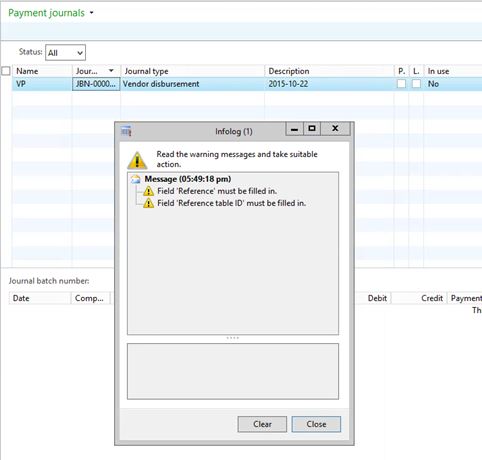
 

Ap-error.JPG

*This post is locked for comments

I have the same question (0)
  • Suggested answer
    nunomaia Profile Picture
    27 Moderator on at

    Try to synchronize AOT. If the error persists, you might have some error in a custom code.  

  • Community Member Profile Picture
    on at

    These fields look like custom fields.

    Please check the properties of these fields in AOT. As far as i understand, the Mandatory property might be set to Yes.

    Setting in to No should do the trick.

  • Community Member Profile Picture
    on at

    Thanks for the suggestions Nidhi and Nuno, but there is no customization to tables or  code, this is "out-of-the-box" functionality.

  • nunomaia Profile Picture
    27 Moderator on at

    Did you tried to sync ?

  • ZvikaR Profile Picture
    190 on at

    when does the error show up? when the journal header row is created? when the user presses the "Lines" button? when trying to post?

  • Suggested answer
    Ludwig Reinhard Profile Picture
    Microsoft Employee on at

    Hi, the AP payment journal includes a payment reference field that you probably have not filled. Please double check how your method of payments used is set up as you can specify there that a payment ID needs to be filled. hope it helps, Ludwig

  • Community Member Profile Picture
    on at

    I went through the entire process with the user, and didn't get any error, so I'm going to assume it was some kind of database glitch that must have been resolved...... somehow.

    It's annoying though as I'd like to know what was causing it.

  • Community Member Profile Picture
    on at

    Thanks Ludwig, that was the only "reference" field I could think of also, but that wasn't the problem.

  • Ludwig Reinhard Profile Picture
    Microsoft Employee on at

    I see.  Guess that you need to ask a developer to debug the issue as Zvika and Nuno indicated. All the best, Ludwig

Under review

Thank you for your reply! To ensure a great experience for everyone, your content is awaiting approval by our Community Managers. Please check back later.

Helpful resources

Quick Links

Introducing the 2026 Season 1 community Super Users

Congratulations to our 2026 Super Stars!

Meet the Microsoft Dynamics 365 Contact Center Champions

We are thrilled to have these Champions in our Community!

Congratulations to the April Top 10 Community Leaders

These are the community rock stars!

Leaderboard > 🔒一 Microsoft Dynamics AX (Archived)

#1
CP04-islander Profile Picture

CP04-islander 24

#2
Michel ROY Profile Picture

Michel ROY 14

#3
Jagadabi Profile Picture

Jagadabi 6

Last 30 days Overall leaderboard

Featured topics

Product updates

Dynamics 365 release plans
