web
You’re offline. This is a read only version of the page.
close
Skip to main content

Announcements

No record found.

News and Announcements icon
Community site session details

Community site session details

Session Id :
Customer experience | Sales, Customer Insights,...
Suggested Answer

EMT$ email template subject field not working

(0) ShareShare
ReportReport
Posted on by 443

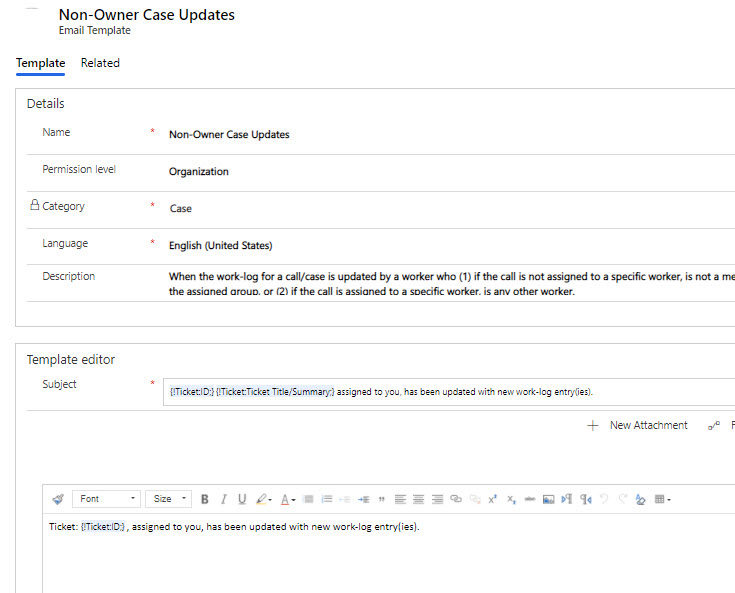
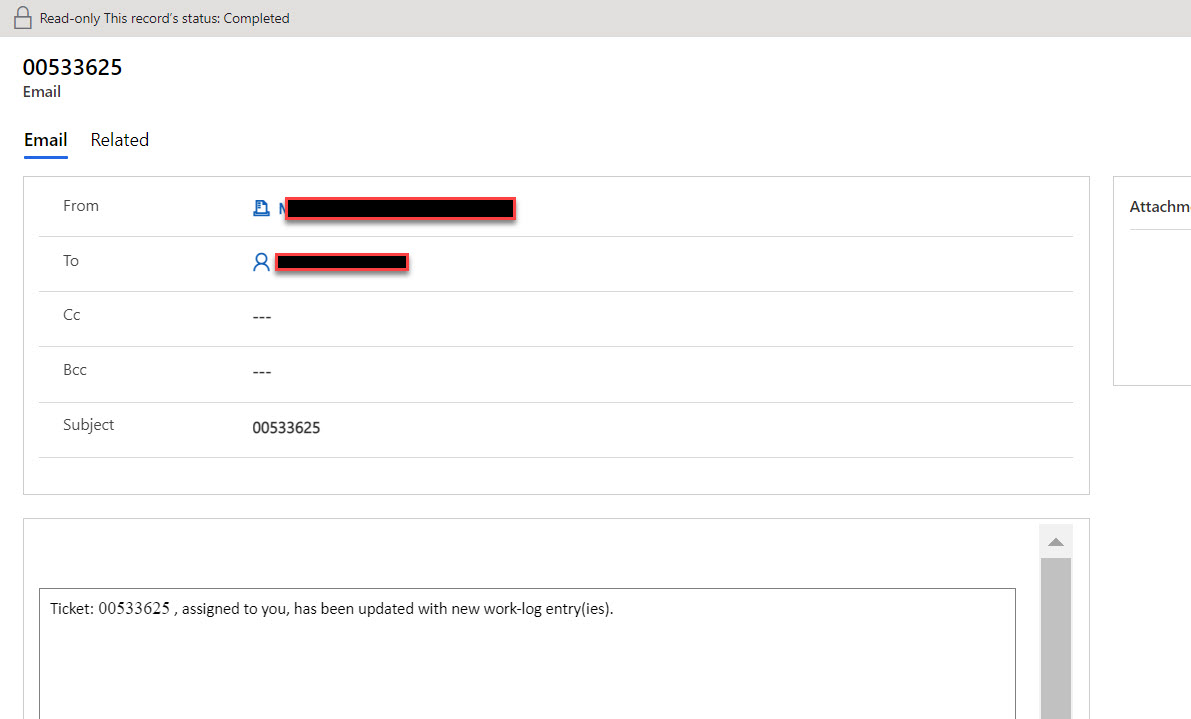
email-template-subject-field-1.jpgemail-template-subject-field-2.jpg

In my world the case/incident is named Ticket. We use email templates for notifications for a new Ticket, resolved Ticket, etc.

No matter what we type in the Subject field of the email template ONLY the Ticket ID shows in the subject when the email is sent/received.

We have typed text and inserted dynamic text fields. none of these show in the actual email that is sent.

Also, we had previously turned off email tracking so that the subject does not contain "CRM: 999999" for example.

Has anyone seen this behavior? what gives?

I have the same question (0)
  • urklnme Profile Picture
    443 on at

    surprised an expert or microsoft employee cannot shed some light on this.  

    another D365 wart I guess.

  • Community Member Profile Picture
    on at

    Hi Urklnme,

    You follow the steps to create an Email template, just if you can put some screenshot about your email template, and the sent email how it become , and so on.

    in this case I guess that the D365 experts will trigger the issue if there a one,

  • urklnme Profile Picture
    443 on at

    This issue is really a burr under the ol' saddle.  All of the emails we send using standard email form or email template can only have the case number in the subject.  Any other case field or text added to the field is ignored.  

    Only Case Id shows up in the subject field.

    Does anyone understand how the subject and regarding field are used in relation to an email?

    I have found that if you leave both blank the timeline will not be updated with the email activity.

    Please help if you can, thanks.

  • urklnme Profile Picture
    443 on at

    ok. it is definitely something that was done by one of us (me and 2 contractors) that affected the Subject field.   There were emails sent during the initial creation of our application that contained the extra text in the subject field.

    The ticket number only subject behavior started well before we turned off email tracking.

    I have been going through the advance settings and the environment setting but have yet to find the cause of this.

  • Suggested answer
    urklnme Profile Picture
    443 on at

    OY!  somebody added a change to an otherwise unrelated workflow.  The change was to set the subject to the ticket number.  I removed that change and whaddyaknow Robert is your dad's brother!

Under review

Thank you for your reply! To ensure a great experience for everyone, your content is awaiting approval by our Community Managers. Please check back later.

Helpful resources

Quick Links

Introducing the 2026 Season 1 community Super Users

Congratulations to our 2026 Super Stars!

Meet the Microsoft Dynamics 365 Contact Center Champions

We are thrilled to have these Champions in our Community!

Congratulations to the March Top 10 Community Leaders

These are the community rock stars!

Leaderboard > Customer experience | Sales, Customer Insights, CRM

#1
11manish Profile Picture

11manish 165

#2
ManoVerse Profile Picture

ManoVerse 161 Super User 2026 Season 1

#3
Zhilan Profile Picture

Zhilan 49

Last 30 days Overall leaderboard

Product updates

Dynamics 365 release plans
