web
You’re offline. This is a read only version of the page.
close
Skip to main content

Announcements

No record found.

News and Announcements icon
Community site session details

Community site session details

Session Id :
Microsoft Dynamics AX (Archived)

"The selected database is not a model store database" getting this error in AOS 2012 installation process

(0) ShareShare
ReportReport
Posted on by

Hi All,

We have installed SQL in another machine and created "MicrosoftDynamicsAX" database manually as the AOS is installed in another machine, 

In the installation process we have given our SQL server name , and selected manually created database "MicrosoftDynamicsAX" but the error is coming as "The selected database is not a model store database" attaching the screen shot. We assumed after installation of AX we will restore/import the database (which we have taken from one of our DEV environment)

Kindly help us in proceeding further.
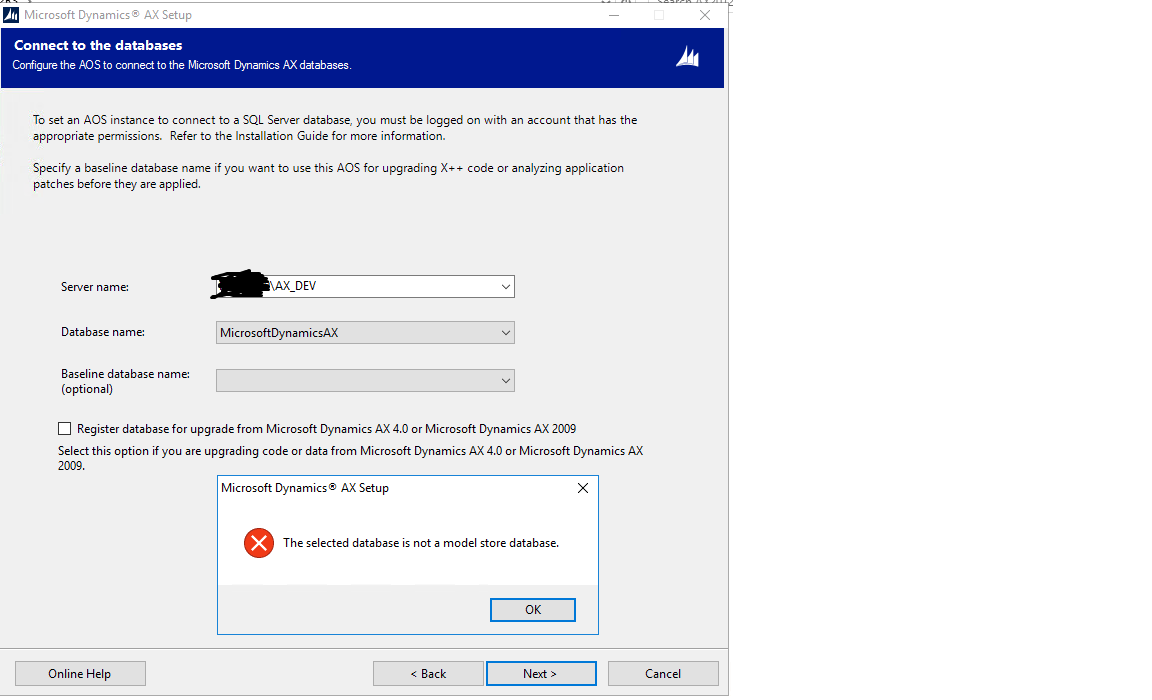
 DB-error.png

*This post is locked for comments

I have the same question (0)
  • Suggested answer
    nmaenpaa Profile Picture
    101,166 Moderator on at

    You should not create MicrosoftDynamicsAx database manually. I assume it's an empty database with no tables in it. You must let AX installer create the database. First install the database, then AOS. After AOS is installed, you can replace the db with your dev db.

    Note that you must also have a model database, named YourAXDatabaseName_model (except in Ax2012 RTM maybe? Check from your dev db). The installer does that for you automatically when you install AX database. And when copying from dev, copy also this database with the business database. Otherwise your business db won't work because of id conflicts.

  • Suggested answer
    Martin Dráb Profile Picture
    239,029 Most Valuable Professional on at

    Assuming that your version is R2 or higher, modelstore is in a separate database (e.g. MicrosoftDynamicsAX_model, if you didn't provide a meaningful name describing your installation). Your're trying to use the transactional database where you should have selected the modelstore database.

    Also, what do you mean by creating a database manually? You shouldn't ever create a clean database by yourself; let the installer create databases for you. You can restore an existing database from a backup, though, which may be what you mean. Yes, the database is needed when you're installing AOS; you can't set up and environment without any code (which is in modelstore database) and add it later. AOS can't work without any application.

  • Akbarpasha Profile Picture
    on at

    Thanks Nicolaos and Martin, 

    we haven't select Database while selecting the components, again we ran the setup and selected Database,AOS,Client and Debugger, we are able to install AX successfully.

    Thank you very much for your inputs.


Under review

Thank you for your reply! To ensure a great experience for everyone, your content is awaiting approval by our Community Managers. Please check back later.

Helpful resources

Quick Links

Introducing the 2026 Season 1 community Super Users

Congratulations to our 2026 Super Stars!

Congratulations to our 2025 Community Spotlights

Thanks to all of our 2025 Community Spotlight stars!

Leaderboard > 🔒一 Microsoft Dynamics AX (Archived)

#1
Joris dG Profile Picture

Joris dG 5

#2
Alexey Lekanov Profile Picture

Alexey Lekanov 2

#2
Henrik Nordlöf Profile Picture

Henrik Nordlöf 2 User Group Leader

Last 30 days Overall leaderboard

Featured topics

Product updates

Dynamics 365 release plans
