web
You’re offline. This is a read only version of the page.
close
Skip to main content

Notifications

Announcements

No record found.

Community site session details

Community site session details

Session Id :
Microsoft Dynamics CRM (Archived)

Show HTML in Sent CRM Email (Custom Workflow Activity) in Email Provider

(0) ShareShare
ReportReport
Posted on by

When I attempt to use Custom Workflow Activity code to send an email on custom entity type field change, it creates an email (using a template created in CRM), then sends it to the Activity Party - AddressUsed specified.  

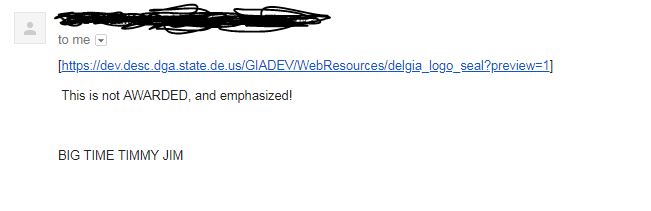
The problem is, when I create the email in the code, then go into CRM to check it out, it renders the HTML correctly (showing an image which is what I need to display in GMAIL or directed email service provider), but only shows plain text in the sent email in GMAIL.  See screen shots below:

CRM:

4263.CRM.JPG

GMAIL:

8686.GMAIL.JPG

Does anyone know how to include HTML styling/images in the Email.Description of Custom Workflow Activity-triggered code creating the email record, so that it shows correctly in the destination email?  Seems it keeps converting it to plain text, also shows the image as a hyperlink (not desired result).

Thanks,

-Tom

*This post is locked for comments

I have the same question (0)
  • Suggested answer
    Radu Chiribelea Profile Picture
    6,667 on at

    Hi Tom,

    If the email is displayed correctly in CRM (with the proper html formatting) then this might be a configuration setting on the email server side.

    What email server are you using to send out the email? If you try to send the same email to you, does it work?

    With Server Side Synchronization configure with Exchange, the way CRM works, is to use the Exchange Web Services to generate a request towards exchange. In the request it sends the body as is (containing the HTML definition). I've seen situations in the past where the email server along the way (usually the receiving one) strips the email from the HTML formatting and displays the email as plain text. This usually can happen due to security restrictions, etc.

    Hope this helps.

    Radu

  • Community Member Profile Picture
    on at

    We are using EWS Exchange to send out the emails from the Email Server Profile from within CRM.

    When I try to manually send an email to myself by-passing the Custom Workflow Activity code that sends the email, it still appears in GMAIL the same, with no HTML formatting.  Seems the HTML is being stripped away somewhere in the process, probbaly on the GMAIL side.  In GMAIL on the receieved email, it does show a "?" for the icon of the sender, as being not authenticated.

    But I have sent emails to GMAIL before from an un-authenticated sender account and it rendered the HTML just fine.

    I am just not sure what is happening here.

    -Tom

Under review

Thank you for your reply! To ensure a great experience for everyone, your content is awaiting approval by our Community Managers. Please check back later.

Helpful resources

Quick Links

Responsible AI policies

As AI tools become more common, we’re introducing a Responsible AI Use…

Neeraj Kumar – Community Spotlight

We are honored to recognize Neeraj Kumar as our Community Spotlight honoree for…

Leaderboard > 🔒一 Microsoft Dynamics CRM (Archived)

#1
SA-08121319-0 Profile Picture

SA-08121319-0 4

#1
Calum MacFarlane Profile Picture

Calum MacFarlane 4

#3
Alex Fun Wei Jie Profile Picture

Alex Fun Wei Jie 2

Last 30 days Overall leaderboard

Featured topics

Product updates

Dynamics 365 release plans