web
You’re offline. This is a read only version of the page.
close
Skip to main content

Notifications

Announcements

No record found.

Community site session details

Community site session details

Session Id :
Microsoft Dynamics AX (Archived)

Async Client installation can't connect to Async Server

(1) ShareShare
ReportReport
Posted on by 1,845

Hi all ,

I am installed Async server and configured required detail on Ax 2012.

I am able to check metadata of that url in other system

After that trying to install async client on another system with all details when i am testing connection i got following eror
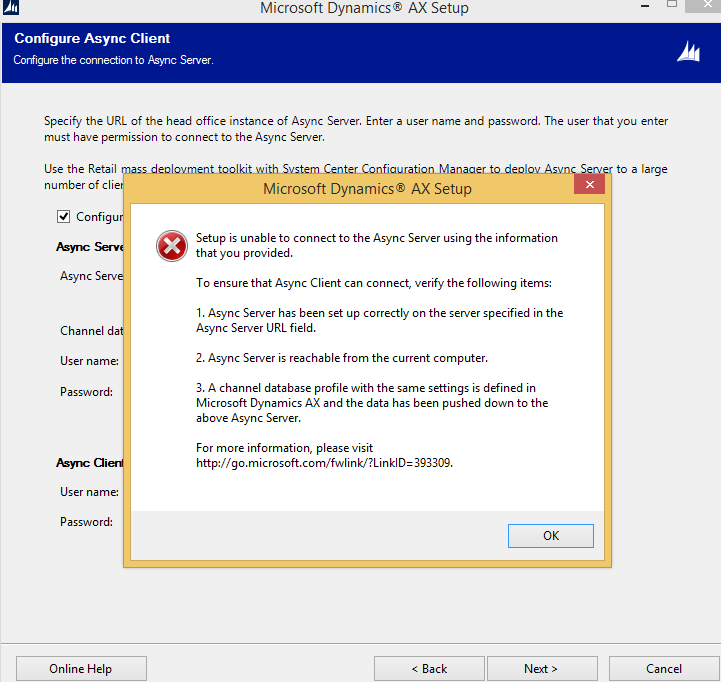
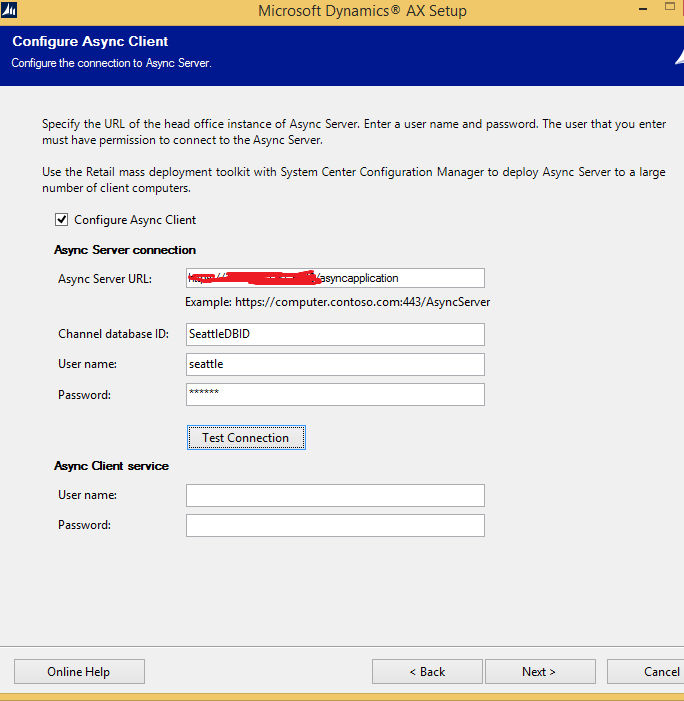
2018.Capture.PNG

1460.132.PNG

Any help.

Thank You.

*This post is locked for comments

I have the same question (0)
  • Rodolfo Recalde Profile Picture
    on at

    Hi Dinkar,

    Double check:

    a) Application Name (IIS) and http port (1)

    b) User Name/Password at Channel Database Form (AX\Retail\Setup\Retail Scheduler\Channel Integration\Channel Database). (2)

    c) After update user name and password (b), don't forget Sync metadata process at the Retail Scheduler Parameters Form (AX\Retail\Setup\Parameters\Retail scheduler parameters).

    d) Trusted certification/self-signed certificate installed on the Async Client machine.

    AsyncClientConfigurationUtility_5F00_DAX_5F00_Recalde.png

    You can install the Async Client without configuring it. Once installed, you can configure the component using Async Client Configuration Utility

    By default, the executable file is located at C:\Program Files\Microsoft Dynamics AX\60\CDX\Async Client\<DatabaseName>_Package. Double-click the AsyncClientConfigurationUtility.exe file.

    AsyncClientConfigurationUtility_5F00_DAX_5F00_Recalde.png

    I Hope this Helps!

    Regards

    Rodolfo Recalde

  • startax Profile Picture
    1,845 on at

    Hi Rodolfo Recalde,

    Thanks for reply.

    I am installed Async server on ax 2012 after that checked asyncserver with self sign certificate its giving me metadata on different system.

    After that i am created database channel,  Sync metadata process at the Retail Scheduler Parameters Form (AX\Retail\Setup\Parameters\Retail scheduler parameters), Working Folder, Channel data group also created on ax 2012 where i am installed AsyncServer.

    When i am trying to install Async Client on other Computer i am filled Details.

    What UserName, and password required in Asunc Client Service.

    plz suggest me.

  • Rodolfo Recalde Profile Picture
    on at

    Async Client Service User it is necessary. Create a specific service account for the Async Client/Store. The account that will be used to run the Async Client service. Enter the account in the form value=“Domain or Computer Name\User”.

    Retail_5F00_AscynClientUser_5F00_DAX_5F00_Recalde.png

    MOC 80637 - Module 03 - page 3

    About Install Commerce Data Exchange: Async Client

    About Create service accounts.

    I Hope this Helps!

    Regards,

    Rodolfo Recalde.

  • startax Profile Picture
    1,845 on at

    Hi Rodolfo Recalde,

    Thanks for reply

    As per your suggestion i am installed the Async Client without configuring it. Once installed, you can configure the component using Async Client Configuration Utility.

    After that when i click on test connection get error "Connection failed. A network-related or instance-specific error occurred while establishing a connection to Async Server. The server was not found or was not accessible."

    I think issue in self sign certificate creation. i am created certificate using following process

    this is correct option or not.

    apc-itengineer.blogspot.in/.../microsoft-dynamics-ax.html

    Please suggest me what i am missing now,

    Thank You

  • Rodolfo Recalde Profile Picture
    on at

    Install certificate on the Async Client machine.

    I Hope this Helps!

    Regards,

    Rodolfo Recalde.

  • Community Member Profile Picture
    on at

    Hi Rodolfo,

    I have tried everything but still getting the same error.  so i skipped the configuration part on installation and tried doing the installation later but getting below error.

    error-on-async-client.PNG

    I am trying everything on a same machine since i ll be using it for demo purposes. 

    Feel free to ask any queries, I ll be waiting for ur reply. 

    Thanks in ADVANCE !!!!

  • Suggested answer
    startax Profile Picture
    1,845 on at

    Hi Vinod ,

    Please check your self sign certificate. i am facing the same issue due to certificate issue. Untill you get metadata with your certificate on same system this issue is not going to solve. I am created correct certificate then my issue is resolved.

  • Community Member Profile Picture
    on at

    Hi Dinkar,

    Can u please guide me how to do that. I am new to all this.

  • Community Member Profile Picture
    on at

    If its is doing the Sync Matadata from retail scheduler parameters, i already did that .

  • Suggested answer
    startax Profile Picture
    1,845 on at

    Hi vinod,

    First you have to create SSL Certificate. Install Async Server and open IIS you can find Sites option in IIS. Then you can see your async website name given at time of installing async server. Open IE as administrator and put URL - https://computername:port/asyncwebsitename/uploadservice

    loki this

    localhost/.../uploadservice.svc

    If you get metadata data successfully then proceed next ,

    Hope this help you.

Under review

Thank you for your reply! To ensure a great experience for everyone, your content is awaiting approval by our Community Managers. Please check back later.

Helpful resources

Quick Links

Responsible AI policies

As AI tools become more common, we’re introducing a Responsible AI Use…

Neeraj Kumar – Community Spotlight

We are honored to recognize Neeraj Kumar as our Community Spotlight honoree for…

Leaderboard > 🔒一 Microsoft Dynamics AX (Archived)

#1
Martin Dráb Profile Picture

Martin Dráb 4 Most Valuable Professional

#1
Priya_K Profile Picture

Priya_K 4

#3
MyDynamicsNAV Profile Picture

MyDynamicsNAV 2

Last 30 days Overall leaderboard

Featured topics

Product updates

Dynamics 365 release plans
