web
You’re offline. This is a read only version of the page.
close
Skip to main content

Notifications

Announcements

No record found.

Community site session details

Community site session details

Session Id :
Microsoft Dynamics CRM (Archived)

Creating a dialog with User lookup value

(0) ShareShare
ReportReport
Posted on by

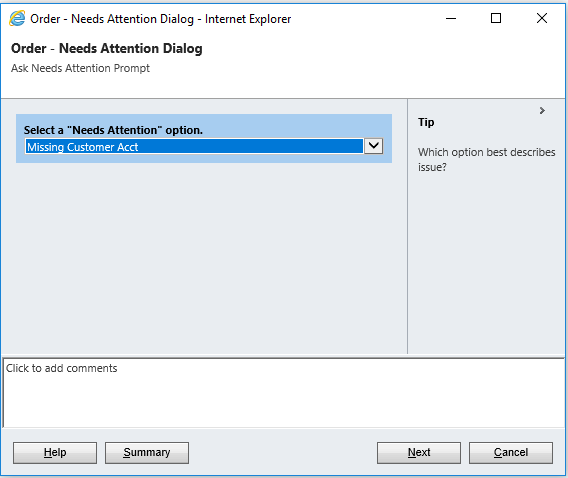
I'm working out of CRM 2015.  I'm creating a dialog that will allow users to select an option set value and assign a task to a specific user.  However when creating the dialog, the lookup function does not allow me to select a user record (only created by, modified by, etc).  First pic is my dialog logic.  Second pic is the dialog window.  I need to have a section option to allow me to assign the created task to user.  Any advise on how to create this?
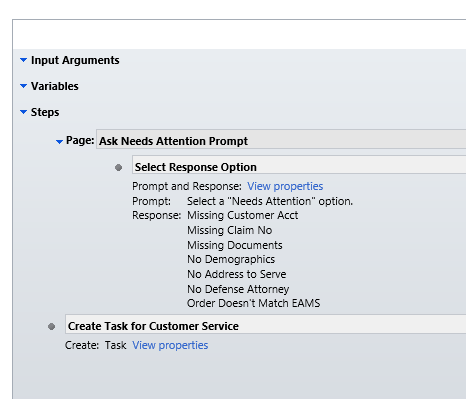
Dialog-Criteria.PNG

Dialog-Box.PNG

*This post is locked for comments

I have the same question (0)
  • Suggested answer
    Adrian Begovich Profile Picture
    1,027 Moderator on at

    Hi M Cruz,

    Is there any particular reason why you are implementing this functionality with a Dialog?

    It is better to implement this functionality with a Workflow or Plugin.

  • Community Member Profile Picture
    on at

    Thank you for your help.   Users need to be able to select reason why task activity is being created and then it needs to be assigned to corresponding team.

  • Verified answer
    Community Member Profile Picture
    on at

    Hi M Cruz,

    Use the following blog site to assist you in adding a lookup to the dialog: www.ec.co.za/.../crm-2013-workflows-and-dialogs-ins-and-outs (Near the bottom of the post)

    Simply add a lookup prompt and response to the dialog page and have it lookup to the active user list.

    Once the dialog has completed, use this dynamic value to automatically set the owner of the task activity to the user supplied in this lookup.

    NOTE: If you are ever considering moving to Dynamics 365, keep in mind that Dialogs are being deprecated!

    Reference: crmtipoftheday.com/.../deprecated-dialogs

Under review

Thank you for your reply! To ensure a great experience for everyone, your content is awaiting approval by our Community Managers. Please check back later.

Helpful resources

Quick Links

Responsible AI policies

As AI tools become more common, we’re introducing a Responsible AI Use…

Neeraj Kumar – Community Spotlight

We are honored to recognize Neeraj Kumar as our Community Spotlight honoree for…

Leaderboard > 🔒一 Microsoft Dynamics CRM (Archived)

#1
SA-08121319-0 Profile Picture

SA-08121319-0 4

#1
Calum MacFarlane Profile Picture

Calum MacFarlane 4

#3
Alex Fun Wei Jie Profile Picture

Alex Fun Wei Jie 2

Last 30 days Overall leaderboard

Featured topics

Product updates

Dynamics 365 release plans