web
You’re offline. This is a read only version of the page.
close
Skip to main content
Community site session details

Community site session details

Session Id :
Customer experience | Sales, Customer Insights,...
Answered

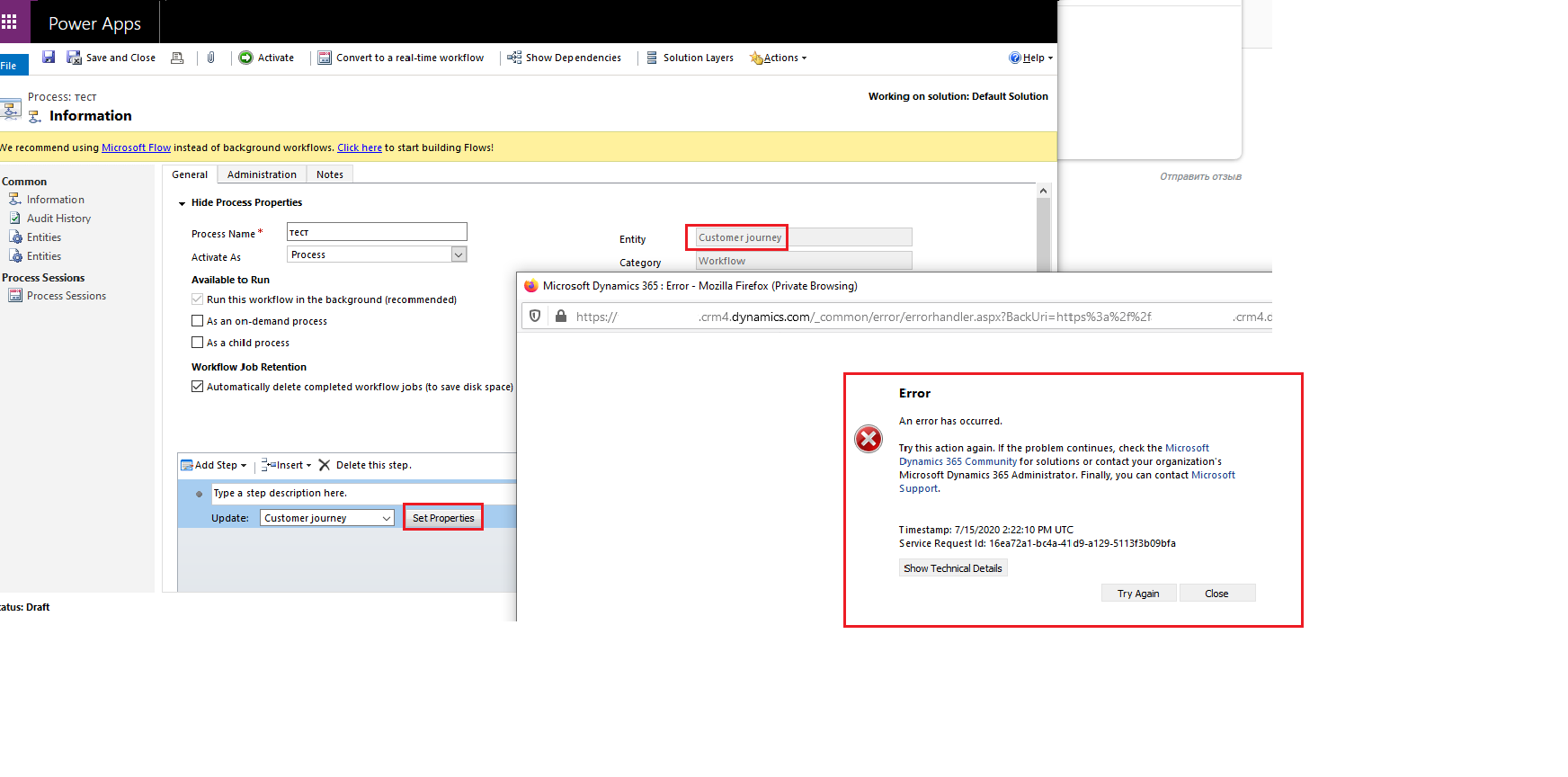
When I open workflow's step Update ("Customer journey" entity), error appears instead customization window

(0) ShareShare
ReportReport
Posted on by 90

Good day!

When I customize workflow (on Customer journey entity), I cannot use step Update ("Customer journey" entity) because when I press "Set Properties" button, Error window appear:
(An error has occurred.Try this action again. If the problem continues, check the Microsoft Dynamics 365 Community for solutions or contact your organization's Microsoft Dynamics 365 Administrator. Finally, you can contact Microsoft Support.)

This error appear in some enviroments now.

Someone knows, it’s temporary and we need to wait it out, or it’s a bug and we have to fix this error?

Thanks,
Valera
8473.png

I have the same question (0)
  • Verified answer
    Denny Deng Profile Picture
    on at
    RE: When I open workflow's step Update ("Customer journey" entity), error appears instead customization window

    from my experience, the issue could be resolved by:

    1. open a customer journey record

    2. switch to another form

    3. customize this workflow and set property again

  • Spiker Profile Picture
    90 on at
    RE: When I open workflow's step Update ("Customer journey" entity), error appears instead customization window

    Thank you very much, Denny, for your reply.

    Now it works without any error.

  • Community Member Profile Picture
    on at
    RE: When I open workflow's step Update ("Customer journey" entity), error appears instead customization window

    Hi Denny,

    i'm actually facing the same issue but can not reproduce your help for that. Which form you mean to switch in the record? There is no possibility to switch the form of a normal customer journey record..

    Would be great if you could help me in there.

    Thanks,

    Lisa

  • Community Member Profile Picture
    on at
    RE: When I open workflow's step Update ("Customer journey" entity), error appears instead customization window

    Hey Valera, I know this is pretty old, but I worked with MS to figure out a solution for this and it might be useful for others.

    I created a new Customer Journey form and removed all of the related subgrids.  Then you also have to remove the msdyncrm_lockdowndateinmilliseconds field.  

    After that, I had to change my form order so the new form was at the top.  Switch over to that form and then I could update the Customer Journey using a Workflow.

    Hope that helps anyone else!

    Josh

Under review

Thank you for your reply! To ensure a great experience for everyone, your content is awaiting approval by our Community Managers. Please check back later.

Helpful resources

Quick Links

Responsible AI policies

As AI tools become more common, we’re introducing a Responsible AI Use…

Neeraj Kumar – Community Spotlight

We are honored to recognize Neeraj Kumar as our Community Spotlight honoree for…

Leaderboard > Customer experience | Sales, Customer Insights, CRM

#1
Tom_Gioielli Profile Picture

Tom_Gioielli 203 Super User 2025 Season 2

#2
#ManoVerse Profile Picture

#ManoVerse 121

#3
Pallavi Phade Profile Picture

Pallavi Phade 68

Last 30 days Overall leaderboard

Product updates

Dynamics 365 release plans
