web
You’re offline. This is a read only version of the page.
close
Skip to main content

Notifications

Announcements

No record found.

Community site session details

Community site session details

Session Id :
Microsoft Dynamics CRM (Archived)

What query can I use to get email addresses of contacts from the CRM database

(0) ShareShare
ReportReport
Posted on by 2,555

Hello,

I have a little situation that looks tight.

I need to get the email addresses of some contacts. Now, when email messages were sent from CRM to these contacts, the emails did not deliver, the status reason is "Pending Send" or "failed".

So, I want a query that will get the email addresses of such contacts that emails were attempted for delivery but could not deliver, so that I can confirm the validity of their email addresses.

I tried this from Advanced find by adding a column, using Regarding(Contact) and selecting email, I did not get any data, which is why I suspect to run a SQL query on the CRM database to get this data.

Thanks

*This post is locked for comments

I have the same question (0)
  • Deepesh161 Profile Picture
    6,317 on at

    Hi,

    Have you populated regarding in all your mails?

  • Suggested answer
    Deepesh161 Profile Picture
    6,317 on at

    Assuming you have set regarding (Edit view to show Regarding(contact) email field can be selected.

    Irrespective of this, you can find emails to contacts which are pending or failed.

    Following is advanced find:

  • Jeremiah Profile Picture
    2,555 on at

    Thanks a lot Deepesh.

    I still cannot get the email addresses. Now let me say that these emails are attempted for delivery regarding Cases that are generated in crm.

    so, there's a workflow that auto-generates the emails and attempt to deliver them for the customers.

    Some of these emails are not delivered but remains in the pending send state!

    I sent a test email to samples of these emails and noticed them to be invalid email addresses.

    Now I want to get all these email addresses whose emails remain in the pending send state(generated after creating a case in crm) and correct them.

    Thanks for your help

  • Suggested answer
    Mithilesh Kumar Profile Picture
    10,047 on at

    Hi Jeremiah,

    You won't be able to retrieve "Email Address" of the Recipients in MSCRM, because the "To" field will always resolve and use their names in that field.

    Even if you manage to find all such records using Advanced Find, the "To" field will show their names and not the email address, as shown below

    To get all those "Email Address", I would suggest to write a Console Application and retrieve them using oData and export to excel.

    Hope that clarifies
    Thanks
    Please mark my post as verified if you found it helpful

  • Suggested answer
    Deepesh161 Profile Picture
    6,317 on at

    That is why i asked , do you have all regarding set to same contacts as your to fields(in emails).

    Based on Regarding(Contact) you could find email.

    Only in that case you will be able to get them.

    Otherwise , I already told, its a simple console application.

  • Suggested answer
    Mithilesh Kumar Profile Picture
    10,047 on at

    Deepesh,

    I think, this has nothing to do with the "Regarding" field.

    We need to check the "To" field in the email (Pending Send and Failed). "To" field is a lookup field which will provide you with the GUID and the entity Logical Name.

    The code will run against the GUID in the EntitySet and retrieve the record. With this record you can search for the Email Field and get the value. You can then populate the value into your Excel Sheet.

    Regarding field plays no role into that. Jeremiah is only concerned on picking up the Email Ids.

    Hope that clarifies

    Thanks

  • Jeremiah Profile Picture
    2,555 on at

    Thanks Mithilesh,

    I guess this route will solve this.

    However I am confused about the console application, will it be a web resource and how will it be brought into CRM?

    I would really appreciate it if you could post a sample.

    Thanks

  • Verified answer
    Aileen Gusni Profile Picture
    44,524 on at

    Hi Jeremiah,

    Actually I agree with Deepesh, he mentioned the integral part, is it based on concept "To recipient" is aligned or not with the Regarding. Is yes, then it will be easier.

    Jeremiah,

    Now, hopefully this can help and refer to your exact question, let's see from other way, let's do query from another way.

    Since you want to find all contact that being recipients after you send email but always "Pending Send" or "Failed", so let's start with finding all Contacts, not by Email, and match it with Activity Party, remember, all of the contacts/accounts if linked to the Activity (email is one of the activity) will become the Activity Party, so I will find filter the Contact by Participation Type and then link to the email and finally only filter the email status to Pending Send, failed, or any status you want.

    So here is the final advanced find.

    adv-find-contact3.png

    You can also select the Participation Type to "To Recipient" or even CC Recipient (if any)

    And the Status reason to the status you want.

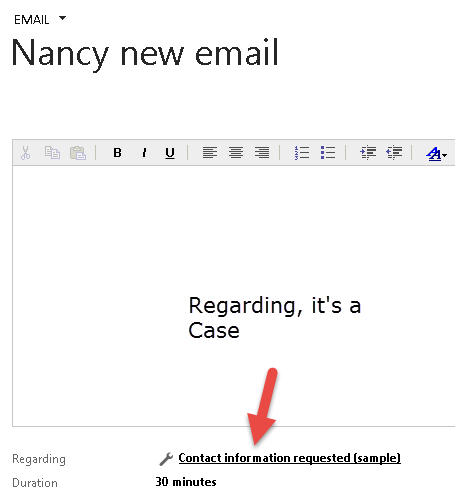
    Then, it will show all of the contacts that you sent email to them but still pending Send or Failed, no matter your regarding is themselves (contact record itself), their Accounts, or even as you mentioned before, regarding as Case.
    adv-find-contact.png

    Remember, we didn't link to any Regarding, so it can be anything as long as the recipients are Contacts, if you want to get the Account, then change the entity from Contact to Account.

    Then just insert the Contact email address to display column to get your recipient email result.

    Once you see the result, you can see all the contacts that becoming your recipients but still failed to deliver and you can see the email address, either blank, valid, or just like dummy account, abc@example.com or firstname.lastname@domain.com, a common sense that usually if you put mandatory, the user can key in anything for the sake of saving the record.

    So this is the example of the result

    As we can see, Nancy Anderson is there (eventhough the email is regarding to Case, not herself record), maybe with fake email and another example, why it was failed? Emily Lee, for example, doesn't have valid email address (blank)

    Hope this can help you.

    If not, then we all know we can do query :

    select ToRecipients, subject from FilteredEmail

    Or you can link to the activity party if still can't get the data.

    Thank you.

  • Suggested answer
    Mithilesh Kumar Profile Picture
    10,047 on at

    My Bad, I misunderstood your point. Thanks Deepesh and Aileen. Cheers !!

    Having said that, I still don't agree with you completely. I don't see any relevance of Regarding field found in the Email form in this context. What has that to do here. We are looking for email address which Failed/Pending to send out emails

    Jeremiah, here is your complete solution irrespective of what your Regarding Field contains (whether has data or does not have)

    Use Advanced Find with below criteria (If you want to search Account change the Look For variable)


    Hit on Result to see the contacts which failed to send email (Include email field in you Contacts Advanced Find View)


    Export your contacts to excel


    Hope that helps

    Thanks

  • Aileen Gusni Profile Picture
    44,524 on at

    Hi Kumar,

    Thank you.

    Of course it is related.

    For example, you have an email message, an email you know, you can send to many people, not only one. And as my example, an email you can send to many people, but you use the regarding field to the Case, if you use the Email as your main entity and you use regarding (Contact) email address, of course it will give zero result because the regarding (Contact) is null, in fact your email regarding field is Case, not Contact.

    So that at the very first, Deepesh was asking the regarding field.

    If this is Contact, then Jeremiah can easily link to the Email as the entity, then display Regarding Contact field email address as the displayed column in the result.

    Btw, if you don't agree completely, why you copy and use solution that I mentioned before? :)

    Thank you.

Under review

Thank you for your reply! To ensure a great experience for everyone, your content is awaiting approval by our Community Managers. Please check back later.

Helpful resources

Quick Links

Responsible AI policies

As AI tools become more common, we’re introducing a Responsible AI Use…

Neeraj Kumar – Community Spotlight

We are honored to recognize Neeraj Kumar as our Community Spotlight honoree for…

Leaderboard > 🔒一 Microsoft Dynamics CRM (Archived)

#1
SA-08121319-0 Profile Picture

SA-08121319-0 4

#1
Calum MacFarlane Profile Picture

Calum MacFarlane 4

#3
Alex Fun Wei Jie Profile Picture

Alex Fun Wei Jie 2

Last 30 days Overall leaderboard

Featured topics

Product updates

Dynamics 365 release plans
