web
You’re offline. This is a read only version of the page.
close
Skip to main content

Announcements

No record found.

News and Announcements icon
Community site session details

Community site session details

Session Id :
Microsoft Dynamics AX (Archived)

AX Retail Development debugging

(0) ShareShare
ReportReport
Posted on by 505

Good day.

i am hoping that somebody could possibly help me. i am new to AX retail development, and i am trying to learn the code process by going though the 'services' and 'triggers' code. i have installed AX retail and configured the database, POS starts up and all is fine. i have read all that i can find of the 'getting started' but i cannot seem to debug the code. i have set the build configuration to debug and set the 'Start external program' to start the POS.exe, but when i start debugging and set a break point i get a yellow exclamation mark next saying "The breakpoint will not currently be hit. No symbols have been loaded for this document"
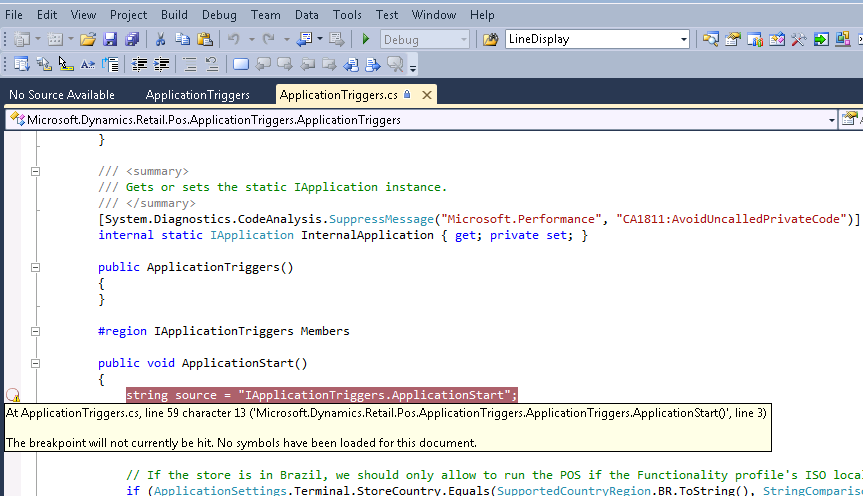
breakpoint.PNG

i have been coding in C# for a couple of years now, but i have never en-counted this problem before, and i am an absolute beginner to AX Retail Development.

how can i get the debugger to work?

any assistance would be greatly appreciated

*This post is locked for comments

I have the same question (0)
  • Rodolfo Recalde Profile Picture
    on at

    Hi B.A.

    Take a look in this link: (especially item 4)

    https://community.dynamics.com/ax/b/axwonders/archive/2012/05/19/ax-2012-pos-development-application-triggers

    I Hope this Helps! 

    Regards,

    Rodolfo Recalde

  • B.W Profile Picture
    505 on at

    good day Rodolfo.

    Thank you so much for your reply. that is actually one of the links/examples that i used, i have followed all of the steps outlined there but I'm afraid i still cannot seem to get VS to hit the debugger.

    the only thing that i have not checked or have done, was step 5. "All the assemblies need to be signed" would this make any difference?

    also, does it matter where the output folder is located, or where the 'services' and 'triggers' projects are loaded from? i currently have the projects in a folder called 'Dev' under C:\.

  • nunomaia Profile Picture
    25 Moderator on at

    Did you copied the .pdb to POS folder ?

  • B.W Profile Picture
    505 on at

    good day Nuno.

    thank you for your reply. i did try and copy the .pdb file. i tried with the triggers and services. i also tried setting the output path to the triggers and services folders respectively to "C:\Program Files\Microsoft Dynamics AX\60\Retail POS"

    but it still does not hit the break point.

  • Verified answer
    B.W Profile Picture
    505 on at

    good day, i think i found a solution (well, that seems to work for me)

    1. a reference to 'Microsoft.Dynamics.Retail.Pos.Contracts.dll' must point to the dll in 'C:\Program Files\Microsoft Dynamics AX\60\Retail POS'

    2. build the .dll solution you want to debug.

    3. Copy the .dll to the services or Triggers folder.

    4. Under properties of project -> debug - > start with external program (pointing to POS.exe)

    5. Right click on project you want to debug ->Debug -> start new instance.

    if anyone knows of a better way, please let me know.

Under review

Thank you for your reply! To ensure a great experience for everyone, your content is awaiting approval by our Community Managers. Please check back later.

Helpful resources

Quick Links

Introducing the 2026 Season 1 community Super Users

Congratulations to our 2026 Super Stars!

Meet the Microsoft Dynamics 365 Contact Center Champions

We are thrilled to have these Champions in our Community!

Congratulations to the March Top 10 Community Leaders

These are the community rock stars!

Leaderboard > 🔒一 Microsoft Dynamics AX (Archived)

#1
Joris dG Profile Picture

Joris dG 5

#2
Andrew Jones a1x Profile Picture

Andrew Jones a1x 2

#3
GL-01081504-0 Profile Picture

GL-01081504-0 1

Last 30 days Overall leaderboard

Featured topics

Product updates

Dynamics 365 release plans
