web
You’re offline. This is a read only version of the page.
close
Skip to main content

Announcements

No record found.

News and Announcements icon
Community site session details

Community site session details

Session Id :
Microsoft Dynamics AX (Archived)

One Query to output Values & Descriptions of Default Dimensions like CostCenter, ExpensePurpose, Department, BusinessUnit

(0) ShareShare
ReportReport
Posted on by 792

Hello all,

My Requirement:-

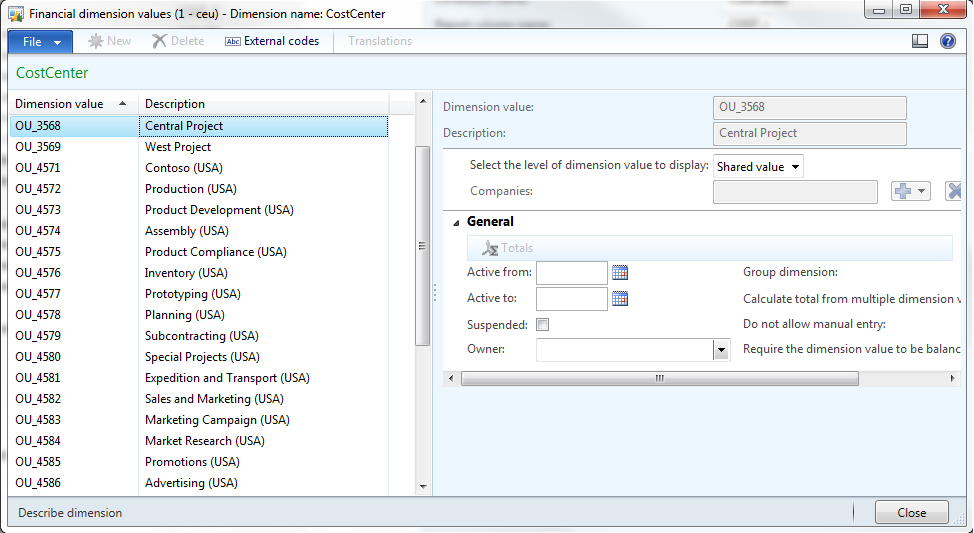
I need to create a single Query in AX 2012 which will take a Default Financial Dimension name (like CostCenter, Department, ExpensePurpose, BusinessUnit) as argument i.e. as Range and output all the Values & Descriptions of that particular Dimension. Like this below image:-
defaultdimension_5F00_valdesc.png

My Findings:-

I have joined these tables -- DimensionAttribute, DimensionAttributeValue, DimensionAttributeValueSet and DimensionAttributeValueSetItem and fetched Values for each system dimensions but I couldn't reach their Descriptions. Then I realised that the descriptions are stored in the DirPartyTable under Name field. I also found out that different default dimensions have different Views like DimAttributeOMCostCenter or DimAttributeOMDepartment or DimAttributeTrvTravelTxt (which are either join between DirPartyTable and OMOperatingUnit, or just a view over TrvTravelTxt) which output both Values & Descriptions. I also know that DimensionFinancialTag table which outputs Values & Descriptions is only used for custom dimensions and not for default system dimensions.

I need one single generic Query which will fetch me Values & Descriptions of all the 4 default dimensions.

Plz help.

*This post is locked for comments

I have the same question (0)
  • Suggested answer
    Community Member Profile Picture
    on at

    Try the following code:

       DimensionAttributeValueSet      dimensionAttributeValueSet;

       DimensionAttributeValueSetItem  dimensionAttributeValueSetItem;

       DimensionAttributeValue         dimensionAttributeValue;

       DimensionAttribute              dimensionAttribute;

       DimensionFinancialTag           dimensionFinancialTag;

       ProjTable                       projTable;

       while select RecId from projTable

           join RecId from dimensionAttributeValueSet

               where dimensionAttributeValueSet.RecId == projTable.DefaultDimension

                  && projTable.ProjId == this.ProjId

           join RecId from dimensionAttributeValueSetItem

               where dimensionAttributeValueSetItem.DimensionAttributeValueSet == dimensionAttributeValueSet.RecId

           join RecId from dimensionAttributeValue

               where dimensionAttributeValue.RecId == dimensionAttributeValueSetItem.DimensionAttributeValue

           join RecId from dimensionAttribute

               where dimensionAttributeValue.DimensionAttribute == dimensionAttribute.RecId

    //&& dimensionAttribute.Name == 'A_Managing_Group' //Un Comment to get specific value of Financial Dimension

           join Description from dimensionFinancialTag

               where dimensionFinancialTag.RecId == dimensionAttributeValue.EntityInstance

    {

       info(strfmt('%1', dimensionFinancialTag.Description));

    }

    For more details check this page : thinkinginax.blogspot.com/.../fetching-financial-dimension-value-x.html

  • Martin Dráb Profile Picture
    239,451 Most Valuable Professional on at

    You have to take DimensionAttribute.BackingEntityType into account. It says which view you should use (for system dimensions), or that the value can be found in DimensionFinancialTag (custom dimensions).

Under review

Thank you for your reply! To ensure a great experience for everyone, your content is awaiting approval by our Community Managers. Please check back later.

Helpful resources

Quick Links

Introducing the 2026 Season 1 community Super Users

Congratulations to our 2026 Super Stars!

Meet the Microsoft Dynamics 365 Contact Center Champions

We are thrilled to have these Champions in our Community!

Congratulations to the April Top 10 Community Leaders

These are the community rock stars!

Leaderboard > 🔒一 Microsoft Dynamics AX (Archived)

#1
CP04-islander Profile Picture

CP04-islander 39

#2
Michel ROY Profile Picture

Michel ROY 14

#3
imran ul haq Profile Picture

imran ul haq 8

Last 30 days Overall leaderboard

Featured topics

Product updates

Dynamics 365 release plans
