web
You’re offline. This is a read only version of the page.
close
Skip to main content

Announcements

No record found.

News and Announcements icon
Community site session details

Community site session details

Session Id :
Microsoft Dynamics AX (Archived)

Get ProjectID value from LedgerDimension

(0) ShareShare
ReportReport
Posted on by

Hi 

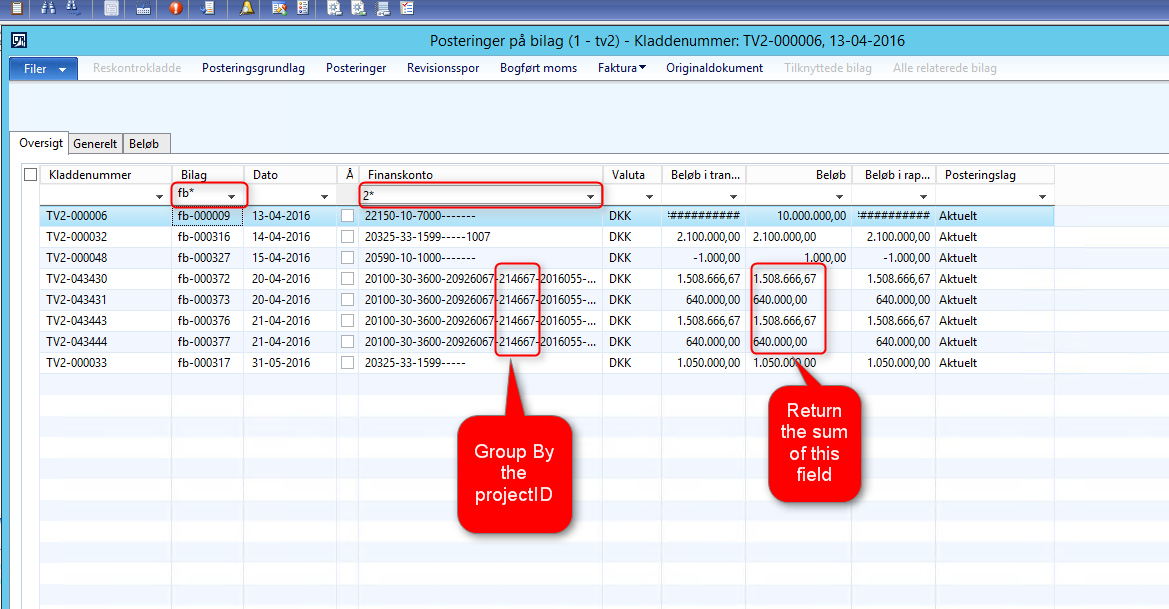
from my LedgerTransVoucher I will do following:

  1. Select all records where SubledgerVoucher starts with 'fb-' and LedgerAccount starts with '2'.
  2. Select the sum(AccountingCurrencyAmount) where ProjectID (in LedgerDimension) ==  '214667'
  3. I have made this job to test the functionality. But I dont get any value. It seems that I never get any ProjId. 
  4. What is it that do wrong?

2016_2D00_05_2D00_20_5F00_12h01_5F00_15.png

static void NCExpensed(Args _args)
{
    GeneralJournalAccountEntry generalJournalAccountEntry, generalJournalAccountEntryLocal;
    GeneralJournalEntry        generalJournalEntry;
    ProjId  projId;
    MainAccount                 mainAccount;
    str                         mainAccountId, subLedgerVoucher;
    real expensed;


    while select generalJournalAccountEntry
         join generalJournalEntry
         where generalJournalAccountEntry.GeneralJournalEntry == generalJournalEntry.RecId
    {


        projId              = ProjTable::findByLedgerDimension(generalJournalAccountEntry.LedgerDimension).ProjId;
        mainAccount         = MainAccount::findByLedgerDimension(generalJournalAccountEntry.LedgerDimension);
        mainAccountId       = subStr(mainAccount.MainAccountId,1,1);
        subLedgerVoucher    = subStr(generalJournalEntry.SubledgerVoucher,1,2);


        if(mainAccountId == '2' && subLedgerVoucher == 'fb' && projId == '214667')
        {
            select sum(AccountingCurrencyAmount) from generalJournalAccountEntryLocal;
            expensed = generalJournalAccountEntryLocal.AccountingCurrencyAmount;
        }

    }

   if(expensed)
    {
       info(strFmt('%1', expensed));
    }


}


*This post is locked for comments

I have the same question (0)
  • Suggested answer
    Martin Dráb Profile Picture
    239,084 Most Valuable Professional on at

    First of all, you'll have to somehow identify the right dimension attribute, because you can have more than one attribute based on ProjTable.

    Then the easiest solution may be joining DimensionAttributeLevelValueView (LedgerDimension == ValueCombinationRecId) and filtering by the attribute.

    I'm not sure what you expected from your code; I think the best approach will be abandoning it.

  • Community Member Profile Picture
    on at

    Hi Martin 

    I have changed the code to join DimensionAttributeLevelValueView, but I still doesnt get any right result.

     while select generalJournalAccountEntry
             join generalJournalEntry
             where generalJournalAccountEntry.GeneralJournalEntry == generalJournalEntry.RecId
             join  dimensionAttributeLevelValueView
             where dimensionAttributeLevelValueView.ValueCombinationRecId == generalJournalAccountEntry.LedgerDimension
            && dimensionAttributeLevelValueView.DisplayValue == '214667'
        {
    
    
            //projId              = ProjTable::findByLedgerDimension(generalJournalAccountEntry.LedgerDimension).ProjId;//NCDimensionHelper::getDimensionValueByName(generalJournalAccountEntry.LedgerDimension, 'Programaftale');
            mainAccount         = MainAccount::findByLedgerDimension(generalJournalAccountEntry.LedgerDimension);
            mainAccountId       = subStr(mainAccount.MainAccountId,1,1);
            subLedgerVoucher    = subStr(generalJournalEntry.SubledgerVoucher,1,2);
    
    
            if(mainAccountId == '2' && subLedgerVoucher == 'fb')
            {
                select sum(AccountingCurrencyAmount) from generalJournalAccountEntryLocal;
                expensed = generalJournalAccountEntryLocal.AccountingCurrencyAmount;
                
                if(expensed)
                {
                   info(strFmt('%1', expensed));
                }
            }


        }


  • Verified answer
    Martin Dráb Profile Picture
    239,084 Most Valuable Professional on at

    I'm sorry, but your code makes no sense to me. That's why I wanted to avoid it. What's the purpose all the code inside the loop?

    For example, you always sum AccountingCurrencyAmount across the whole GeneralJournalAccountEntry table, without any filter. What do you expect to get?

    select sum(AccountingCurrencyAmount) from generalJournalAccountEntryLocal;


    You don't have any filter for the dimension attribute. And so on...

    Look at following pseudocode demonstrating the approach I suggest:

    select sum of amount from journalEntry
    join with attributeValueView
    where attribute is your project attribute
    and value (ProjId) is 214667

    Notice that it's a single select statement; there is even no loop at all.

  • Community Member Profile Picture
    on at

    You are right. It was as simple as you said.

Under review

Thank you for your reply! To ensure a great experience for everyone, your content is awaiting approval by our Community Managers. Please check back later.

Helpful resources

Quick Links

Introducing the 2026 Season 1 community Super Users

Congratulations to our 2026 Super Stars!

Meet the Microsoft Dynamics 365 Contact Center Champions

We are thrilled to have these Champions in our Community!

Congratulations to the March Top 10 Community Leaders

These are the community rock stars!

Leaderboard > 🔒一 Microsoft Dynamics AX (Archived)

#1
Basit Profile Picture

Basit 1

#1
GL-01081504-0 Profile Picture

GL-01081504-0 1

#1
Roya Profile Picture

Roya 1

Last 30 days Overall leaderboard

Featured topics

Product updates

Dynamics 365 release plans