web
You’re offline. This is a read only version of the page.
close
Skip to main content

Announcements

No record found.

News and Announcements icon
Community site session details

Community site session details

Session Id :
Microsoft Dynamics NAV (Archived)

Reg Event Subscription

(0) ShareShare
ReportReport
Posted on by 475

Hi Everyone,

I have created an event subscriber for the item table.

I have also created an another customized table called item revision table.

So I created Event subscriber and Wrote the following code in the event subscriber

WITH Itemrevision DO BEGIN
SETRANGE("ITem No.",Rec."No.");
IF FINDSET THEN
DELETEALL(TRUE);
MESSAGE(FORMAT('Item Deleted'));
END;

But it is not working.

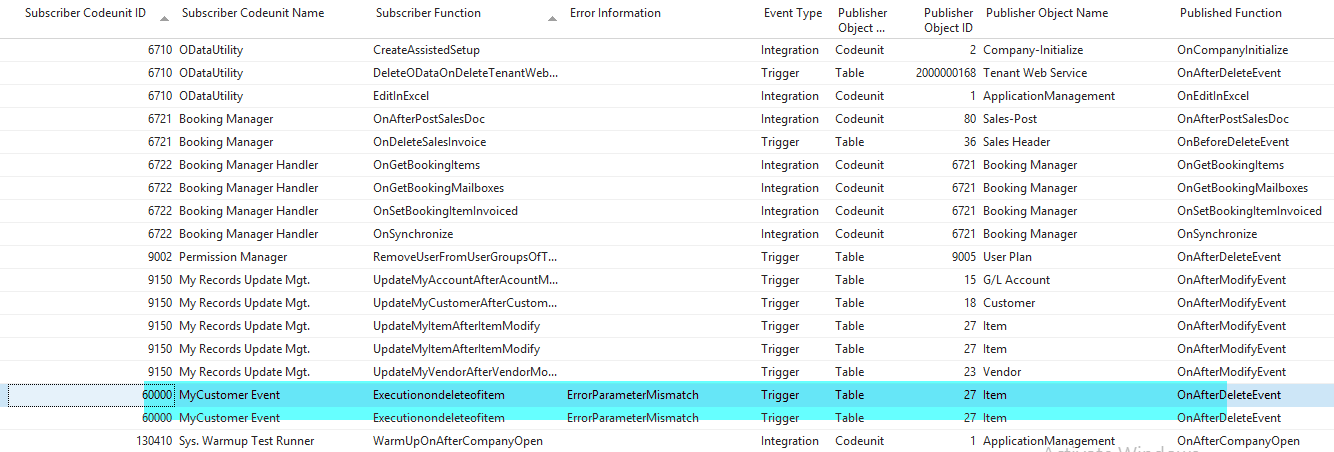
No when go to debugger and see the event subscriptions it is showing some error like this.2018_2D00_06_2D00_05-10_5F00_16_5F00_12_2D00_View-_2D00_-Event-Subscriptions.png
Please advice,

Regards

Bharath K

*This post is locked for comments

I have the same question (0)
  • Suggested answer
    Andrey Baludin Profile Picture
    3,943 on at

    Hi!

     Please make a screenshot of your event function properties.

  • bharathkarunakaran Profile Picture
    475 on at

    Thanks for your reply.

    But There is not available trigger called ondelete.

    the only available triggers are onafterdelete and onbeforedelte

  • bharathkarunakaran Profile Picture
    475 on at

    2018_2D00_06_2D00_05-10_5F00_40_5F00_55_2D00_Demo-Database-NAV-_2800_10_2D00_0_2900_-_2D00_-Microsoft-Dynamics-NAV-Development-Environment-_2D00_-_5B00_Exe.png

  • Suggested answer
    Stefano Demiliani Profile Picture
    37,172 Most Valuable Professional on at

    Parameters mismatch means that your event subscription function has not the correct parameters like exposed by the event it subscribes. Try to recreate the function and when NAV asks a confirmation for the parameter, answer yes.

  • Suggested answer
    Andrey Baludin Profile Picture
    3,943 on at

    Check that parameters of event looks like this:

    params.JPG

  • bharathkarunakaran Profile Picture
    475 on at

    2018_2D00_06_2D00_05-12_5F00_31_5F00_25_2D00_Demo-Database-NAV-_2800_10_2D00_0_2900_-_2D00_-Microsoft-Dynamics-NAV-Development-Environment-_2D00_-_5B00_Exe.png

    Thank you,

    But the properties already set in the same way like it is in your screenshot.

    Since I am a newbie to these events I am finding it really tough to solve.

    Please advice.

    BHarath

  • Suggested answer
    Andrey Baludin Profile Picture
    3,943 on at

    Remove ItemRevision from parameters tab and put it on Variables tab.

Under review

Thank you for your reply! To ensure a great experience for everyone, your content is awaiting approval by our Community Managers. Please check back later.

Helpful resources

Quick Links

Introducing the 2026 Season 1 community Super Users

Congratulations to our 2026 Super Stars!

Meet the Microsoft Dynamics 365 Contact Center Champions

We are thrilled to have these Champions in our Community!

Congratulations to the April Top 10 Community Leaders

These are the community rock stars!

Leaderboard > 🔒一 Microsoft Dynamics NAV (Archived)

Last 30 days Overall leaderboard

Featured topics

Product updates

Dynamics 365 release plans
