web
You’re offline. This is a read only version of the page.
close
Skip to main content

Notifications

Announcements

No record found.

Community site session details

Community site session details

Session Id :
Microsoft Dynamics CRM (Archived)

'Display Name' of custom workflow activities

(0) ShareShare
ReportReport
Posted on by 265

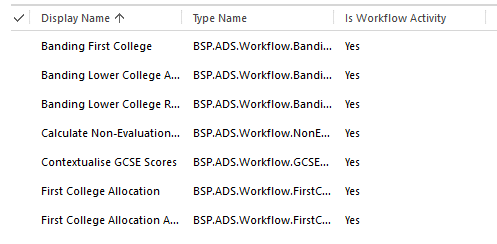
In Workflows assemblies which I've created recently (using new CRM dev toolkit) the 'Display Name' of the activity is showing as the GUID of the activity, whereas in the past we've managed to get these displayed with their 'friendly' names.

Here are the new ones:
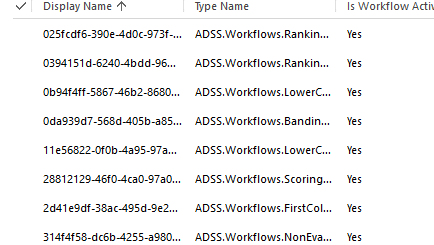
WorkflowsWithoutDisplayNames.png

And the old ones:

WorkflowsWithDisplayNames.png

Am I missing some obvious step in the registration process?

*This post is locked for comments

I have the same question (0)
  • Ben Walker Profile Picture
    265 on at

    And related to this - our old workflows are displaying with the 'friendly' name in the workflow builder, wheras new ones are displaying with the full name of the workflow class.

    Here are the old ones:

    NotSoNicelyNamedWorkflows.png

    and the new ones:

    NotSoNicelyNamedWorkflows.png

  • ashlega Profile Picture
    34,477 on at

    Hi,

      not sure what happened to the names, but did you try to change them using plugin registration tool?

      https://msdn.microsoft.com/en-us/library/gg328515.aspx#NameandGroupName


  • Ben Walker Profile Picture
    265 on at

    Hi Alex,

    it does not seem that there is an option to change the name of a workflow step using the current version of the plugin registration tool - only to Register or Un-register:

    WorkflowRegistrationOptions.png

    Thanks,

    Ben

  • ashlega Profile Picture
    34,477 on at

    Hi Ben,

     look under the "properties" tab (it's not under the popup menu - in that bottom half of the screen, you have "properties" and "details".. )

  • Community Member Profile Picture
    on at

    Hi Ben

    Did you manage to resolve this issue?

    I have just upgraded my crm developer tools and seem to be having the same issue. I really don't want to manually update the names via the standalone plugin registration  tool.

    Kind regards

    Andrew

  • Ben Walker Profile Picture
    265 on at

    Hi Andrew,

    no, sorry,I didn't find a way to solve this other than through the plugin registration tool....

    best wishes,

    Ben

  • Lone Wolf Profile Picture
    15 on at

    Simply change and save properties

    Simply change and save properties

  • Ben Walker Profile Picture
    265 on at

    Thanks Lone Wolf. The issue is not really about the plugin registration tool but about the Software Developer toolkit - as you can see from the very first screenshot, when you use it to deploy from Visual studio it ignores the 'Friendly' names and gives them guid names instead - which can be fixed in the plugin registration tool but would be better if it gave them the correct names in the first place.

Under review

Thank you for your reply! To ensure a great experience for everyone, your content is awaiting approval by our Community Managers. Please check back later.

Helpful resources

Quick Links

Responsible AI policies

As AI tools become more common, we’re introducing a Responsible AI Use…

Neeraj Kumar – Community Spotlight

We are honored to recognize Neeraj Kumar as our Community Spotlight honoree for…

Leaderboard > 🔒一 Microsoft Dynamics CRM (Archived)

#1
SA-08121319-0 Profile Picture

SA-08121319-0 4

#1
Calum MacFarlane Profile Picture

Calum MacFarlane 4

#3
Alex Fun Wei Jie Profile Picture

Alex Fun Wei Jie 2

Last 30 days Overall leaderboard

Featured topics

Product updates

Dynamics 365 release plans